现在网上的demo是多,但是要找到一个自己需要的却不容易。今天跟大家分享自己写的一个弹幕功能。
先来一张效果图:
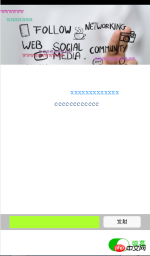
wxml代码如下:
<!-- pages/index/index.wxml -->
<swiper>
  <block>
    <swiper-item>
      <image></image>
    </swiper-item>
  </block></swiper><!--弹幕开关--><view>
    <switch></switch>
    <text>弹幕</text></view><!--弹幕输入框-->
  <view>
      <view>
        <input>
      </view>
      <view>
          <button>发射</button>
      </view>
  </view><!--弹幕上单文字--><view>
  <block>
   <text>{{item.barrage_shootText}}</text>
  </block></view>
wxss代码如下:
/* pages/index/index.wxss */
.slide-image{
    width: 100%;
}
/* 弹幕选择按钮的操作*/
.barrage-Switch{
    position: absolute;
    bottom: 10px;
    right: 10px;
    z-index: 2;
}
/* 弹幕输入框的操作*/
.barrage-inputText{
    position: absolute;
    display: flex;
    background-color: #BFBFBF;
    width: 100%;
    height: 40px;
    flex-direction: row;
    nav-index: 2;
    justify-content: center;
    align-items: center;
    bottom: 10%;
}
.barrage-input{
    background-color: greenyellow;
    width: 60%;
    height: 30px;
}
.barrage-shoot{
    margin-left: 10px;
    width: 25%;
    height: 30px;
}
.shoot{
    width: 100%;
    color: black;
}
/*弹幕飞飞飞*/
.barrage-fly{
    z-index: 3;
    height: 80%;
    width: 100%;
    position: absolute;
    top: 0;
}
.barrage-textFly{
    position: absolute;
}
这样基本的样式就都实现了。接下来要对弹幕上的字进行处理。
文字是从右往左移动,文字出现的位置top是随机,left则是取屏幕的宽度。移动的时候是用定时器进行处理。
还有就是字体的颜色是随机出现的。这些功能都是利用js处理的。
js的代码如下:
var barrage_style_arr = [];
var barrage_style_obj ={};
var phoneWidth = 0;
var timers = [];
var timer ;
Page({
  data: {
    imgUrls: [
      'http://img02.tooopen.com/images/20150928/tooopen_sy_143912755726.jpg',
      'http://img06.tooopen.com/images/20160818/tooopen_sy_175866434296.jpg',
      'http://img06.tooopen.com/images/20160818/tooopen_sy_175833047715.jpg'
    ],
    indicatorDots: true,
    autoplay: true,
    interval: 3000,
    duration: 500,
    barrageTextColor:"#D3D3D3",
    barrage_inputText:"none",
    barrage_shoottextColor:"black",
    bind_shootValue:"",
    barrage_style:[],
    barragefly_display:"none",
  },
    // 生命周期函数--监听页面加载
  onLoad:function(options){
    var that = this;
    //获取屏幕的宽度
      wx.getSystemInfo({
        success: function(res) {
           that.setData({
                barrage_phoneWidth:res.windowWidth-100,
           })
        }
      })
      phoneWidth = that.data.barrage_phoneWidth;
      console.log(phoneWidth);
  },
  //是否打开弹幕...
  barrageSwitch: function(e){
    console.log(e);
    //先判断没有打开
    if(!e.detail.value){
    //清空弹幕
      barrage_style_arr = [];
      //设置data的值
      this.setData({
        barrageTextColor:"#D3D3D3",
        barrage_inputText:"none",
        barragefly_display:"none",
        barrage_style:barrage_style_arr,
      });
      //清除定时器
      clearInterval(timer);
    }else{
      this.setData({
        barrageTextColor:"#04BE02",
        barrage_inputText:"flex",
        barragefly_display:"block",
      });
      //打开定时器
        timer= setInterval(this.barrageText_move,800)
    }
  },
  //发射按钮
  shoot: function(e){
    //字体颜色随机
    var textColor = "rgb("+parseInt(Math.random()*256)+","+parseInt(Math.random()*256)+","+parseInt(Math.random()*256)+")";
    // //设置弹幕字体的水平位置样式
    // var textWidth = -(this.data.bind_shootValue.length*0);
    //设置弹幕字体的垂直位置样式
    var barrageText_height = (Math.random())*266;
     barrage_style_obj = {
      // textWidth:textWidth,
      barrageText_height:barrageText_height,
      barrage_shootText:this.data.bind_shootValue,
      barrage_shoottextColor : textColor,
      barrage_phoneWidth:phoneWidth
    };
    barrage_style_arr.push(barrage_style_obj);
    this.setData({
      barrage_style:barrage_style_arr,        //发送弹幕
      bind_shootValue:""                    //清空输入框
    })
      //定时器  让弹幕动起来
      //  this.timer= setInterval(this.barrageText_move,800);
  },
//定时器  让弹幕动起来
  barrageText_move: function(){
    var timerNum = barrage_style_arr.length;
    var textMove ;
    for(var i=0;i<timernum><section><section><section><section><section><p style="padding:0px;box-sizing:border-box;margin-top:0px;line-height:2em;margin-bottom:0px;"><span style='font-family:微软雅黑, "microsoft yahei";'></span></p>
<p style="padding:0px;box-sizing:border-box;margin-top:0px;line-height:2em;margin-bottom:0px;"><span style='font-family:微软雅黑, "microsoft yahei";'>    })</span></p>
<p style="padding:0px;box-sizing:border-box;margin-top:0px;line-height:2em;margin-bottom:0px;"><span style='font-family:微软雅黑, "microsoft yahei";'>  },</span></p>
<p style="padding:0px;box-sizing:border-box;margin-top:0px;margin-bottom:0px;"><br></p>
<p style="padding:0px;box-sizing:border-box;margin-top:0px;line-height:2em;margin-bottom:0px;"><span style='font-family:微软雅黑, "microsoft yahei";'>})</span></p></section></section></section></section><section><section></section></section></section></timernum>
因为刚刚接触小程序,所以对一些语句的使用都不是很了解。所以遇到了一些问题:
1、在js中获取wxml的控件的信息。
js:
barrageSwitch: function(e){
console.log(e);
}
wxml:
结果:返回了一个objec.在控制台返回的类型好像都是json格式的数据。
Object {type: "change", timeStamp: 2766, target: Object, currentTarget: Object, detail: Object}
2、在实现弹幕的时候,点击发射按钮,如何获取到输入框的信息。
在这,我是输入框失去焦点的时候,将数据复制给js中的data类,再点击发射的时候取data类中的值。
3、其中最大的问题是如何让文字跑起来,因为小程序不支持jQuery,让我这个js白痴有点无能为力。
在这说说自己让文字移动的思路:
首先,在打开弹幕的时候定义一个定时器,关闭的弹幕的时候把定时器给关掉。因为我是用数组来存储文字移动的样式,其他确定下来。我只要改变left的大小就可以让文字移动。所以我用for循环,当定时器运行的时候改变弹幕文字样式 left:xxx px;的大小。