goreleaser 通过 .goreleaser.yaml 配置文件中的 builds 字段来排除特定系统平台。在构建任务中设置 goos 和 goarch 列表,并移除不需要的目标(如 linux、windows),即可实现编译目标的精确过滤。

如何配置 builds 以仅保留 macOS 和 Windows 平台?
要仅保留 macOS 和 Windows 平台,需要在 .goreleaser.yaml 的 builds 部分明确指定 goos 为 ["darwin", "windows"],并省略 linux。这样 GoReleaser 在运行 release 或 build 命令时,只会针对这两个操作系统生成二进制文件。

module example.com/myapp

go 1.21

require github.com/sirupsen/logrus v1.9.3

require golang.org/x/sys v0.15.0 // indirect
以下是 .goreleaser.yaml 的核心配置片段:
version: 1

builds:
  - id: myapp-build
    main: .
    binary: myapp
    goos:
      - darwin
      - windows
    goarch:
      - amd64
      - arm64
    env:
      - CGO_ENABLED=0
    ldflags:
      - -s -w

archives:
  - format: tar.gz
    name_template: '{{ .ProjectName }}_{{ .Version }}_{{ .Os }}_{{ .Arch }}'

checksum:
  name_template: 'checksums.txt'

snapshot:
  name_template: "{{ incpatch .Version }}-next"

changelog:
  sort: asc
  filters:
    exclude:
      - '^docs:'
      - '^test:'
预期结果:运行 goreleaser build --single-target 后,生成的二进制文件仅包含 myapp_darwin_amd64、myapp_darwin_arm64、myapp_windows_amd64.exe 和 myapp_windows_arm64.exe。没有 Linux 版本生成。

如何在多构建场景中排除特定架构?
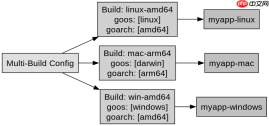
当项目需要支持多种构建配置时,可以通过定义多个 builds 条目来分别控制不同平台的架构。例如,一个构建任务专门处理 Linux 的 amd64 架构,另一个任务处理 macOS 的 arm64 架构。这种细粒度控制允许更灵活地管理跨平台发布。
version: 1

builds:
  - id: linux-amd64
    main: .
    binary: myapp-linux
    goos:
      - linux
    goarch:
      - amd64
    env:
      - CGO_ENABLED=0

  - id: mac-arm64
    main: .
    binary: myapp-mac
    goos:
      - darwin
    goarch:
      - arm64
    env:
      - CGO_ENABLED=0

  - id: win-amd64
    main: .
    binary: myapp-windows
    goos:
      - windows
    goarch:
      - amd64
    env:
      - CGO_ENABLED=0

archives:
  - format: tar.gz
    name_template: '{{ .ProjectName }}_{{ .Version }}_{{ .Os }}_{{ .Arch }}'

checksum:
  name_template: 'checksums.txt'

snapshot:
  name_template: "{{ incpatch .Version }}-next"

changelog:
  sort: asc
  filters:
    exclude:
      - '^docs:'
      - '^test:'
预期结果:运行 goreleaser build 后,生成三个独立的二进制文件:myapp-linux(Linux amd64)、myapp-mac(macOS arm64)和 myapp-windows(Windows amd64)。每个文件对应特定的平台和架构组合,实现了精确的架构过滤。
基于程序中某个输入、条件或结果的具体问题
当 goos 列表中未包含任何有效值时,GoReleaser 会报错并停止执行。这是因为 Go 编译器需要明确的操作系统目标才能进行交叉编译。如果 goos 为空或无效,构建过程无法确定目标环境,导致失败。