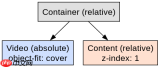
使用绝对定位配合 object-fit 实现视频背景全屏,核心做法是将 元素设为 position: absolute,并设置 top/left/width/height 为 0 以覆盖父容器,同时应用 object-fit: cover 确保视频按比例填充且不变形。这样做会得到一个始终铺满屏幕、保持纵横比且无黑边的背景层,前提是父容器需设为相对定位或视口级别。
如何设置HTML结构以确保视频不被内容遮挡?
直接回答:将视频放在最外层容器内,并赋予极低的 z-index(如 -1),同时给后续内容赋予更高的 z-index,这样视频就会作为底层背景存在,不会干扰上层交互元素。

    <meta charset="UTF-8"><meta name="viewport" content="width=device-width, initial-scale=1.0"><title>Video Background</title><style>
        body, html {
            margin: 0;
            padding: 0;
            height: 100%;
            overflow-x: hidden;
        }
        .video-container {
            position: relative;
            width: 100%;
            height: 100vh;
        }
        .bg-video {
            position: absolute;
            top: 0;
            left: 0;
            width: 100%;
            height: 100%;
            object-fit: cover;
            z-index: -1;
        }
        .content {
            position: relative;
            z-index: 1;
            color: white;
            text-align: center;
            padding-top: 20%;
        }
    </style><div class="video-container">
        <video class="bg-video" autoplay muted loop playsinline><source src="https://www.w3schools.com/html/mov_bbb.mp4" type="video/mp4"></source></video><div class="content">
            <h1>Full Screen Video Background</h1>
            <p>This content sits on top of the video.</p><div class="aritcle_card flexRow artxards">
											<div class="artcardd flexRow">
												<a class="aritcle_card_img" rel="nofollow" href="/xiazai/skill13837" title="htmlq 命令行 HTML 内容提取器,支持 CSS 选择器"><img
														src="https://img.php.cn/upload/skill/001/246/273/6adaf20d3191a227.jpg" alt="htmlq 命令行 HTML 内容提取器,支持 CSS 选择器" onerror="this.onerror='';this.src='/static/lhimages/moren/morentu.png'" ></a>
												<div class="aritcle_card_info flexColumn">
													<a rel="nofollow" href="/xiazai/skill13837" title="htmlq 命令行 HTML 内容提取器,支持 CSS 选择器" class="overflowclass">htmlq 命令行 HTML 内容提取器,支持 CSS 选择器</a>
													<p class="overflowclass">htmlq 是一个命令行工具,使用 CSS 选择器从 HTML 中提取内容,相当于 jq 的 HTML 版本。该工具使用 Rust 编写,允许你通过 CSS 选择器将 HTML 管道化,直接从终端提取文本、属性和结构化内容。</p>
												</div>
												<a rel="nofollow" href="/xiazai/skill13837" title="htmlq 命令行 HTML 内容提取器,支持 CSS 选择器" class="aritcle_card_btn flexRow flexcenter"><b></b><span>下载</span>
												</a>
											</div>
										</div>
        </div>
    </div>
如何处理移动端自动播放限制与加载体验?
直接回答:在移动端必须添加 muted 和 playsinline 属性才能触发自动播放,同时建议添加 poster 属性提供封面图,避免视频加载期间的空白闪烁,提升用户体验。

<video class="bg-video" autoplay muted loop playsinline poster="fallback-image.jpg"><source src="video.mp4" type="video/mp4"></source></video>
当视频源不可用时,CSS fallback机制如何生效?
直接回答:如果视频源加载失败,浏览器会显示 poster 指定的图片;若未指定 poster,则显示第一帧或黑色背景。此时 object-fit: cover 依然对静态图片生效,确保背景视觉一致性,无需额外JS干预即可维持布局稳定。
前端入门到VUE实战笔记:立即使用
在学习笔记中,你将探索 前端 的入门与实战技巧!