在 junit 5 平台上保留旧版测试,需要在项目中引入 junit-vintage-engine 依赖。以 maven 为例,只需在 pom.xml 的 dependencies 中添加该依赖即可,gradle 用户需在 testimplementation 中声明相同坐标。配置完成后,junit platform 会自动发现并运行使用 @test 注解的 junit 3/4 风格测试类,无需修改现有代码。

Maven 环境下如何添加 Vintage 引擎依赖?
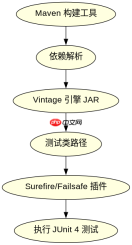
在 Maven 项目中,通过添加 junit-vintage-engine 依赖来启用对旧版测试的支持。确保版本与 JUnit BOM 管理的一致,避免版本冲突。添加后,Maven Surefire 或 Failsafe 插件会自动识别 JUnit Platform,并执行包含 JUnit 4 注解的测试用例。
<dependency><groupid>org.junit.vintage</groupid><artifactid>junit-vintage-engine</artifactid><version>5.10.0</version><scope>test</scope></dependency>
上述配置将 JUnit Vintage 引擎作为测试范围依赖引入。构建工具会下载该引擎及其传递依赖,并在运行时注册到 JUnit Platform。测试执行时,平台会扫描类路径,找到标记为 JUnit 4 的测试类并通过 Vintage 适配器执行。若未指定版本,建议通过
Gradle 项目中如何配置 Vintage 支持?
在 Gradle 项目中,使用 testImplementation 配置 junit-vintage-engine。同时需确保使用了支持 JUnit Platform 的测试插件,如 java-test-fixtures 或默认的 testing 扩展。配置后,Gradle 的 test 任务将自动处理 JUnit 3/4 测试。


dependencies {
    testImplementation 'org.junit.vintage:junit-vintage-engine:5.10.0'
}
该配置将 Vintage 引擎加入测试类路径。Gradle 检测到引擎后,会在测试阶段初始化 JUnit Platform。所有使用 junit.framework.TestCase 或 org.junit.Test 的类都会被正确加载和执行。若项目同时包含 JUnit 5 和旧版测试,两者可共存,平台会根据注解类型分发执行器。无需额外配置插件,标准 Java 插件已内置对 Platform 的支持。
Vintage 引擎如何处理 @Rule 和 @ClassRule?
JUnit Vintage 引擎支持 JUnit 4 的 @Rule 和 @ClassRule 注解,将其转换为 JUnit 5 的扩展机制。这些规则在测试执行前后生效,行为与 JUnit 4 一致。例如,TemporaryFolder 规则会在每个测试方法前后创建和清理临时目录。引擎内部通过适配器将规则应用逻辑映射到 JUnit 5 的生命周期回调中,确保兼容性。