






国际化功能一般很少用到,但作为学习,还是有必要接触一下。
国际化最常用到的方法是\yii::t,官方文档如下
t() public static method
Translates a message to the specified language.
This is a shortcut method of yii\i18n\I18N::translate().
The translation will be conducted according to the message category and the target language will be used.
You can add parameters to a translation message that will be substituted with the corresponding value after translation.
The format for this is to use curly brackets around the parameter name as you can see in the
following example:
[code]$username = 'Alexander';
echo \Yii::t('app', 'Hello, {username}!', ['username' => $username]);
Further formatting of message parameters is supported using the PHPintl extensions message formatter. See yii\i18n\I18N::translate() formore details.
public static stringt ($category, $message, $params = [],$language = null )
$category    string    The message category.
$message    string    The message to be translated.
$params    array    The parameters that will be used to replace the corresponding placeholders in the message.
$language    string    The language code (e.g.en-US,en).If this is null, the current application language will be used.
return
string    The translated message.
参数有4个,但常用到的是前两个。
第一个是组别,组别的定义放在config/main-local.php下。
Yii2默认用的是英语(en-US),现在添加中文支持(zh-CN)
在component下添加如下块
'components' => [
        ...
    	'i18n' => [
    		'translations' => [
    			'common' => [
    				'class' => 'yii\i18n\PhpMessageSource',
    				'basePath' => '@common/messages',
    				'fileMap' => [
    					'common' => 'common.php',
    				],
    			],
    		],
    	],
        ...
    ],
这段代码定义了一个名为common的组别,解析翻译文件用的是默认的类yii\i18n\PhpMessageSource,翻译文件放置在common/messages下,翻译文件是common.php。
根据配置,建立如下的目录结构
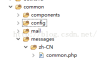
翻译文件以数组的方式组织的,内容如下
<?php
return [
    'Signup' => '注册',
    'Login' => '登陆',
    'Logout' => '登出',
    'Home' => '首页',
    'Contact' => '反馈',
    'About' => '关于',
];
然后我们在layouts文件里做翻译,在/views/layouts/main.php里修改如下:
$menuItems = [
        //['label' => 'Home', 'url' => ['/site/index']],
        //['label' => 'About', 'url' => ['/site/about']],
        //['label' => 'Contact', 'url' => ['/site/contact']],
        ['label' => \Yii::t('common', 'Home'), 'url' => ['/site/index']],
        ['label' => \Yii::t('common', 'About'), 'url' => ['/site/about']],
        ['label' => \Yii::t('common', 'Contact'), 'url' => ['/site/contact']],
    ];
打开页面,看看是否生效。
遗憾的是,并不能生效。。。。。

究其原因,是因为网站的根语言还是en-US,需要配置为zh-CN。
在common/config/main-local.php里,添加如下配置:
<?php
return [
   'language' => 'zh-CN',
   ...
];
再检查一下是否生效。

可以看到翻译已经生效。
但用Yii::t方法的主要原因是要实现多语言,如果只是显示一种语言,还不如做hardcode(yii2框架实际做的也是hardcode的语言显示)
yii2没有提供现成的切换语言的控件,需要我们自己开发一个。
实现参考http://www.yiiframework.com/wiki/294/seo-conform-multilingual-urls-language-selector-widget-i18n/,并做了适度的简化,不做seo方面的考虑。
实现的主要思路是把用户选择的语言保存到cookie中,每次用户访问页面前,将语言设置为cookie中的值。为什么需要每次设置语言,原因如下
Note: If we don't set Yii::app()->language explicitly for each request, it will be equal to its default value set in the confg file. If it is not set in the config file, it will be equal to the value Yii::app()->sourceLanguage, which defaults to 'en_us'.
大概意思就是如果不每次进行设值的话,系统将自己采用默认语言,一般是英语。
1.准备素材,国旗两面,放到frontend/web/image/下,命名为en.png和zh.png。
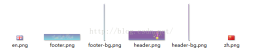

2.在/common/config/main-local.php里配置可用的语言,供我们在控件中调用
<?php
return [
    'language' => 'zh-CN',

    'components' => [
        ...
    ],
    'params' => [
        'availableLanguages' => [
            'zh-CN' => ['img' => 'image/zh.png', 'desc' => '中文'],
            'en-US' => ['img' => 'image/en.png', 'desc' => 'English'],
        ],
    ],
    ...
];
3.在/common/widgets/下新建一个php文件,命名为LanguageSelector.php,内容如下:
<?php namespace common\widgets;

use Yii;
use yii\helpers\Html;
use yii\helpers\Url;

class LanguageSelector
{
	public static function getMenu()
	{
		$lang = Yii::$app->language;
		$avLang = Yii::$app->params['availableLanguages'];
		$isMatch = false;
		foreach ($avLang as $key => $value) {
			if($key == $lang) {
				$tag = LanguageSelector::buildImgTag($value['img'], $value['desc']);
				$isMatch = true;
			}
		}
		if(!$isMatch) {
			$tag = LanguageSelector::buildImgTag($avLang[0]['img'], $avLang[0]['desc']);
		}
		$return = [
			'label' => $tag,
			'items' => LanguageSelector::buildMenuItems($avLang),
		];

		return $return;
	}

	private static function buildImgTag($src, $desc)
	{
		return '@@##@@';
	}

	private static function buildMenuItems($langs)
	{
		foreach ($langs as $key => $value) {
			$link = Html::a(LanguageSelector::buildImgTag($value['img'], $value['desc']) . ' ' . $value['desc'], Url::home(), [
					'title' => LanguageSelector::buildImgTag($value['img'], $value['desc']) . ' ' . $value['desc'],
					'onclick'=>"
					     $.ajax({
					    type     :'POST',
					    cache    : false,
					    url  : '" . Url::toRoute("ajax/lang") . "',
						data: { _lang : '" . $key . "' },
					    success  : function(response) {
					        window.location.reload();
					    }
					    });return false;",
			]);
			$menuItems[] = '
主要做的事情为:
读取main-local.php中的配置项,形成数组。
渲染菜单。
为菜单中的按钮绑定事件,当点击时触发ajax请求,ajax顺利返回后刷新页面。
4.添加处理ajax的controller。在frontend/controllers下新建AjaxController.php,添加如下代码:
<?php namespace frontend\controllers;

use Yii;
use yii\web\Controller;
use common\components\SelectLanguageBehavior;
use yii\web\cookie;

class AjaxController extends Controller {
	public $layout = false;

	public function actionLang() {
		if (isset($_POST['_lang']))
		{
			$lang = SelectLanguageBehavior::getSelectedLanguage($_POST['_lang']);
			Yii::$app->language = $lang;
			$cookie = new cookie([
					'name' => '_lang',
					'value' => $lang,
			] );
			$cookie->expire = time() + (60*60*24*365); // (1 year)
			Yii::$app->response->cookies->add($cookie);
		}
		return "success";
	}

}
其中重要的是把$layouts设为false,防止ajax返回渲染多余的东西。
5.增加一个动作(Behaviors),用来每次用户访问页面时修改语言。
在common/components下(如果没有该目录则新建目录),新建SelectLanguageBehavior.php,内容如下
<?php namespace common\components;

use yii\base\Application;
use yii\base\Behavior;
use yii\web\cookie;
use Yii;
class SelectLanguageBehavior extends Behavior
{
	public function events()
	{
		return [
				Application::EVENT_BEFORE_REQUEST => 'beforeRequest',
		];
	}

	public function beforeRequest($event) {
		$app = Yii::$app;

		$lang = SelectLanguageBehavior::getSelectedLanguage(Yii::$app->request->cookies->getValue('_lang'));
		$app->language = $lang;
	}

	public static function getSelectedLanguage($val) {
		$langs = Yii::$app->params['availableLanguages'];
		foreach ($langs as $key=>$value) {
			if($val == $key) {
				return $val;
			}
		}
		return key($langs);
	}
}
6.将该动作绑定到系统中。
在common/config/main-local.php中添加as beginRequest项
<?php
return [
    'language' => 'zh-CN',

    'components' => [
        ...
    ],
    ...
    'as beginRequest' => [
            'class' => 'common\components\SelectLanguageBehavior',
    ],
];
7.将该控件添加到页面上。
在frontend/views/layouts/main.php里,添加代码显示我们的控件,因为控件中带html代码,还要防止它做转义处理
...
    if (Yii::$app->user->isGuest) {
        $menuItems[] = ['label' => Yii::t('common', 'Signup'), 'url' => ['/site/signup']];
        $menuItems[] = ['label' => Yii::t('common', 'Login'), 'url' => ['/site/login']];
    } else {
        $menuItems[] = [
            'label' => Yii::t('common', 'Logout') . ' (' . Yii::$app->user->identity->username . ')',
            'url' => ['/site/logout'],
            'linkOptions' => ['data-method' => 'post']
        ];
    }

	// add this line
        $menuItems[] = \common\widgets\LanguageSelector::getMenu();

	echo Nav::widget([
        'options' => [
        	'class' => 'navbar-nav navbar-right',
        	],
        'items' => $menuItems,
        // add this line
    	'encodeLabels' => false,
    ]);
	...
8.打开页面查看效果
以上就是Yii2 framework学习笔记(三) -- 语言与国际化的内容,更多相关内容请关注PHP中文网(www.php.cn)!














