在 apache 中通过 url 重写实现图片自动缩放,核心做法是利用 rewriterule 将包含尺寸参数的请求路径转发给后端的 php 脚本处理,并在脚本中根据参数动态生成或裁剪图片。具体而言,需要开启 mod_rewrite 模块,配置规则匹配形如 /images/300x200/photo.jpg 的 url,提取宽度和高度参数传递给 resize.php,该脚本接收参数后读取原图,使用 gd 库进行缩放并输出图像数据。

如何配置 .htaccess 规则以捕获尺寸参数
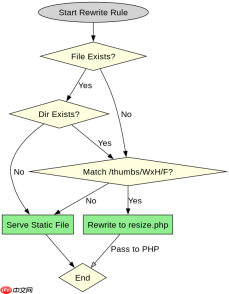
要捕获 URL 中的尺寸信息,需要在 .htaccess 文件中编写正则表达式来匹配特定的 URL 模式。假设我们希望处理的路径格式为 /thumbs/{width}x{height}/{filename},我们可以使用 RewriteRule 结合 ([0-9]+)x([0-9]+) 这样的模式来分别捕获宽度和高度。关键是将这些捕获组作为查询字符串参数传递给后端脚本,同时保持原始文件名清晰可辨。例如,将 /thumbs/100x100/logo.png 重写为 resize.php?w=100&h=100&file=logo.png。这需要确保规则不会干扰其他静态资源的直接访问,通常通过 -f 和 -d 条件排除已存在的物理文件和目录。
<ifmodule mod_rewrite.c>
    RewriteEngine On

    # 如果请求的文件或目录存在,则直接服务,不重写
    RewriteCond %{REQUEST_FILENAME} -f [OR]
    RewriteCond %{REQUEST_FILENAME} -d
    RewriteRule ^ - [L]

    # 匹配 /thumbs/WxH/filename.ext 格式
    # 捕获宽度 (W)、高度 (H) 和文件名 (filename.ext)
    RewriteRule ^thumbs/([0-9]+)x([0-9]+)/(.+)$ resize.php?w=$1&h=$2&file=$3 [QSA,L]</ifmodule>
上述配置首先检查请求的资源是否在磁盘上真实存在,如果存在(例如用户上传了实际大小的原图),则直接返回文件,避免不必要的 PHP 开销。只有当请求匹配 thumbs/... 模式且物理文件不存在时,才会触发重写规则。这里使用了 [QSA] 标志保留原有查询字符串,[L] 表示这是最后一条规则。注意,file 参数包含了文件名及扩展名,后端脚本需要据此定位源文件。

通过Apache Tika Server REST API从1400多种文件格式中提取文本和元数据。处理PDF、DOCX、PPTX、电子邮件归档以及带有MIME类型检测的嵌入式文档提取。
PHP 脚本如何实现动态缩放与缓存
后端 resize.php 脚本负责接收 URL 重写传递的参数,执行实际的图像处理逻辑。脚本首先需要验证输入参数的合法性,防止注入攻击或无效的尺寸值。接着,它需要确定源文件的完整路径,通常位于一个安全的上传目录中。使用 PHP 的 GD 库或 ImageMagick 扩展加载原图,计算新的宽高比以保持比例或强制拉伸,然后创建一个新的图像资源并绘制缩放后的内容。为了提升性能,建议将生成的缩略图保存到本地缓存目录,下次相同尺寸的请求直接返回缓存文件,而不是重新计算。

<?php // resize.php
$width = isset($_GET['w']) ? (int)$_GET['w'] : 0;
$height = isset($_GET['h']) ? (int)$_GET['h'] : 0;
$filename = isset($_GET['file']) ? $_GET['file'] : '';

// 基本验证
if ($width <= 0 || $height <= 0 || empty($filename)) {
    http_response_code(400);
    exit('Invalid parameters');
}

// 定义源文件路径和缓存路径
$sourceDir = '/var/www/images/originals/';
$cacheDir = '/var/www/images/cache/';
$sourcePath = $sourceDir . $filename;

// 检查源文件是否存在
if (!file_exists($sourcePath)) {
    http_response_code(404);
    exit('Source image not found');
}

// 生成缓存文件名:基于原文件名和尺寸
$cacheFilename = md5($filename . $width . $height) . '.jpg';
$cachePath = $cacheDir . $cacheFilename;

// 如果缓存存在且有效,直接输出
if (file_exists($cachePath)) {
    header('Content-Type: image/jpeg');
    header('Cache-Control: public, max-age=31536000');
    readfile($cachePath);
    exit;
}

// 获取原图信息
$imageInfo = getimagesize($sourcePath);
if (!$imageInfo) {
    http_response_code(500);
    exit('Invalid image file');
}

$mimeType = $imageInfo['mime'];
header('Content-Type: ' . $mimeType);

// 加载原图
switch ($mimeType) {
    case 'image/jpeg':
        $srcImage = imagecreatefromjpeg($sourcePath);
        break;
    case 'image/png':
        $srcImage = imagecreatefrompng($sourcePath);
        break;
    case 'image/gif':
        $srcImage = imagecreatefromgif($sourcePath);
        break;
    default:
        http_response_code(500);
        exit('Unsupported image type');
}

// 计算新尺寸(保持比例)
$originalWidth = $imageInfo[0];
$originalHeight = $imageInfo[1];
$ratio = min($width / $originalWidth, $height / $originalHeight);
$newWidth = (int)($originalWidth * $ratio);
$newHeight = (int)($originalHeight * $ratio);

// 创建新图像并缩放
$newImage = imagecreatetruecolor($newWidth, $newHeight);

// 处理透明背景(针对 PNG/GIF)
if ($mimeType === 'image/png' || $mimeType === 'image/gif') {
    imagealphablending($newImage, false);
    imagesavealpha($newImage, true);
    $transparent = imagecolorallocatealpha($newImage, 255, 255, 255, 127);
    imagefilledrectangle($newImage, 0, 0, $newWidth, $newHeight, $transparent);
}

imagecopyresampled($newImage, $srcImage, 0, 0, 0, 0, $newWidth, $newHeight, $originalWidth, $originalHeight);

// 输出图像到浏览器
switch ($mimeType) {
    case 'image/jpeg':
        imagejpeg($newImage, null, 90); // 质量 90%
        break;
    case 'image/png':
        imagepng($newImage, null, 9); // 压缩级别 9
        break;
    case 'image/gif':
        imagegif($newImage);
        break;
}

imagedestroy($srcImage);
imagedestroy($newImage);

// 保存缓存(可选,需确保目录可写)
// if (!is_dir($cacheDir)) { mkdir($cacheDir, 0755, true); }
// switch ($mimeType) {
//     case 'image/jpeg': imagejpeg($newImage, $cachePath, 90); break;
//     case 'image/png': imagepng($newImage, $cachePath, 9); break;
//     case 'image/gif': imagegif($newImage, $cachePath); break;
// }