JUnit怎么比较两个Map?键值内容相等的断言示例
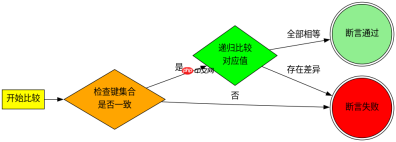
在junit中比较两个map是否相等,推荐使用hamcrest库提供的`equalto()`匹配器配合`assertthat()`方法。只需将期望的map作为参数传入`equalto()`,再与实际的map进行断言即可。该方法会自动递归比较map中的键和值,只要两者包含相同的键值对且顺序无关,断言就会通过。
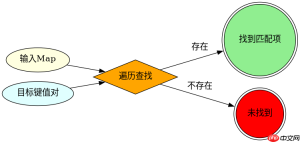
如何验证Map中包含特定的键值对?
如果只需要验证Map中存在某些特定的键值对,而不是完全相等,可以使用`hasEntry()`匹配器。它允许你指定一个键和一个对应的值,只要Map中包含这个映射关系,断言即成功。这对于测试部分数据或忽略其他无关字段非常有用。

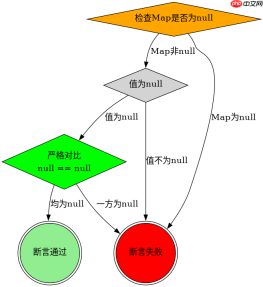
当Map值为null时断言会怎样?
当Map的值包含null时,`equalTo()`匹配器依然能正常工作,它会严格检查实际值是否为null。如果期望值是null而实际值不是,或者反过来,断言都会失败。此外,如果Map本身为null,`equalTo()`也会抛出异常或返回false,具体取决于JUnit版本和配置,通常建议先检查Map非空再进行详细比较。
import org.junit.jupiter.api.Test;
import static org.hamcrest.MatcherAssert.assertThat;
import static org.hamcrest.Matchers.equalTo;
import static org.hamcrest.Matchers.hasEntry;
import java.util.HashMap;
import java.util.Map;

public class MapComparisonTest {
    @Test
    public void testFullMapEquality() {
        Map<string integer> expected = new HashMap();
        expected.put("a", 1);
        expected.put("b", 2);

        Map<string integer> actual = new HashMap();
        actual.put("b", 2); // 顺序不同
        actual.put("a", 1);

        assertThat(actual, equalTo(expected));
    }

    @Test
    public void testPartialMatch() {
        Map<string string> map = new HashMap();
        map.put("key1", "value1");
        map.put("key2", "value2");

        assertThat(map, hasEntry("key1", "value1"));
    }

    @Test
    public void testNullValue() {
        Map<string string> map = new HashMap();
        map.put("key", null);

        Map<string string> expected = new HashMap();
        expected.put("key", null);

        assertThat(map, equalTo(expected));
    }
}</string></string></string></string></string>