






java preparedstatement 执行批量数据时,若遇到主库故障或网络中断,可通过捕获 batchupdateexception 并切换至备用连接实现故障转移。具体做法是在 executebatch() 调用前后包裹 try-catch 块,在 catch 中判断异常类型,若确认为连接问题则重新获取备用 connection 并重建 preparedstatement,同时利用原参数列表重试提交。这样做能确保部分成功的数据不丢失,并在主库恢复前继续写入备用库。

如何识别批量操作中的连接故障
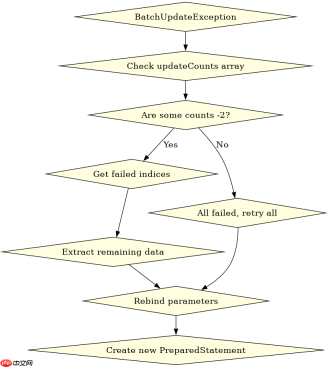
通过检查 BatchUpdateException 的 updateCounts 数组和 getNextException() 链来定位故障点。当主库不可用时,驱动通常会抛出 BatchUpdateException,其 updateCounts 中已成功执行的条目为 BATCH_UPDATE_SUCCESSFUL(值为 -2),而失败及之后的条目为 BATCH_UPDATE_FAILED(值为 -3)。结合 getNextException() 可获取具体的底层 SQL 异常(如 CommunicationsException),从而确认是网络断开还是数据库宕机。
import java.sql.*;

public class BatchFailoverExample {
    public static void main(String[] args) {
        String url = "jdbc:mysql://primary:3306/db";
        String failoverUrl = "jdbc:mysql://secondary:3306/db";
        String sql = "INSERT INTO users (name, email) VALUES (?, ?)";

        // 模拟批量数据
        String[][] data = {
            {"Alice", "alice@example.com"},
            {"Bob", "bob@example.com"},
            {"Charlie", "charlie@example.com"}
        };

        try (Connection conn = DriverManager.getConnection(url);
             PreparedStatement pstmt = conn.prepareStatement(sql)) {

            for (String[] row : data) {
                pstmt.setString(1, row[0]);
                pstmt.setString(2, row[1]);
                pstmt.addBatch();
            }

            int[] results = pstmt.executeBatch();
            System.out.println("Primary batch executed successfully.");

        } catch (BatchUpdateException e) {
            System.err.println("Batch update failed on primary. Switching to failover.");
            handleFailover(failoverUrl, sql, data);
        } catch (SQLException e) {
            e.printStackTrace();
        }
    }

    private static void handleFailover(String failoverUrl, String sql, String[][] data) {
        try (Connection conn = DriverManager.getConnection(failoverUrl);
             PreparedStatement pstmt = conn.prepareStatement(sql)) {

            for (String[] row : data) {
                pstmt.setString(1, row[0]);
                pstmt.setString(2, row[1]);
                pstmt.addBatch();
            }

            int[] results = pstmt.executeBatch();
            System.out.println("Failover batch executed successfully.");

        } catch (SQLException e) {
            System.err.println("Failover also failed!");
            e.printStackTrace();
        }
    }
}
如何确保故障转移后数据一致性
在故障转移场景中,需确保重试逻辑不会导致重复插入或数据丢失。由于 BatchUpdateException 可能发生在批量中间,应解析 updateCounts 找出第一个失败索引,仅对剩余未成功的数据进行重试。同时,备用连接应使用相同的 PreparedStatement 模板,但需重新绑定所有参数。若主库部分成功,建议记录已成功的批次 ID 或时间戳,以便后续对账或人工介入,避免自动重试造成幂等性问题。

一个基于源码的 OpenAI Agents SDK JavaScript 和 TypeScript 技术文档。涵盖了代理编排、工具、转接、追踪以及实际安装路径。

import java.sql.*;
import java.util.ArrayList;
import java.util.List;

public class SmartBatchFailover {
    public static void main(String[] args) {
        String url = "jdbc:mysql://primary:3306/db";
        String failoverUrl = "jdbc:mysql://secondary:3306/db";
        String sql = "INSERT INTO logs (msg) VALUES (?)";

        List<string> batchData = new ArrayList();
        for (int i = 0; i  data) {
        Connection conn = null;
        PreparedStatement pstmt = null;

        try {
            conn = DriverManager.getConnection(primaryUrl);
            pstmt = conn.prepareStatement(sql);

            for (String[] row : data) {
                pstmt.setString(1, row[0]);
                pstmt.addBatch();
            }

            int[] results = pstmt.executeBatch();
            System.out.println("Primary success. Results: " + results.length);

        } catch (BatchUpdateException e) {
            System.out.println("Primary batch failed at index: " + getFirstFailedIndex(e));
            List<string> remainingData = getRemainingData(data, e);
            retryOnFailover(failoverUrl, sql, remainingData);

        } catch (SQLException e) {
            System.err.println("Unexpected error: " + e.getMessage());
        } finally {
            closeResources(pstmt, conn);
        }
    }

    private static int getFirstFailedIndex(BatchUpdateException e) {
        int[] counts = e.getUpdateCounts();
        for (int i = 0; i  getRemainingData(List<string> original, BatchUpdateException e) {
        int firstFailIndex = getFirstFailedIndex(e);
        return original.subList(firstFailIndex, original.size());
    }

    private static void retryOnFailover(String failoverUrl, String sql, List<string> data) {
        Connection conn = null;
        PreparedStatement pstmt = null;
        try {
            conn = DriverManager.getConnection(failoverUrl);
            pstmt = conn.prepareStatement(sql);
            for (String[] row : data) {
                pstmt.setString(1, row[0]);
                pstmt.addBatch();
            }
            int[] results = pstmt.executeBatch();
            System.out.println("Failover success. Retried count: " + results.length);
        } catch (SQLException ex) {
            System.err.println("Failover failed: " + ex.getMessage());
        } finally {
            closeResources(pstmt, conn);
        }
    }

    private static void closeResources(PreparedStatement pstmt, Connection conn) {
        try { if (pstmt != null) pstmt.close(); } catch (SQLException ignored) {}
        try { if (conn != null) conn.close(); } catch (SQLException ignored) {}
    }
}</string></string></string></string>
基于程序中某个输入、条件或结果的具体问题
当批量操作中部分语句成功、部分失败时,BatchUpdateException 的 updateCounts 数组会明确标记哪些索引成功(-2)、哪些失败(-3)。例如,若第 2 条数据因主库宕机失败,则 updateCounts[0] 和 updateCounts[1] 为 -2,updateCounts[2] 及之后为 -3。此时应提取从失败索引开始的所有原始数据,重新绑定到新的 PreparedStatement 中,并通过备用连接执行。这种细粒度处理避免了全量重试,提高了故障恢复效率。
Java免费学习笔记:立即使用
解锁 Java 大师之旅:从入门到精通的终极指南


