在css中使用 :indeterminate 伪类设置半选中复选框样式,核心在于利用该选择器匹配处于“不确定”状态的表单元素,并通过 appearance: none 重置默认外观后自定义背景色或图标。浏览器原生支持通过 javascript 的 .indeterminate 属性动态切换此状态,而 css 仅负责渲染这一特定视觉表现。

如何为原生复选框应用 indeterminate 样式
要为原生复选框应用 :indeterminate 样式,需先隐藏默认控件,使用 background-image 绘制自定义图形,并在 :indeterminate 状态下替换背景以表示半选状态。这种方法不依赖任何第三方库,完全基于标准 CSS 和少量 JS 控制。
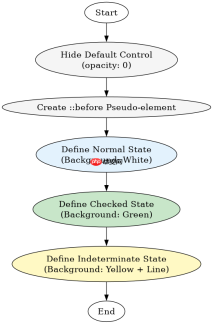
<style>
.checkbox-wrapper {
  display: inline-block;
  position: relative;
  width: 20px;
  height: 20px;
}

.checkbox-wrapper input[type="checkbox"] {
  opacity: 0;
  position: absolute;
  width: 100%;
  height: 100%;
  cursor: pointer;
  z-index: 2;
}

.checkbox-wrapper::before {
  content: "";
  position: absolute;
  top: 0;
  left: 0;
  width: 100%;
  height: 100%;
  background-color: #fff;
  border: 2px solid #ccc;
  border-radius: 4px;
  transition: all 0.2s;
  z-index: 1;
}

/* 选中状态 */
.checkbox-wrapper input:checked + ::before {
  background-color: #4CAF50;
  border-color: #4CAF50;
}

/* 半选中(indeterminate)状态 */
.checkbox-wrapper input:indeterminate + ::before {
  background-color: #FFC107;
  border-color: #FFC107;
  /* 使用线性渐变模拟横线 */
  background-image: linear-gradient(to right, transparent 30%, #000 30%, #000 70%, transparent 70%);
  background-size: 100% 4px;
  background-position: center;
  background-repeat: no-repeat;
}
</style><div class="checkbox-wrapper">
  <input type="checkbox" id="myCheckbox">
</div>

<script>
const checkbox = document.getElementById('myCheckbox');
// 模拟设置为半选中状态
checkbox.indeterminate = true;
</script>
如何处理批量列表中的 indeterminate 状态同步
在处理批量列表时,:indeterminate 通常用于表示“部分选中”。当子项改变时,父级复选框的状态需通过 JavaScript 计算并更新 .indeterminate 属性,CSS 会自动响应这一属性变化并应用对应样式。关键在于确保 JS 逻辑与 CSS 选择器严格对应,避免状态不同步。

htmlq 命令行 HTML 内容提取器,支持 CSS 选择器
下载
htmlq 是一个命令行工具,使用 CSS 选择器从 HTML 中提取内容,相当于 jq 的 HTML 版本。该工具使用 Rust 编写,允许你通过 CSS 选择器将 HTML 管道化,直接从终端提取文本、属性和结构化内容。

<style>
.group-checkbox {
  margin-bottom: 10px;
}

.group-checkbox label {
  display: block;
  margin-left: 20px;
}

.custom-checkbox {
  appearance: none;
  width: 16px;
  height: 16px;
  border: 2px solid #333;
  border-radius: 3px;
  position: relative;
  cursor: pointer;
  vertical-align: middle;
}

.custom-checkbox:checked {
  background-color: #2196F3;
  border-color: #2196F3;
}

.custom-checkbox:checked::after {
  content: "✓";
  color: white;
  font-size: 12px;
  position: absolute;
  top: 50%;
  left: 50%;
  transform: translate(-50%, -50%);
}

/* 关键:处理 indeterminate 状态 */
.custom-checkbox:indeterminate {
  background-color: #FF9800;
  border-color: #FF9800;
}

.custom-checkbox:indeterminate::after {
  content: "-";
  color: white;
  font-size: 14px;
  position: absolute;
  top: 50%;
  left: 50%;
  transform: translate(-50%, -50%);
}
</style><div class="group-checkbox">
  <label>
    <input type="checkbox" class="custom-checkbox" id="parent">
    Parent Item
  </label>
  <label>
    <input type="checkbox" class="child" data-parent="parent">
    Child 1
  </label>
  <label>
    <input type="checkbox" class="child" data-parent="parent">
    Child 2
  </label>
  <label>
    <input type="checkbox" class="child" data-parent="parent">
    Child 3
  </label>
</div>

<script>
const parent = document.getElementById('parent');
const children = document.querySelectorAll('.child');

function updateParentState() {
  const checkedCount = Array.from(children).filter(c => c.checked).length;
  const totalCount = children.length;

  if (checkedCount === 0) {
    parent.checked = false;
    parent.indeterminate = false;
  } else if (checkedCount === totalCount) {
    parent.checked = true;
    parent.indeterminate = false;
  } else {
    parent.checked = false;
    parent.indeterminate = true;
  }
}

children.forEach(child => {
  child.addEventListener('change', updateParentState);
});

// 初始化
updateParentState();
</script>
indeterminate 状态在无障碍访问中如何被识别
:indeterminate 状态不仅影响视觉,还会自动更新 ARIA 属性 aria-checked="mixed",屏幕阅读器会将其读作“混合”或“不确定”。开发者无需手动添加 ARIA 属性,但需确保 HTML 结构语义正确,以便辅助技术能准确传达半选中含义。
前端入门到VUE实战笔记:立即使用
在学习笔记中,你将探索 前端 的入门与实战技巧!