使用linq的groupby方法结合range表达式或自定义键值,可以将数据按分数段分组并统计数量。具体做法是遍历集合,对每个元素计算其所属的区间(如0-59, 60-79, 80-100),然后按该区间键进行分组,最后调用count()获取每组的元素个数。

如何定义分数段的映射逻辑?
通过一个辅助函数或Lambda表达式将具体分数映射为字符串标签或整数区间ID,这是实现分段统计的关键步骤。例如,可以使用switch语句或if-else链来判断分数落在哪个区间,返回对应的键值。
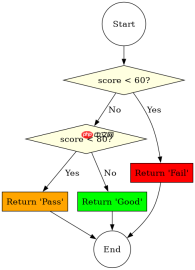
using System;
using System.Linq;
using System.Collections.Generic;

public class ScoreStats
{
    public static void Main()
    {
        var scores = new List<int> { 45, 72, 88, 55, 91, 30, 67, 82 };

        var result = scores.GroupBy(s => GetScoreRange(s))
                           .Select(g => new { Range = g.Key, Count = g.Count() })
                           .OrderBy(x => x.Range)
                           .ToList();

        foreach (var item in result)
        {
            Console.WriteLine($"{item.Range}: {item.Count}");
        }
    }

    private static string GetScoreRange(int score)
    {
        if (score <p>预期输出结果如下:
Fail (0-59): 3
Pass (60-79): 2
Good (80+): 3</p>
<h2>如何处理空值或无效输入?</h2>
<p>在统计前过滤掉null或负数等无效数据,确保GroupBy只处理有效记录。可以在查询开始时添加Where条件,排除不符合业务逻辑的分数值,避免产生异常或错误统计。</p><div class="aritcle_card flexRow artxards">
											<div class="artcardd flexRow">
												<a class="aritcle_card_img" rel="nofollow" href="/xiazai/skill2795" title="C#"><img
														src="https://img.php.cn/upload/skill/000/000/081/178936933912641.jpg" alt="C#" onerror="this.onerror='';this.src='/static/lhimages/moren/morentu.png'" ></a>
												<div class="aritcle_card_info flexColumn">
													<a rel="nofollow" href="/xiazai/skill2795" title="C#" class="overflowclass">C#</a>
													<p class="overflowclass">"避开 C# 常见错误——空陷阱、异步陷阱、LINQ 陷阱及资源泄漏。"</p>
												</div>
												<a rel="nofollow" href="/xiazai/skill2795" title="C#" class="aritcle_card_btn flexRow flexcenter"><b></b><span>下载</span>
												</a>
											</div>
										</div>
<p><img src="https://img.php.cn/upload/article/001/431/639/179548102440533.png?x-oss-process=image/resize,p_40" alt="C#LINQ怎么按分数段统计数量?"></p>
<pre class="brush:php;toolbar:false;">using System;
using System.Linq;
using System.Collections.Generic;

public class SafeScoreStats
{
    public static void Main()
    {
        var scores = new List<int> { 45, null, 72, 88, -5, 55, 91, 30, 67, 82 };

        var result = scores.Where(s => s.HasValue && s.Value >= 0)
                           .Select(s => s.Value)
                           .GroupBy(s => GetScoreRange(s))
                           .Select(g => new { Range = g.Key, Count = g.Count() })
                           .ToList();

        foreach (var item in result)
        {
            Console.WriteLine($"{item.Range}: {item.Count}");
        }
    }

    private static string GetScoreRange(int score)
    {
        if (score <p>预期输出结果如下:
Fail (0-59): 3
Pass (60-79): 2
Good (80+): 3</p>
<h2>当分数正好等于边界值时归属哪个段?</h2>
<p>边界值的归属取决于比较运算符的选择。在上述代码中,使用小于号(</p></int>