Ubuntu PHP8.3 XSS跨站漏洞修复详细操作教程
在ubuntu系统上修复php 8.3的xss(跨站脚本)漏洞,核心在于升级php到包含安全补丁的最新版本,并配置web服务器以启用严格的安全响应头。具体做法是通过`apt update`和`apt upgrade`更新软件包,同时在nginx或apache中设置`x-xss-protection`、`content-security-policy`等http头部,以增强浏览器端的安全防护。若存在已知的高危cve,建议直接从官方源或ppa获取最新修补版,避免使用过时的旧版本。

如何检查当前PHP版本及已知的XSS相关CVE
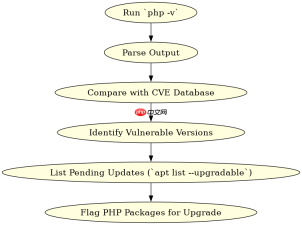
要确认系统是否存在XSS风险,首先需要查看当前安装的PHP版本是否低于最新的安全版本。可以通过命令行查询版本信息,并结合Ubuntu的安全公告判断是否需要立即升级。如果版本较旧,应优先处理依赖关系,确保升级过程不会破坏现有服务。
#!/bin/bash
# 检查当前PHP版本
echo "Current PHP Version:"
php -v

# 检查是否有待更新的安全包
echo "Checking for security updates..."
apt list --upgradable 2>/dev/null | grep php

# 示例:模拟检查特定CVE(需结合实际CVE数据库)
# 这里仅展示如何获取版本信息用于后续比对
VERSION=$(php -r "echo PHP_VERSION;")
echo "Detected PHP Version: $VERSION"
if [[ "$VERSION" <p>运行上述脚本后,若输出显示PHP版本低于8.3.1(假设此为修复某特定XSS漏洞的版本阈值),则表明需要执行升级操作。注意,实际CVE编号需参考Ubuntu Security Notices (USN) 或 PHP官方公告。例如,若发现CVE-2023-XXXX涉及XSS,且该漏洞在8.3.2中修复,则必须升级至8.3.2或更高。</p><h2>如何通过Nginx配置缓解XSS攻击</h2><p>即使PHP代码本身存在潜在XSS风险,通过Web服务器配置额外的安全头也能有效减轻攻击后果。在Nginx中,可以添加`X-XSS-Protection`、`Content-Security-Policy`和`Referrer-Policy`等头部,限制浏览器对恶意脚本的执行。</p><div class="aritcle_card flexRow artxards">
											<div class="artcardd flexRow">
												<a class="aritcle_card_img" rel="nofollow" href="/xiazai/skill13222" title="Build MCP servers and clients for PHP applications with the official PHP SDK"><img
														src="https://img.php.cn/upload/skill/001/246/273/6adaf20e352aa140.jpg" alt="Build MCP servers and clients for PHP applications with the official PHP SDK" onerror="this.onerror='';this.src='/static/lhimages/moren/morentu.png'" ></a>
												<div class="aritcle_card_info flexColumn">
													<a rel="nofollow" href="/xiazai/skill13222" title="Build MCP servers and clients for PHP applications with the official PHP SDK" class="overflowclass">Build MCP servers and clients for PHP applications with the official PHP SDK</a>
													<p class="overflowclass">使用官方Model Context Protocol PHP SDK将PHP应用程序功能暴露为MCP工具、资源和提示,用于代理工作流。</p>
												</div>
												<a rel="nofollow" href="/xiazai/skill13222" title="Build MCP servers and clients for PHP applications with the official PHP SDK" class="aritcle_card_btn flexRow flexcenter"><b></b><span>下载</span>
												</a>
											</div>
										</div><p><img src="https://img.php.cn/upload/article/001/503/042/179542272897803.png?x-oss-process=image/resize,p_40" alt="Ubuntu PHP8.3 XSS跨站漏洞修复详细操作教程"></p><pre class="brush:php;toolbar:false;"># Nginx configuration snippet for security headers
server {
    listen 80;
    server_name example.com;

    # Enable XSS Protection Header
    add_header X-XSS-Protection "1; mode=block" always;

    # Content Security Policy to restrict script sources
    add_header Content-Security-Policy "default-src 'self'; script-src 'self' 'unsafe-inline';" always;

    # Referrer Policy
    add_header Referrer-Policy "strict-origin-when-cross-origin" always;

    location / {
        proxy_pass http://127.0.0.1:9000; # Assuming PHP-FPM on port 9000
        proxy_set_header Host $host;
        proxy_set_header X-Real-IP $remote_addr;
    }
}
将上述配置添加到Nginx的站点配置文件(如`/etc/nginx/sites-available/default`)中,然后重启Nginx服务使配置生效。这些头部并不能完全阻止XSS,但能显著增加攻击难度,特别是`Content-Security-Policy`能有效限制内联脚本的执行。务必根据应用实际需求调整CSP策略,避免误拦正常资源。
升级PHP后如何验证XSS漏洞是否已修复
完成PHP升级和Nginx配置后,必须验证漏洞是否真正被修复。最直接的方法是构造一个包含XSS payload的请求,观察服务器响应和浏览器行为。同时,检查PHP版本确认已更新至安全版本。
#!/bin/bash
# 验证PHP版本是否已升级
echo "Verifying PHP Version after upgrade:"
php -v

# 构造一个简单的XSS测试页面(仅用于本地验证,勿在生产环境直接使用)
cat >> /var/www/html/test_xss.php
EOF

echo "Test page created at /var/www/html/test_xss.php"
echo "Please visit http://localhost/test_xss.php?name=%3Cscript%3Ealert(1)%3C/script%3E in a browser to test."
echo "If CSP and XSS-Protection headers are working, the alert should be blocked."
访问测试页面并注入`<script>alert(1)</script>`编码后的payload。如果浏览器未弹出警告框,且网络请求中包含了之前配置的CSP和XSS-Protection头部,则说明防护措施生效。同时,确保PHP代码中的`htmlspecialchars()`等函数正确使用,从根源上消除XSS风险。最终,通过`php -v`确认版本已升级至包含安全补丁的最新版本,即视为修复完成。
php免费学习视频:立即使用
踏上前端学习之旅,开启通往精通之路!从前端基础到项目实战,循序渐进,一步一个脚印,迈向巅峰!