php 8.6命令行工具接入微软账号时,可以使用设备代码流:先申请设备代码,让用户在浏览器完成登录,再按服务器返回的interval轮询令牌。它不需要本地回调端口,但需要已注册的公共客户端、允许设备代码流的应用与租户策略;不能用此流程绕过管理员限制。
先准备应用身份与请求函数
在Microsoft Entra应用注册中准备自己的客户端ID,按应用类型启用公共客户端流;示例只请求Microsoft Graph的User.Read,不请求离线刷新权限。将租户ID与客户端ID分别放入ENTRA_TENANT_ID和ENTRA_CLIENT_ID环境变量。
<?php $tenant = getenv('ENTRA_TENANT_ID');
$clientId = getenv('ENTRA_CLIENT_ID');
if (!$tenant || !$clientId || !preg_match('/^[a-zA-Z0-9.-]+$/D', $tenant)) {
    throw new RuntimeException('Missing or invalid application configuration');
}
$base = 'https://login.microsoftonline.com/'.$tenant.'/oauth2/v2.0';
function postForm(string $url, array $fields): array {
    $ch = curl_init($url);
    curl_setopt_array($ch, [CURLOPT_POST => true, CURLOPT_RETURNTRANSFER => true,
        CURLOPT_POSTFIELDS => http_build_query($fields),
        CURLOPT_HTTPHEADER => ['Content-Type: application/x-www-form-urlencoded'],
        CURLOPT_CONNECTTIMEOUT => 5, CURLOPT_TIMEOUT => 20]);
    $body = curl_exec($ch);
    if ($body === false) { throw new RuntimeException('Authorization network error'); }
    $status = curl_getinfo($ch, CURLINFO_RESPONSE_CODE);
    curl_close($ch);
    return [$status, json_decode($body, true, 512, JSON_THROW_ON_ERROR)];
}
[$status, $device] = postForm($base.'/devicecode', [
    'client_id' => $clientId, 'scope' => 'https://graph.microsoft.com/User.Read']);
if ($status !== 200 || !isset($device['device_code'], $device['user_code'],
    $device['verification_uri'], $device['expires_in'], $device['interval'])) {
    throw new RuntimeException('Device authorization was not issued');
}
echo $device['verification_uri'], PHP_EOL, $device['user_code'], PHP_EOL;
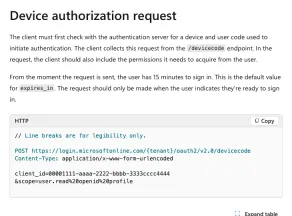
微软官方文档中的设备代码授权请求
轮询到成功、拒绝或过期
$interval = max(1, (int)$device['interval']);
$deadline = hrtime(true) + (int)$device['expires_in'] * 1_000_000_000;
$token = null;
while (hrtime(true) = $deadline) { break; }
    [$status, $answer] = postForm($base.'/token', [
        'grant_type' => 'urn:ietf:params:oauth:grant-type:device_code',
        'client_id' => $clientId, 'device_code' => $device['device_code']]);
    if ($status === 200 && isset($answer['access_token'])) {
        $token = $answer['access_token']; break;
    }
    $error = $answer['error'] ?? 'unknown';
    if ($error === 'authorization_pending') { continue; }
    if ($error === 'slow_down') { $interval += 5; continue; }
    throw new RuntimeException('Authorization stopped: '.$error);
}
if ($token === null) { throw new RuntimeException('Device authorization expired'); }
echo "Authorization completed; token stays in process memory.\n";
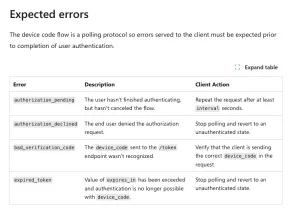
微软官方文档中的设备授权轮询错误和停止条件
保护授权结果和交互边界
authorization_declined、expired_token或无法识别的设备代码都应停止,不能不断申请新代码。将返回的access_token作为不透明值,在其有效期内只发给对应的Microsoft Graph接口,不打印、解码推断权限或保存到命令历史。设备代码也不应贴入公共日志或交给其他人代为授权。用户应在微软验证页面核对应用名称与权限;没有用户发起登录意图时不要后台反复启动授权。

Build MCP servers and clients for PHP applications with the official PHP SDK
下载
使用官方Model Context Protocol PHP SDK将PHP应用程序功能暴露为MCP工具、资源和提示,用于代理工作流。
php免费学习视频:立即使用
踏上前端学习之旅,开启通往精通之路!从前端基础到项目实战,循序渐进,一步一个脚印,迈向巅峰!