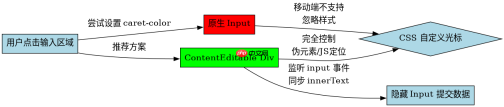
移动端无法通过标准 css 直接修改原生 `` 的光标颜色与大小,因为 `caret-color` 属性在 ios safari 和 android chrome 中支持极差或完全无效。要实现这一效果,必须放弃使用原生输入框,转而采用 `contenteditable` 的 `
为什么 caret-color 在移动端失效
在桌面端浏览器中,你可以直接使用 `caret-color: red;` 来改变光标颜色,但这一属性在移动操作系统层面并未被统一实现。iOS Safari 会忽略该属性,Android 上的 WebView 或 Chrome 也往往保持系统默认的白色或黑色光标,且没有任何 CSS 属性可以调整其宽度或高度。因此,依赖原生 input 的光标定制在移动端是死胡同,必须寻找替代方案。
<style>
  .fake-input {
    min-height: 40px;
    border: 1px solid #ccc;
    padding: 8px;
    outline: none;
    font-size: 16px;
    position: relative;
  }
  /* 自定义光标:使用伪元素模拟 */
  .fake-input::after {
    content: '';
    display: inline-block;
    width: 2px;
    height: 1.2em;
    background-color: blue;
    vertical-align: text-bottom;
    animation: blink 1s step-end infinite;
    position: absolute;
    left: 0;
    top: 0;
    pointer-events: none;
  }
  @keyframes blink {
    50% { opacity: 0; }
  }
</style><div class="fake-input" contenteditable="true" id="editor"></div>

<script>
  const editor = document.getElementById('editor');

  // 同步内容到隐藏的真实 input 以提交表单
  const realInput = document.createElement('input');
  realInput.type = 'text';
  realInput.name = 'username';
  realInput.style.display = 'none';
  document.body.appendChild(realInput);

  editor.addEventListener('input', (e) => {
    realInput.value = editor.innerText;
  });

  // 处理光标位置更新(简化版,实际需计算 offsetLeft)
  editor.addEventListener('keyup', () => {
    updateCursorPos();
  });

  function updateCursorPos() {
    // 这里需要复杂的 DOM 测量来计算光标在 div 内的精确位置
    // 简单示例:仅展示逻辑,实际项目建议使用现成库如 quill.js 或 custom-cursor-lib
    console.log('Content changed:', editor.innerText);
  }
</script>
如何模拟输入与光标定位
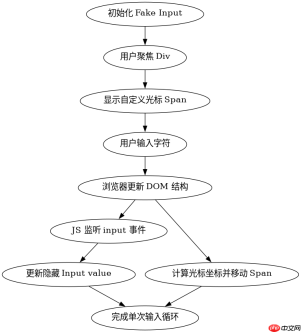
使用 `contenteditable` 后,你需要解决两个核心问题:一是如何将用户输入的内容传递给后端或表单系统,二是如何维持自定义光标的视觉位置。对于数据传递,只需监听 `input` 事件,将 `innerText` 或 `innerHTML` 赋值给一个隐藏的 `` 即可。对于光标定位,由于 `contenteditable` 内部结构复杂,手动计算光标相对于容器的 `left` 和 `top` 值非常困难。通常的做法是使用 Range 和 Selection API 获取当前光标所在的文本节点和偏移量,然后遍历子节点累加宽度来确定像素位置。如果不需要极度精确的像素级对齐,也可以考虑使用绝对定位的伪元素跟随最后一个字符,但这在处理换行和多行文本时会失效。

Lightning CSS 是由 Parcel 团队开发的基于 Rust 的 CSS 解析器、转换器、打包工具和压缩工具。此技能适用于需要优化样式表、为目标浏览器降低现代 CSS 语法以及将快速 CSS 处理集成到构建或重构工作流中的代理。

// 简化的光标位置计算逻辑片段
function getCaretCoordinates(element, selectionRatio) {
  let x = 0, y = 0;
  const selectionRange = window.getSelection().getRangeAt(0).cloneRange();
  selectionRange.collapse(true);
  const nodeRect = selectionRange.getClientRects()[0];

  if (nodeRect) {
    x = nodeRect.left;
    y = nodeRect.top;
  } else {
    // 回退逻辑:如果 getClientRects 为空,可能需要遍历 DOM
    // 这是一个极其耗时的操作,建议在生产环境中使用优化过的库
  }
  return { x, y };
}

// 在每次按键后调用
editor.addEventListener('keyup', () => {
  const coords = getCaretCoordinates(editor, 0);
  const cursor = editor.querySelector('::after'); // 伪元素无法直接查询,需改用 span 模拟
  // 实际开发中,建议用一个独立的 span 作为光标元素
  const cursorSpan = document.getElementById('cursor-span');
  if(cursorSpan) {
     cursorSpan.style.left = coords.x + 'px';
     cursorSpan.style.top = coords.y + 'px';
  }
});
基于 contenteditable 空状态的具体问题
当 `contenteditable` 元素为空时,浏览器通常会插入一个空的 `
` 标签以保持可编辑状态,这会导致 `innerText` 返回一个换行符而非空字符串。在验证表单时,这会被误判为有内容。解决方法是在提交前检查 `innerText.trim()` 是否为空,或者在 CSS 中使用 `:empty` 伪类显示占位符文本,并在用户首次聚焦时清除该占位符。此外,空状态下自定义光标的定位也需要特殊处理,因为此时没有字符边界可供参考,通常需要将其固定在容器的左上角或中心位置。
前端入门到VUE实战笔记:立即使用
在学习笔记中,你将探索 前端 的入门与实战技巧!