






在对象方法中使用箭头函数会导致 this 指向错误,因为箭头函数没有自己的 this,它会捕获定义时所在作用域的 this。解决这个问题的最直接方法是使用 es6 的简写方法语法(如 method() { ... }),或者在构造函数中通过 .bind(this) 绑定上下文。
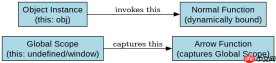
为什么普通函数能访问实例属性而箭头函数不行?
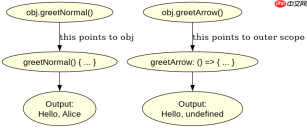
普通函数作为对象方法调用时,this 由调用者决定,即指向该对象实例。而箭头函数在定义时就绑定了外层作用域(通常是全局或模块级)的 this,导致无法访问实例数据。下面通过对比代码展示这一差异。
const obj = {
  name: 'Alice',
  // 普通函数:this 指向 obj
  greetNormal() {
    console.log(`Hello, ${this.name}`);
  },
  // 箭头函数:this 指向定义时的外层作用域(此处为 undefined 或 window)
  greetArrow: () => {
    console.log(`Hello, ${this.name}`);
  }
};

obj.greetNormal(); // 输出: Hello, Alice
obj.greetArrow();  // 输出: Hello, undefined (严格模式下 this 为 undefined)
运行结果证实了 greetNormal 正确输出了 Alice,而 greetArrow 由于 this 未指向 obj,输出为 undefined。
如何在回调函数中保持正确的 this 指向?
当对象方法内部包含异步回调或定时器时,即使方法本身是普通函数,其内部的箭头函数依然会捕获外层的 this。如果外层是普通函数且被正确绑定,那么内部的箭头函数也能正确访问实例属性。若需手动修复,可使用 .bind() 或保存 this 引用。

使用 Husky 将 pre-commit、pre-push 和 commit-msg 检查集成到仓库中,以便代理和开发人员在更改离开工作站之前运行相同的本地防护措施。

const timerObj = {
  count: 0,
  startTimer() {
    // 这里的 this 指向 timerObj
    setTimeout(() => {
      // 箭头函数捕获了 startTimer 的 this
      this.count++;
      console.log(`Count is now: ${this.count}`);
    }, 1000);
  }
};

timerObj.startTimer();
执行 startTimer 后,一秒钟内控制台将打印 Count is now: 1。这是因为 setTimeout 的回调使用了箭头函数,它继承了 startTimer 方法执行时的 this 上下文,从而正确指向 timerObj 实例。
使用 bind 处理已定义的箭头函数方法
如果必须使用箭头函数作为属性值,可以通过 .bind() 强制改变其 this 指向。虽然这破坏了箭头函数的简洁性,但在某些特定场景下是必要的补救措施。
const boundObj = {
  name: 'Bob',
  greet: (() => {
    return function() {
      console.log(`Hello, ${this.name}`);
    };
  })().bind({ name: 'Charlie' })
};

// 注意:直接对箭头函数属性 bind 无效,因为箭头函数不可绑定
// 正确做法是将方法定义为普通函数或使用简写语法
const validObj = {
  name: 'Dave',
  greet: function() {
    console.log(`Hello, ${this.name}`);
  }
};
validObj.greet(); // 输出: Hello, Dave
Java免费学习笔记:立即使用
解锁 Java 大师之旅:从入门到精通的终极指南





