本文实例为大家分享了mvc4图书管理系统的制作教程,供大家参考,具体内容如下
首先项目结构图:
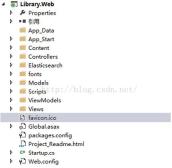
Model层的相关代码如下:
Book.cs代码如下:
public class Book
 {
 [Key]
 [DatabaseGenerated(DatabaseGeneratedOption.Identity)]
 public Guid Id { get; set; }

 [MaxLength(500)]

 [Display(Name = "标题")]
 public string Title { get; set; }

 [MaxLength(5000)]
 [Display(Name = "前言")]
 public string Foreword { get; set; }

 [Display(Name = "总页数")]
 public int Pages { get; set; }

 [Display(Name = "作者")]
 public string Author { get; set; }
 }
public class AppContext:DbContext
 {
 public AppContext()
 {

 }
 public DbSet<book> Books { get; set; }
 }</book>
ViewModels的相关:
public class SearchViewModel
 {
 public string Query { get; set; }

 public IEnumerable<ihit>> Results { get; set; }

 public IDictionary<string> Suggestions { get; set; }

 public long Elapsed { get; set; }

 }</string></ihit>
接下来就HomeController.cs和BooksController.cs的代码:
public class HomeController : Controller
 {
 private SearchService _searchService;
 public HomeController()
 {
  _searchService = new SearchService();
 }
 public ActionResult Index()
 {

  return View();
 }

 public ActionResult Search(string query, int page = 0, int pageSize = 10)
 {

  var result = _searchService.Find(query, page, pageSize);
  var suggestion = _searchService.FindPhraseSuggestion(query, 0, 3);

  var viewModel = new SearchViewModel { Query = query, Results = result.Item1,Elapsed = result.Item2, Suggestions = suggestion };


  return View("Index", viewModel);
 }

 }
public class BooksController : Controller
 {
 private AppContext db = new AppContext();

 public ActionResult Index()
 {
  return View(db.Books.ToList());
 }

 public ActionResult Details(Guid? id)
 {
  if (id == null)
  {
  return new HttpStatusCodeResult(HttpStatusCode.BadRequest);
  }
  Book book = db.Books.Find(id);
  if (book == null)
  {
  return HttpNotFound();
  }
  return View(book);
 }

 public ActionResult Create()
 {
  return View();
 }


 [HttpPost]
 [ValidateAntiForgeryToken]
 public ActionResult Create([Bind(Include="Id,Title,Foreword,Pages,Author")] Book book)
 {
  if (ModelState.IsValid)
  {
  book.Id = Guid.NewGuid();
  db.Books.Add(book);
  db.SaveChanges();

  //添加书
  Elasticsearch.Elasticsearch.Client.Index<book>(book);


  return RedirectToAction("Index");
  }

  return View(book);
 }

 public ActionResult Edit(Guid? id)
 {
  if (id == null)
  {
  return new HttpStatusCodeResult(HttpStatusCode.BadRequest);
  }
  Book book = db.Books.Find(id);
  if (book == null)
  {
  return HttpNotFound();
  }
  return View(book);
 }


 [HttpPost]
 [ValidateAntiForgeryToken]
 public ActionResult Edit([Bind(Include="Id,Title,Foreword,Pages,Author")] Book book)
 {
  if (ModelState.IsValid)
  {
  db.Entry(book).State = EntityState.Modified;
  db.SaveChanges();
  return RedirectToAction("Index");
  }
  return View(book);
 }

 public ActionResult Delete(Guid? id)
 {
  if (id == null)
  {
  return new HttpStatusCodeResult(HttpStatusCode.BadRequest);
  }
  Book book = db.Books.Find(id);
  if (book == null)
  {
  return HttpNotFound();
  }
  return View(book);
 }

 [HttpPost, ActionName("Delete")]
 [ValidateAntiForgeryToken]
 public ActionResult DeleteConfirmed(Guid id)
 {
  Book book = db.Books.Find(id);
  db.Books.Remove(book);
  db.SaveChanges();
  return RedirectToAction("Index");
 }

 public JsonResult Reindex()
 {
  foreach (var book in db.Books)
  {
  //Indexing book
  Elasticsearch.Elasticsearch.Client.Index<book>(book);
  }
  return Json("OK",JsonRequestBehavior.AllowGet);
 }

 protected override void Dispose(bool disposing)
 {
  if (disposing)
  {
  db.Dispose();
  }
  base.Dispose(disposing);
 }
 }</book></book>
Elasticsearch辅助类:
首先是Elasticsearch.cs
public class Elasticsearch
 {
 private static ElasticClient _client;
 public static ElasticClient Client
 {
  get
  {
  if (_client == null)
  {
   //连接配置
   var setting = new ConnectionSettings(ElasticsearchConfiguration.Connection,ElasticsearchConfiguration.DefaultIndex);
   _client = new ElasticClient(setting);
  }
  return _client;
  }

 }
 }
ElasticsearchConfiguration.cs类
public static class ElasticsearchConfiguration
 {
 public static string Host { get { return "http://localhost"; } }

 public static long Port { get { return 9200; } }

 public static Uri Connection
 {
  get { return new Uri(string.Format("{0}:{1}", Host, Port)); }
 }

 public static string DefaultIndex
 {
  get { return "library"; }
 }
 }
SearchService.cs代码:
public class SearchService
 {
 public double MinScore { get {return 0.0005; }}

 //高亮标记前缀
 public string PreHighlightTag
 {
  get { return @"<strong>"; }
 }

 //高亮标记后缀
 public string PostHighlightTag
 {
  get { return @"</strong>"; }
 }


 public Tuple>,long> Find(string query, int page = 0, int pageSize = 10)
 {
  var result = Elasticsearch.Elasticsearch.Client.Search<book>(s => s
  .From(page * pageSize)
  .Size(pageSize)
  .MinScore(MinScore)
  .Highlight(h => h
   .PreTags(PreHighlightTag)
   .PostTags(PostHighlightTag)
   .OnFields(
   f => f.OnField(b => b.Foreword),
   f => f.OnField(b => b.Title)
   ))
  .Query(q => q.QueryString(qs => qs.Query(query).UseDisMax())));

  return new Tuple<ienumerable>>, long>(result.Hits,result.ElapsedMilliseconds);
 }

 //查找短语建议
 public IDictionary<string> FindPhraseSuggestion(string phrase, int page = 0, int pageSize = 5)
 {
  var result = Elasticsearch.Elasticsearch.Client.Search<book>(s => s
  .From(page*pageSize)
  .Size(pageSize)
  .SuggestPhrase("did-you-mean", ps => ps
   .Text(phrase)
   .OnField(f => f.Foreword))
  .Query(q => q.MatchAll()));

  return result.Suggest;
 }


 public IEnumerable<ihit>> FindAll()
 {
  var result = Elasticsearch.Elasticsearch.Client.Search<book>(s => s.AllIndices());
  return result.Hits;
 }

 }</book></ihit></book></string></ienumerable></book>
Views视图
Books文件夹下:
Index.cshtml:
@model IEnumerable<library.web.models.book>

@{
 ViewBag.Title = "Index";
 Layout = "~/Views/Shared/_Layout.cshtml";
}

<h2>Index</h2>

<p>
 @Html.ActionLink("创建新书", "Create")
</p>
<table>
 <tr>
 <th>
  @Html.DisplayNameFor(model => model.Title)
 </th>
 <th>
  @Html.DisplayNameFor(model => model.Foreword)
 </th>
 <th>
  @Html.DisplayNameFor(model => model.Pages)
 </th>
 <th>
  @Html.DisplayNameFor(model => model.Author)
 </th>
 <th></th>
 </tr>

@foreach (var item in Model) {
 <tr>
 <td>
  @Html.DisplayFor(modelItem => item.Title)
 </td>
 <td>
  @Html.DisplayFor(modelItem => item.Foreword)
 </td>
 <td>
  @Html.DisplayFor(modelItem => item.Pages)
 </td>
 <td>
  @Html.DisplayFor(modelItem => item.Author)
 </td>
 <td>
  @Html.ActionLink("编辑", "Edit", new { id=item.Id }) |
  @Html.ActionLink("详细", "Details", new { id=item.Id }) |
  @Html.ActionLink("删除", "Delete", new { id=item.Id })
 </td>
 </tr>
}

</table></library.web.models.book>
Edit.cshtml:
@model Library.Web.Models.Book

@{
 ViewBag.Title = "Edit";
 Layout = "~/Views/Shared/_Layout.cshtml";
}

<h2>Edit</h2>


@using (Html.BeginForm())
{
 @Html.AntiForgeryToken()

 <div>
 <h4>Book</h4>
 <hr>
 @Html.ValidationSummary(true)
 @Html.HiddenFor(model => model.Id)

 <div>
  @Html.LabelFor(model => model.Title, new { @class = "control-label col-md-2" })
  <div>
  @Html.EditorFor(model => model.Title)
  @Html.ValidationMessageFor(model => model.Title)
  </div>
 </div>

 <div>
  @Html.LabelFor(model => model.Foreword, new { @class = "control-label col-md-2" })
  <div>
  @Html.TextAreaFor(model => model.Foreword)
  @Html.ValidationMessageFor(model => model.Foreword)
  </div>
 </div>

 <div>
  @Html.LabelFor(model => model.Pages, new { @class = "control-label col-md-2" })
  <div>
  @Html.EditorFor(model => model.Pages)
  @Html.ValidationMessageFor(model => model.Pages)
  </div>
 </div>

 <div>
  @Html.LabelFor(model => model.Author, new { @class = "control-label col-md-2" })
  <div>
  @Html.EditorFor(model => model.Author)
  @Html.ValidationMessageFor(model => model.Author)
  </div>
 </div>

 <div>
  <div>
  <input>
  </div>
 </div>
 </div>
}

<div>
 @Html.ActionLink("返回列表", "Index")
</div>

@section Scripts {
 @Scripts.Render("~/bundles/jqueryval")
}
Details.cshtml:
@model Library.Web.Models.Book

@{
 ViewBag.Title = "Details";
 Layout = "~/Views/Shared/_Layout.cshtml";
}

<h2>Details</h2>

<div>
 <h4>Book</h4>
 <hr>
 <dl>
 <dt>
  @Html.DisplayNameFor(model => model.Title)
 </dt>

 <dd>
  @Html.DisplayFor(model => model.Title)
 </dd>

 <dt>
  @Html.DisplayNameFor(model => model.Foreword)
 </dt>

 <dd>
  @Html.DisplayFor(model => model.Foreword)
 </dd>

 <dt>
  @Html.DisplayNameFor(model => model.Pages)
 </dt>

 <dd>
  @Html.DisplayFor(model => model.Pages)
 </dd>

 <dt>
  @Html.DisplayNameFor(model => model.Author)
 </dt>

 <dd>
  @Html.DisplayFor(model => model.Author)
 </dd>

 </dl>
</div>
<p>
 @Html.ActionLink("编辑", "Edit", new { id = Model.Id }) |
 @Html.ActionLink("返回列表", "Index")
</p>
Delete.cshtml:
@model Library.Web.Models.Book

@{
 ViewBag.Title = "Delete";
 Layout = "~/Views/Shared/_Layout.cshtml";
}

<h2>Delete</h2>

<h3>Are you sure you want to delete this?</h3>
<div>
 <h4>Book</h4>
 <hr>
 <dl>
 <dt>
  @Html.DisplayNameFor(model => model.Title)
 </dt>

 <dd>
  @Html.DisplayFor(model => model.Title)
 </dd>

 <dt>
  @Html.DisplayNameFor(model => model.Foreword)
 </dt>

 <dd>
  @Html.DisplayFor(model => model.Foreword)
 </dd>

 <dt>
  @Html.DisplayNameFor(model => model.Pages)
 </dt>

 <dd>
  @Html.DisplayFor(model => model.Pages)
 </dd>

 <dt>
  @Html.DisplayNameFor(model => model.Author)
 </dt>

 <dd>
  @Html.DisplayFor(model => model.Author)
 </dd>

 </dl>

 @using (Html.BeginForm()) {
 @Html.AntiForgeryToken()

 <div>
  <input> |
  @Html.ActionLink("返回列表", "Index")
 </div>
 }
</div>
Create.cshtml:
@model Library.Web.Models.Book

@{
 ViewBag.Title = "Create";
 Layout = "~/Views/Shared/_Layout.cshtml";
}

<h2>创建</h2>


@using (Html.BeginForm())
{
 @Html.AntiForgeryToken()

 <div>
 <h4>Book</h4>
 <hr>
 @Html.ValidationSummary(true)

 <div>
  @Html.LabelFor(model => model.Title, new { @class = "control-label col-md-2" })
  <div>
  @Html.EditorFor(model => model.Title)
  @Html.ValidationMessageFor(model => model.Title)
  </div>
 </div>

 <div>
  @Html.LabelFor(model => model.Foreword, new { @class = "control-label col-md-2" })
  <div>
  @Html.TextAreaFor(model => model.Foreword)
  @Html.ValidationMessageFor(model => model.Foreword)
  </div>
 </div>

 <div>
  @Html.LabelFor(model => model.Pages, new { @class = "control-label col-md-2" })
  <div>
  @Html.EditorFor(model => model.Pages)
  @Html.ValidationMessageFor(model => model.Pages)
  </div>
 </div>

 <div>
  @Html.LabelFor(model => model.Author, new { @class = "control-label col-md-2" })
  <div>
  @Html.EditorFor(model => model.Author)
  @Html.ValidationMessageFor(model => model.Author)
  </div>
 </div>

 <div>
  <div>
  <input>
  </div>
 </div>
 </div>
}

<div>
 @Html.ActionLink("回到列表", "Index")
</div>

@section Scripts {
 @Scripts.Render("~/bundles/jqueryval")
}
Home->Index.cshtml
@model Library.Web.ViewModels.SearchViewModel
@{
 ViewBag.Title = "Elasticsearch";
}

<div>
 <h1>Elasticsearch入门</h1>
 <p>安装和配置群集</p>
 <ol>
 <li>
  <a javase>安装Java</a>
 </li>
 <li>
  <a download>安装Elasticsearch</a>
 </li>
 <li>运行Elasticsearch</li>
 <li><a>增加一些书籍</a></li>
 </ol>
</div>


@if (Model == null)
{
 return;
}
<div>
 @if (Model.Suggestions.Any(x => x.Key == "did-you-mean"))
 {
 <span>你的意思是: </span>
 foreach (var suggestions in Model.Suggestions["did-you-mean"])
 {
  var count = 0;
  foreach (var suggestion in suggestions.Options)
  {
  <a><strong>@suggestion.Text </strong> </a>
  count++;
  }
  if (count == 0)
  {
  <span>没有建议!</span>
  }

 }
 }
</div>

<h3>
<strong>Results for:</strong> @Model.Query</h3>

@if (Model != null)
{
| 文档的分数(排名相关度) | Title | Content | Author |
|---|---|---|---|
| @result.Score | @if (result.Highlights != null && result.Highlights.Any(x => x.Key == "title")) { var hl = result.Highlights.FirstOrDefault(x => x.Key == "title"); foreach (var h in hl.Value.Highlights) { WriteLiteral(h); } } else { WriteLiteral(result.Source.Title); } | @if (result.Highlights != null && result.Highlights.Any(x => x.Key == "foreword")) { var hl = result.Highlights.FirstOrDefault(x => x.Key == "foreword"); foreach (var h in hl.Value.Highlights) { WriteLiteral(h + "..."); } } | @result.Source.Author |
| 没有结果发现:( |
@Model.Results.Count()搜索结果用了 @Model.Elapsed 毫秒
}_Layout.cshtml
html>


 <meta>
 <meta>
 <title>@ViewBag.Title</title>
 @Styles.Render("~/Content/css")
 @Scripts.Render("~/bundles/modernizr")


 <div>
 <div>
  <div>
  <button>
   <span></span>
   <span></span>
   <span></span>
  </button>
  @Html.ActionLink("Elasticsearch MVC示例", "Index", "Home", null, new { @class = "navbar-brand" })
  </div>
  <div>
  <ul>
   <li>@Html.ActionLink("Home", "Index", "Home")</li>
   <li>@Html.ActionLink("Books", "Index", "Books")</li>
  </ul>


  @using (Html.BeginForm("Search", "Home", FormMethod.Get,new {@class = "navbar-form navbar-left"}))
  {
   <div>
   <input>
   </div>
   <button>提交</button>
  }


  </div>

 </div>
 </div>
 <div>
 @RenderBody()
 <hr>
 <footer>
  <p>© @DateTime.Now.Year - Elasticsearch, Nest, ASP.NET 应用</p>
 </footer>
 </div>

 @Scripts.Render("~/bundles/jquery")
 @Scripts.Render("~/bundles/bootstrap")
 @RenderSection("scripts", required: false)
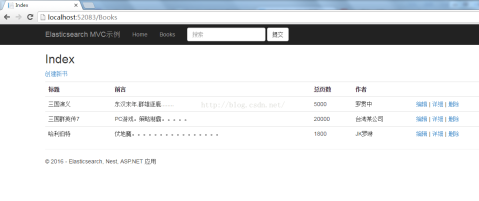
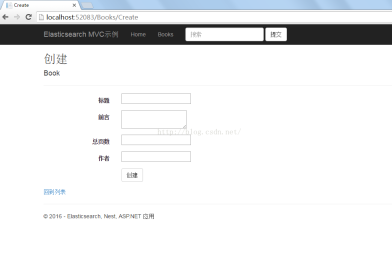
结果如图:
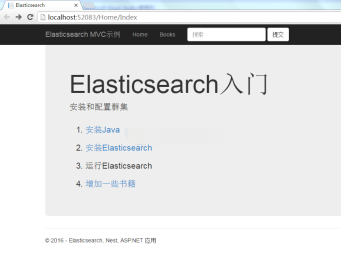
列表页
创建页:
以上就是本文的全部内容,希望对大家的学习有所帮助,也希望大家多多支持PHP中文网。