






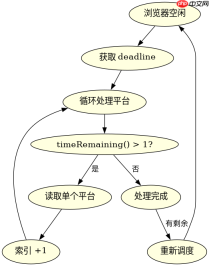
使用 requestidlecallback 或 settimeout 将平台读取逻辑拆分为多个微任务,避免阻塞主线程。具体做法是定义一个包含所有待处理平台的数组,每次回调只处理一小部分(如 5 个),处理完后检查是否还有剩余,若有则继续调度下一次回调,直到数组清空。

如何确保长任务不阻塞 UI 渲染
通过 requestIdleCallback 利用浏览器空闲时间执行任务,确保 UI 渲染优先。在回调函数中,我们获取当前可用时间,并在此时间内尽可能多地处理平台数据。如果时间用尽,剩余的未处理平台会留在队列中,等待下一个空闲周期。这种方法比 setTimeout 更平滑,因为它能更好地与浏览器的帧率同步。
// 假设 platforms 是一个包含大量平台对象的数组
const platforms = [/* ... */];
let currentIndex = 0;
const BATCH_SIZE = 5;

function processPlatforms(deadline) {
  while (currentIndex  1) {
    const platform = platforms[currentIndex];
    // 模拟读取平台数据的耗时操作
    console.log('Reading platform:', platform.id);
    currentIndex++;
  }

  if (currentIndex <p>运行上述代码,控制台将按批次打印平台 ID,直到所有平台处理完毕。这种分批处理的方式确保了主线程不会被长时间占用,从而保持页面的响应性。</p><h2>如何处理平台读取中的错误情况</h2><p>在拆分任务时,每个批次的处理都应包含独立的错误处理机制。如果在读取某个平台数据时发生错误,不应中断整个流程,而是记录错误并继续处理下一个平台。这样可以保证即使部分数据读取失败,其他数据仍能正常加载。</p><div class="aritcle_card flexRow artxards">
											<div class="artcardd flexRow">
												<a class="aritcle_card_img" rel="nofollow" href="/xiazai/skill13713" title="在架构漂移扩散之前,使用 dependency-cruiser 强制执行 JavaScript 和 TypeScript 依赖规则"><img
														src="https://img.php.cn/upload/skill/000/000/081/179523547189831.jpg" alt="在架构漂移扩散之前,使用 dependency-cruiser 强制执行 JavaScript 和 TypeScript 依赖规则" onerror="this.onerror='';this.src='/static/lhimages/moren/morentu.png'" ></a>
												<div class="aritcle_card_info flexColumn">
													<a rel="nofollow" href="/xiazai/skill13713" title="在架构漂移扩散之前,使用 dependency-cruiser 强制执行 JavaScript 和 TypeScript 依赖规则" class="overflowclass">在架构漂移扩散之前,使用 dependency-cruiser 强制执行 JavaScript 和 TypeScript 依赖规则</a>
													<p class="overflowclass">在代码库出现结构漂移之前,扫描JS或TS代码库中的禁止导入、循环依赖、孤立模块和其他依赖规则违规情况。</p>
												</div>
												<a rel="nofollow" href="/xiazai/skill13713" title="在架构漂移扩散之前,使用 dependency-cruiser 强制执行 JavaScript 和 TypeScript 依赖规则" class="aritcle_card_btn flexRow flexcenter"><b></b><span>下载</span>
												</a>
											</div>
										</div><p><img src="https://img.php.cn/upload/article/001/242/473/179523778982903.png?x-oss-process=image/resize,p_40" alt="JavaScript 长任务拆分怎么拆分 platform 读取"></p><pre class="brush:php;toolbar:false;">function processPlatformsWithRetry(deadline) {
  while (currentIndex  1) {
    try {
      const platform = platforms[currentIndex];
      // 模拟可能失败的读取操作
      if (Math.random() <p>此代码展示了如何在每个批次中加入 <code>try...catch</code> 块来捕获异常。即使某个平台读取失败,程序也会继续处理后续平台,最终输出处理完成的状态。这种方式提高了系统的鲁棒性,确保部分失败不会导致整体任务的中断。</p><h2>基于程序中某个输入、条件或结果的具体问题</h2><p>当 <code>platforms</code> 数组为空时,程序应直接结束而不进行任何处理。在上述实现中,由于 <code>currentIndex</code> 初始为 0,且 <code>platforms.length</code> 也为 0,循环条件 <code>currentIndex  立即为假,因此不会进入循环体,也不会再次调用 <code>requestIdleCallback</code>。这确保了空输入时的正确行为,即无操作且无错误。</code></p>
Java免费学习笔记:立即使用
解锁 Java 大师之旅:从入门到精通的终极指南





