






java 中处理大文件断点续传的核心做法是利用 randomaccessfile 的随机读写能力,在每次写入前通过 seek() 方法将文件指针定位到已传输的字节偏移量处,从而实现从断点继续追加数据。具体实现时,需要维护一个记录当前进度的状态(如本地文件大小或远程服务器确认的大小),在建立连接后设置 range 请求头告知服务端起始位置,同时打开本地文件时使用 "rw" 模式并调用 seek() 跳过已存在部分,随后使用 inputstream.read() 循环读取网络流并写入文件,直到流结束。

如何确定续传的起始偏移量
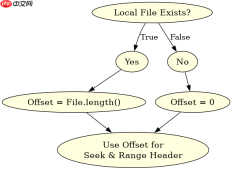
确定起始偏移量的关键在于对比本地已保存文件的长度与远程文件总大小。如果本地文件不存在,偏移量为 0;如果本地文件存在,其长度即为已下载/上传的字节数,这就是下一次操作的起始位置。在实际代码中,可以通过 File.length() 获取本地进度,并结合 HTTP 响应头中的 Content-Range 或 Content-Length 来验证一致性,确保不会覆盖已正确传输的数据块。
import java.io.*;
import java.net.HttpURLConnection;
import java.net.URL;

public class BreakpointResumeDownload {
    public static void main(String[] args) throws Exception {
        String urlStr = "https://example.com/largefile.zip";
        String localPath = "./largefile.zip";
        URL url = new URL(urlStr);
        HttpURLConnection conn = (HttpURLConnection) url.openConnection();
        conn.setRequestMethod("GET");

        File localFile = new File(localPath);
        long startPos = 0;
        if (localFile.exists()) {
            startPos = localFile.length();
            System.out.println("Resuming from: " + startPos);
        }

        // Set Range header for server to send partial content
        conn.setRequestProperty("Range", "bytes=" + startPos + "-");

        int responseCode = conn.getResponseCode();
        if (responseCode == 206 || responseCode == 200) { // 200 OK means no range support, start from 0
            if (responseCode == 200 && startPos > 0) {
                 // If server doesn't support range but we have data, we might need to handle overlap
                 // For simplicity, assume server supports range or we restart if 200 and startPos > 0
                 // Here we strictly follow 206 logic
            }
        } else {
            throw new RuntimeException("Server error: " + responseCode);
        }

        InputStream in = conn.getInputStream();
        RandomAccessFile raf = new RandomAccessFile(localFile, "rw");
        raf.seek(startPos); // Move pointer to resume position

        byte[] buffer = new byte[4096];
        int len;
        while ((len = in.read(buffer)) != -1) {
            raf.write(buffer, 0, len);
        }

        raf.close();
        in.close();
        System.out.println("Download completed.");
    }
}
如何在多线程环境下保证数据完整性
在多线程断点续传场景中,每个线程负责下载文件的一个特定字节范围。为了保证数据完整性,必须为每个线程分配不重叠的区间,并使用 RandomAccessFile 的 seek() 方法让每个线程精准定位到自己的写入位置。由于多个线程同时写入同一个文件的不同区域,操作系统和文件系统通常能保证原子性的块写入,但需确保缓冲区刷新顺序不影响最终结果。更稳妥的做法是,每个线程独立维护自己的局部进度,并在所有线程结束后合并校验,或者使用同步机制确保元数据的一致性。

FilePond 是一个 JavaScript 文件上传库,支持通过拖拽、粘贴和 API 方式处理文件、目录、URL 和 Data URI。它包含内置的图像优化功能、异步分块上传功能,并提供了适用于 React、Vue、Angular 和 Svelte 的适配器。

import java.io.*;
import java.net.HttpURLConnection;
import java.net.URL;

public class MultiThreadResumeDownload {
    private static final int THREAD_COUNT = 4;
    private static long fileSize = 0;

    public static void main(String[] args) throws Exception {
        String urlStr = "https://example.com/largefile.zip";
        String localPath = "./largefile_multi.zip";
        URL url = new URL(urlStr);
        HttpURLConnection conn = (HttpURLConnection) url.openConnection();
        conn.setRequestMethod("HEAD"); // Get file size without downloading body
        fileSize = conn.getContentLengthLong();
        conn.disconnect();

        File localFile = new File(localPath);
        if (!localFile.exists()) localFile.createNewFile();

        // Initialize file size if needed
        if (localFile.length()  {
                try {
                    downloadChunk(urlStr, localPath, s, e);
                } catch (Exception e) {
                    e.printStackTrace();
                }
            });
            threads[i].start();
        }

        for (Thread t : threads) {
            t.join();
        }
        System.out.println("Multi-thread download completed.");
    }

    private static void downloadChunk(String urlStr, String localPath, long start, long end) throws Exception {
        File localFile = new File(localPath);
        RandomAccessFile raf = new RandomAccessFile(localFile, "rw");
        raf.seek(start);

        URL url = new URL(urlStr);
        HttpURLConnection conn = (HttpURLConnection) url.openConnection();
        conn.setRequestMethod("GET");
        conn.setRequestProperty("Range", "bytes=" + start + "-" + end);

        InputStream in = conn.getInputStream();
        byte[] buffer = new byte[4096];
        int len;
        while ((len = in.read(buffer)) != -1) {
            raf.write(buffer, 0, len);
        }

        raf.close();
        in.close();
        System.out.println("Thread finished range: " + start + "-" + end);
    }
}
如何处理网络中断导致的写入不一致
当网络中断发生时,InputStream.read() 会抛出异常,此时程序退出。由于使用了 RandomAccessFile 直接写入磁盘,操作系统可能会将部分缓冲区数据刷入磁盘,也可能未完全刷新,导致文件末尾出现残缺数据。为解决此问题,应在每次成功写入一定批次数据后显式调用 raf.flush(),并在捕获异常时检查本地文件大小是否超过预期断点。如果本地文件比断点大,说明有脏数据,应截断文件至断点位置再重试,确保下次续传时从干净的断点开始,避免数据错乱。
Java免费学习笔记:立即使用
解锁 Java 大师之旅:从入门到精通的终极指南


