






使用 nginx -t 命令可以验证配置文件的语法正确性,包括 access_log 的格式。该工具会解析配置文件并检查指令拼写、参数数量及路径合法性,若发现错误会直接输出报错信息。

如何查看 access_log 的具体日志格式定义
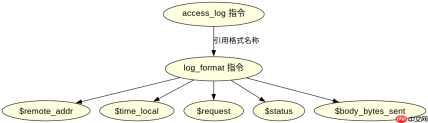
在 Nginx 中,access_log 的格式由 log_format 指令预先定义。要查看具体格式,需检查配置文件中 log_format 块内的变量组合,例如 $remote_addr 或 $request。这些变量决定了最终写入日志文件的内容结构。
server {
    listen 80;
    server_name example.com;

    # 定义自定义日志格式
    log_format my_custom_format '$remote_addr - $remote_user [$time_local] '
                                '"$request" $status $body_bytes_sent';

    location / {
        root /usr/share/nginx/html;
        index index.html;
        # 应用定义的格式
        access_log /var/log/nginx/example_access.log my_custom_format;
    }
}
上述配置定义了名为 my_custom_format 的格式,包含客户端 IP、用户、时间戳、请求行、状态码和响应大小。执行 nginx -t 时,Nginx 会验证 my_custom_format 是否存在以及路径是否可写。
如何排查 access_log 路径权限问题
当 access_log 指定的路径不存在或无写入权限时,nginx -t 通常会报告错误。确保路径存在且 Nginx 工作进程(如 www-data 或 nginx)拥有写入权限是验证的关键步骤。可以通过创建目录并修改权限来解决此问题。


# 创建日志目录并设置权限
sudo mkdir -p /var/log/nginx/custom
sudo chown nginx:nginx /var/log/nginx/custom
sudo chmod 755 /var/log/nginx/custom

# 更新配置中的路径
access_log /var/log/nginx/custom/access.log my_custom_format;
修改配置后再次运行 nginx -t,若权限正确则显示 configuration file /etc/nginx/nginx.conf test is successful。这确认了路径和格式均有效。
基于 log_format 中未定义变量的具体问题
如果在 access_log 中引用了未在 log_format 中定义的变量,Nginx 会在启动或重载配置时报错。例如,若在格式中使用 $custom_var 但未在 log_format 中声明,会导致配置测试失败。必须确保所有使用的变量都在对应的 log_format 中明确定义。


