在 javascript 运行时中查看 http/3 耗时,最直接且准确的方法是使用 performanceobserver 监听 resource 类型的性能条目。http/3 的传输细节(如 quic 连接建立、0-rtt 复用等)通常不直接暴露给 js api,但通过观察资源加载的总耗时与 dns/tcp 阶段的差异,可以推断出 http/3 带来的优化效果。具体做法是注册一个 performanceobserver,设置 entrytypes: ['resource'],并在回调中过滤出 initiatortype 为 fetch 或 xmlhttprequest 的条目,计算其 duration。

如何获取单个资源的完整时间分解
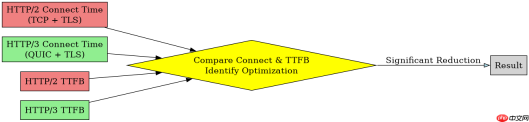
要深入分析 HTTP/3 的性能优势,需要查看资源加载的各个阶段耗时。HTTP/3 主要优化了连接建立和首字节时间(TTFB),因此重点在于对比 connectStart 到 responseEnd 的时间段。通过 PerformanceResourceTiming 接口,可以获取 domainLookupStart、connectStart、secureConnectionStart、requestStart 和 responseStart 等关键时间戳。将这些时间戳相减,即可得到 DNS 查询、TCP 握手、TLS 协商、请求发送和响应接收的具体耗时。

const observer = new PerformanceObserver((list) => {
  const entries = list.getEntries();
  for (const entry of entries) {
    if (entry.initiatorType === 'fetch' || entry.initiatorType === 'xmlhttprequest') {
      console.log(`Resource: ${entry.name}`);
      console.log(`Total Duration: ${entry.duration}ms`);
      console.log(`DNS Lookup: ${(entry.domainLookupEnd - entry.domainLookupStart).toFixed(2)}ms`);
      console.log(`TCP/TLS Connect: ${(entry.connectEnd - entry.connectStart).toFixed(2)}ms`);
      console.log(`Request Send: ${(entry.responseStart - entry.requestStart).toFixed(2)}ms`);
      console.log(`Response Receive: ${(entry.responseEnd - entry.responseStart).toFixed(2)}ms`);
    }
  }
});

observer.observe({ entryTypes: ['resource'] });

// 触发请求以生成数据
fetch('https://example.com/api/data');
HTTP/3 相比 HTTP/2 在时间戳上的具体差异
当浏览器使用 HTTP/3 时,secureConnectionStart 的时间点会显著提前,因为 HTTP/3 基于 QUIC 协议,将 TLS 握手整合在 UDP 数据包中,减少了往返次数。在 PerformanceResourceTiming 对象中,如果 nextHopProtocol 属性值为 h3,则确认使用了 HTTP/3。此时,connectEnd 与 secureConnectionStart 之间的差值通常极小,甚至为零,表明连接建立几乎无延迟。相比之下,HTTP/2 的 connectEnd 包含 TCP 三次握手和 TLS 四次握手,耗时较长。通过比较同一资源在不同协议下的 connectEnd 和 responseStart,可以量化 HTTP/3 节省的时间。

FilePond 是一个 JavaScript 文件上传库,支持通过拖拽、粘贴和 API 方式处理文件、目录、URL 和 Data URI。它包含内置的图像优化功能、异步分块上传功能,并提供了适用于 React、Vue、Angular 和 Svelte 的适配器。
// 检查协议并计算节省的连接时间
const checkHttp3Performance = () => {
  const entries = performance.getEntriesByType('resource');
  const http3Entry = entries.find(e => e.nextHopProtocol === 'h3');

  if (http3Entry) {
    const connectTime = http3Entry.connectEnd - http3Entry.connectStart;
    const secureTime = http3Entry.secureConnectionStart > 0
      ? http3Entry.connectEnd - http3Entry.secureConnectionStart
      : 0;

    console.log('HTTP/3 Connection Time:', connectTime.toFixed(2), 'ms');
    console.log('QUIC/TLS Handshake Time:', secureTime.toFixed(2), 'ms');
    console.log('Next Hop Protocol:', http3Entry.nextHopProtocol);
  } else {
    console.log('Not using HTTP/3');
  }
};

checkHttp3Performance();
如何处理跨域资源的时间戳缺失问题
在分析 HTTP/3 耗时时,常遇到跨域资源的时间戳字段为 0 的情况,这是由于浏览器的安全策略限制。对于跨域请求,除非服务器设置了 Access-Control-Expose-Headers 并明确暴露了相关性能头,否则 PerformanceResourceTiming 中的大部分时间戳将被清零。这导致无法直接通过 JS 获取跨域 HTTP/3 的详细耗时。解决此问题的方法是确保服务端配置正确的 CORS 头,或者仅对同源资源进行详细的性能分析。此外,可以使用 PerformanceNavigationTiming 获取页面整体导航耗时,但这无法区分 HTTP/3 的具体贡献。
Java免费学习笔记:立即使用
解锁 Java 大师之旅:从入门到精通的终极指南