






使用 fetch 获取数据后,调用 response.text() 将响应体解析为字符串,再传入 toml 解析库(如 toml-js)的 parse() 方法即可得到 javascript 对象。此流程适用于所有返回纯文本格式的接口,无需处理二进制或流式数据。

fetch 请求如何获取原始文本内容
通过 fetch 发起请求并调用 .text() 方法,可以确保拿到未经处理的原始 TOML 字符串,这是后续解析的前提。
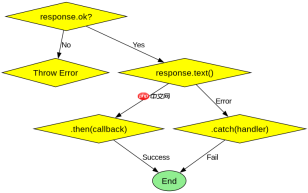
const url = 'https://api.example.com/config';

fetch(url)
  .then(response => {
    if (!response.ok) {
      throw new Error('Network response was not ok');
    }
    return response.text();
  })
  .then(tomlString => {
    console.log('Raw TOML:', tomlString);
    // 这里进行下一步解析
  })
  .catch(error => {
    console.error('Fetch error:', error);
  });
上述代码展示了标准的请求流程。首先检查 response.ok 确保 HTTP 状态码正常,然后调用 response.text() 返回一个 Promise,该 Promise 解析为包含完整 TOML 内容的字符串。如果网络请求失败或服务器返回错误状态,会进入 catch 块处理异常。
TOML 字符串如何转换为 JavaScript 对象
引入 toml-js 库后,直接调用其 parse() 函数,将上一步获得的字符串作为参数传入,即可同步获得对应的 JavaScript 对象结构。

FilePond 是一个 JavaScript 文件上传库,支持通过拖拽、粘贴和 API 方式处理文件、目录、URL 和 Data URI。它包含内置的图像优化功能、异步分块上传功能,并提供了适用于 React、Vue、Angular 和 Svelte 的适配器。

import { parse } from 'toml-js';

const tomlData = `[
  [server]
  host = "localhost"
  port = 8080
]`;

try {
  const config = parse(tomlData);
  console.log(config.server.host); // 输出: localhost
} catch (error) {
  console.error('TOML parsing error:', error);
}
这段代码演示了如何使用 toml-js 解析一个简单的 TOML 字符串。输入是一个包含 [server] 部分的 TOML 文本,经过 parse() 处理后,输出为一个嵌套的对象。如果 TOML 格式有误,parse() 会抛出异常,因此建议包裹在 try...catch 中以捕获语法错误。
当 TOML 中包含日期时间类型时如何处理
toml-js 默认会将 TOML 中的 local-date-time 和 date-time 解析为 JavaScript 的 Date 对象实例,开发者可以直接使用这些对象的方法进行操作。
import { parse } from 'toml-js';

const tomlWithDate = `created_at = 2023-10-27T10:30:00Z`;

const result = parse(tomlWithDate);
console.log(result.created_at instanceof Date); // 输出: true
console.log(result.created_at.getFullYear());    // 输出: 2023
在此示例中,TOML 字符串包含一个 ISO 8601 格式的日期时间字段。解析后的结果中,created_at 键对应的值不再是字符串,而是 Date 对象。这意味着你可以直接调用 getFullYear()、getMonth() 等标准 JS 日期方法,无需手动进行字符串切割或正则匹配。这种自动转换简化了时间数据的处理逻辑。
大量免费API接口:立即使用
涵盖生活服务API、金融科技API、企业工商API、等相关的API接口服务。免费API接口可安全、合规地连接上下游,为数据API应用能力赋能!





