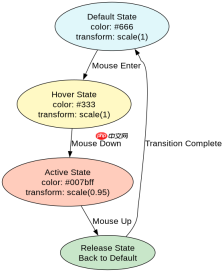
在css中让svg图标点击时平滑变换形态,核心做法是利用 currentcolor 将图标的填充或描边颜色绑定到父元素的 color 属性,并通过 :active 伪类改变该颜色,配合 transition 实现平滑过渡。具体而言,给包含svg的按钮设置 transition: color 0.3s ease,并在 :active 状态下定义新的 color,svg即可随之变色。若需同时缩放,可结合 transform: scale() 一起过渡。

如何仅通过颜色变化实现点击反馈?
仅通过颜色变化实现点击反馈,只需确保SVG使用 fill="currentColor" 或 stroke="currentColor",并在CSS中对容器应用 transition 和 :active 状态的颜色变更。例如,默认灰色,点击时变蓝色,过渡时间设为0.3秒。这种方法无需JavaScript,完全由CSS驱动,性能最佳且代码简洁。
    <meta charset="UTF-8"><title>SVG Color Transition</title><style>
        .icon-btn {
            background: none;
            border: none;
            cursor: pointer;
            padding: 10px;
            transition: color 0.3s ease, transform 0.3s ease;
            color: #666; /* Default gray */
        }
        .icon-btn:hover {
            color: #333;
        }
        .icon-btn:active {
            color: #007bff; /* Blue on click */
            transform: scale(0.95);
        }
        .icon-btn svg {
            width: 24px;
            height: 24px;
            fill: currentColor;
        }
    </style><button class="icon-btn" aria-label="Click me">
        <svg viewbox="0 0 24 24"><path d="M12 2l3.09 6.26L22 9.27l-5 4.87 1.18 6.88L12 17.77l-6.18 3.25L7 14.14 2 9.27l6.91-1.01L12 2z"></path></svg></button>
上述代码中,.icon-btn 设置了 transition: color 0.3s ease,默认 color 为 #666,:active 时变为 #007bff。SVG路径的 fill 为 currentColor,因此会跟随父元素颜色变化。点击按钮时,颜色从灰色平滑过渡到蓝色,同时图标缩小至0.95倍,松开后恢复。预期结果:点击瞬间图标变蓝并轻微缩小,松开后渐变为灰色并恢复原大小,无闪烁。
如何结合缩放与旋转实现更复杂的形态变换?
结合缩放与旋转实现更复杂的形态变换,需在 :active 状态中同时修改 transform 属性,如 scale(0.9) rotate(-10deg),并确保 transform-origin 设置为 center 以避免偏移。同时,保持 color 的过渡以维持视觉一致性。这种组合能提供更丰富的交互反馈,适用于需要强调点击动作的场景。

Lightning CSS 是由 Parcel 团队开发的基于 Rust 的 CSS 解析器、转换器、打包工具和压缩工具。此技能适用于需要优化样式表、为目标浏览器降低现代 CSS 语法以及将快速 CSS 处理集成到构建或重构工作流中的代理。

    <meta charset="UTF-8"><title>SVG Transform Transition</title><style>
        .complex-btn {
            background: none;
            border: none;
            cursor: pointer;
            padding: 10px;
            transition: color 0.3s ease, transform 0.3s ease;
            color: #666;
            transform-origin: center;
        }
        .complex-btn:active {
            color: #ff5722; /* Orange on click */
            transform: scale(0.9) rotate(-10deg);
        }
        .complex-btn svg {
            width: 24px;
            height: 24px;
            fill: currentColor;
        }
    </style><button class="complex-btn" aria-label="Complex interaction">
        <svg viewbox="0 0 24 24"><circle cx="12" cy="12" r="10" stroke="currentColor" stroke-width="2" fill="none"></circle><line x1="12" y1="8" x2="12" y2="16" stroke="currentColor" stroke-width="2"></line><line x1="8" y1="12" x2="16" y2="12" stroke="currentColor" stroke-width="2"></line></svg></button>
此代码中,.complex-btn 的 :active 状态应用了 transform: scale(0.9) rotate(-10deg) 和 color: #ff5722。SVG包含一个圆和十字线,均使用 currentColor。点击时,图标缩小、逆时针旋转10度,颜色变为橙色,松开后平滑恢复。预期结果:点击瞬间图标变小、旋转并变橙,松开后渐复原状,过渡流畅无卡顿。
当SVG内部有多个独立路径时,如何实现整体同步变换?
当SVG内部有多个独立路径时,要实现整体同步变换,需将所有路径的 fill 或 stroke 统一设为 currentColor,并确保它们共享同一个父容器的 transform 和 color 过渡。这样,无论路径数量多少,只要父元素状态改变,所有子路径都会同步响应。例如,多路径图标在点击时整体变色并缩放,各部分不会错位或延迟。
,
前端入门到VUE实战笔记:立即使用
在学习笔记中,你将探索 前端 的入门与实战技巧!