






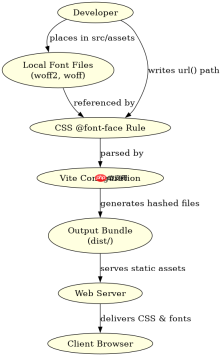
在 vite 项目中处理字体,核心做法是将字体文件作为静态资源引入,并通过 css 的 @font-face 规则进行声明。vite 会自动处理这些文件的哈希命名和路径解析,开发者只需确保 css 引用路径正确即可。

Vite 中如何引入本地字体文件
直接回答:将字体文件放入 public 目录或 src/assets 目录,并在 CSS 中使用相对路径引用。推荐使用 src/assets 目录,因为 Vite 会对其中的资源进行打包优化(如添加内容哈希)。
/* src/styles/fonts.css */
@font-face {
  font-family: 'MyCustomFont';
  src: url('../assets/fonts/myfont.woff2') format('woff2'),
       url('../assets/fonts/myfont.woff') format('woff');
  font-weight: normal;
  font-style: normal;
}

body {
  font-family: 'MyCustomFont', sans-serif;
}
上述代码展示了如何在 CSS 中定义字体。假设 myfont.woff2 和 myfont.woff 位于 src/assets/fonts/ 目录下。通过 url() 指向这些文件,Vite 会在构建时自动处理它们的路径和缓存策略。
如何处理在线字体服务(如 Google Fonts)
直接回答:对于在线字体,建议下载字体文件到本地并使用上述方法引入,以避免网络依赖和加载速度问题。如果必须使用在线链接,可以直接在 HTML 的 中添加 标签,或在 CSS 中使用 @import,但需注意性能影响。


  <meta charset="UTF-8"><link rel="icon" type="image/svg+xml" href="/vite.svg"><meta name="viewport" content="width=device-width, initial-scale=1.0"><title>Vite App</title><!-- 方式一:直接在 HTML 中引入 Google Fonts --><link rel="preconnect" href="https://fonts.googleapis.com"><link rel="preconnect" href="https://fonts.gstatic.com" crossorigin><link href="https://fonts.googleapis.com/css2?family=Roboto:wght@400;700&display=swap" rel="stylesheet"><div id="app"></div>
  <script type="module" src="/src/main.js"></script>
这种方式虽然简单,但会增加对第三方服务的依赖。更推荐的做法是下载字体文件并本地化,以获得更好的控制权和性能。
字体加载失败时的降级策略是什么
直接回答:在 @font-face 定义中指定多个备用字体,并确保系统已安装这些备用字体。同时,可以使用 font-display: swap 来优化字体加载体验,避免文字不可见的问题。
以下是一个完整的示例,展示了如何设置字体回退:
/* src/styles/fonts.css */
@font-face {
  font-family: 'MyCustomFont';
  src: url('../assets/fonts/myfont.woff2') format('woff2'),
       url('../assets/fonts/myfont.woff') format('woff');
  font-weight: normal;
  font-style: normal;
  font-display: swap; /* 关键属性:字体加载期间显示后备字体 */
}

body {
  /* 指定字体栈,从自定义字体到系统字体 */
  font-family: 'MyCustomFont', 'Helvetica Neue', Arial, sans-serif;
}
通过 font-display: swap,浏览器会在自定义字体加载完成前显示后备字体,从而提升用户体验。同时,font-family 中的字体栈确保了即使自定义字体加载失败,页面仍能使用美观的系统字体。
Java免费学习笔记:立即使用
解锁 Java 大师之旅:从入门到精通的终极指南





