






调用 shutdownnow() 会尝试停止所有正在执行的任务并暂停等待处理的任务,返回尚未开始执行的任务列表。该方法通过中断线程池中的工作线程来实现强制关闭,但不会等待正在运行的任务完成。如果希望确保线程池完全终止,需要配合 awaittermination() 方法等待线程结束。

shutdownNow() 如何中断工作线程
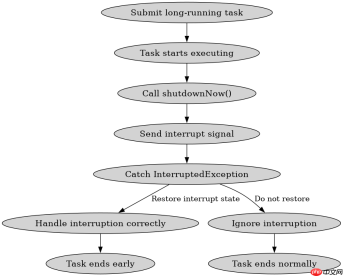
shutdownNow() 的核心机制是遍历线程池中的所有工作线程并调用其 interrupt() 方法。这会导致正在执行任务的线程抛出 InterruptedException,从而允许任务提前退出。需要注意的是,如果任务没有检查中断状态或捕获异常后未重新抛出,线程可能继续运行直到任务自然结束。
import java.util.concurrent.*;

public class Main {
    public static void main(String[] args) throws InterruptedException {
        ExecutorService executor = Executors.newFixedThreadPool(2);

        // 提交一个长时间运行的任务
        executor.submit(() -> {
            try {
                Thread.sleep(10000);
            } catch (InterruptedException e) {
                System.out.println("Task interrupted!");
                Thread.currentThread().interrupt(); // 恢复中断状态
            }
        });

        // 立即尝试关闭
        List<runnable> notStarted = executor.shutdownNow();
        System.out.println("Not started tasks: " + notStarted.size());

        // 等待线程终止
        if (executor.awaitTermination(5, TimeUnit.SECONDS)) {
            System.out.println("Executor terminated.");
        } else {
            System.out.println("Executor did not terminate.");
        }
    }
}</runnable>
上述代码中,shutdownNow() 调用后立即返回,notStarted 列表为空因为任务已经开始执行。工作线程在 sleep 期间被中断,抛出 InterruptedException 并打印 "Task interrupted!"。最后 awaitTermination 等待线程结束,若5秒内未完成则输出 "Executor did not terminate."。
未处理中断的任务为何无法被强制关闭
当任务忽略 InterruptedException 或捕获后未恢复中断状态时,shutdownNow() 的中断信号会被吞掉,导致线程继续执行直至任务完成。这种情况下,即使调用了 shutdownNow(),线程池也无法及时终止。因此,编写可取消的任务时必须正确处理中断信号。

FilePond 是一个 JavaScript 文件上传库,支持通过拖拽、粘贴和 API 方式处理文件、目录、URL 和 Data URI。它包含内置的图像优化功能、异步分块上传功能,并提供了适用于 React、Vue、Angular 和 Svelte 的适配器。

import java.util.concurrent.*;

public class Main {
    public static void main(String[] args) throws InterruptedException {
        ExecutorService executor = Executors.newFixedThreadPool(1);

        // 提交一个忽略中断的任务
        executor.submit(() -> {
            try {
                Thread.sleep(10000);
            } catch (InterruptedException e) {
                System.out.println("Interrupted but ignored!");
                // 未恢复中断状态
            }
            System.out.println("Task completed despite shutdownNow!");
        });

        List<runnable> notStarted = executor.shutdownNow();
        System.out.println("Not started tasks: " + notStarted.size());

        // 等待线程终止
        if (executor.awaitTermination(5, TimeUnit.SECONDS)) {
            System.out.println("Executor terminated.");
        } else {
            System.out.println("Executor did not terminate.");
        }
    }
}</runnable>
此示例中,任务捕获了 InterruptedException 但未调用 Thread.currentThread().interrupt() 恢复中断状态,因此线程继续执行并打印 "Task completed despite shutdownNow!"。awaitTermination 超时后输出 "Executor did not terminate.",证明任务未被正确中断。正确的做法是在捕获异常后恢复中断状态,如第一个示例所示。
如何验证线程池是否真正关闭
仅调用 shutdownNow() 不足以保证线程池立即关闭,必须使用 awaitTermination() 等待所有线程结束。该方法会阻塞当前线程直到所有任务完成或超时。如果超时后仍有线程存活,说明有任务未响应中断,需要进一步排查任务逻辑。结合轮询或定时检查可以更可靠地验证关闭状态。
import java.util.concurrent.*;

public class Main {
    public static void main(String[] args) throws InterruptedException {
        ExecutorService executor = Executors.newFixedThreadPool(2);

        executor.submit(() -> {
            try {
                Thread.sleep(10000);
            } catch (InterruptedException e) {
                System.out.println("Task interrupted!");
                Thread.currentThread().interrupt();
            }
        });

        executor.shutdownNow();

        // 轮询检查关闭状态
        while (!executor.isTerminated()) {
            System.out.println("Waiting for termination...");
            Thread.sleep(1000);
        }
        System.out.println("Executor is fully terminated.");
    }
}
该代码通过 while (!executor.isTerminated()) 循环检查线程池状态,每1秒打印一次等待信息,直到所有线程结束。这种方法比单次 awaitTermination 更灵活,适合需要实时反馈的场景。最终输出 "Executor is fully terminated." 表示线程池已完全关闭。
Java免费学习笔记:立即使用
解锁 Java 大师之旅:从入门到精通的终极指南


