使用属性选择器 [href^="http"] 可以精准匹配所有以 http 开头的链接。该选择器利用 ^= 操作符检查 href 属性的值是否以指定字符串开头,从而选中对应的 元素。

如何区分 http 和 https 链接
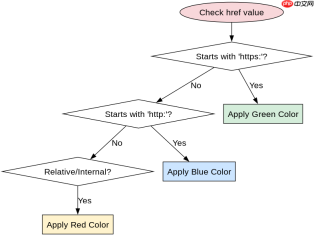
要区分 http 和 https 链接,可以使用 [href^="http:"] 匹配普通 HTTP,用 [href^="https:"] 匹配 HTTPS。由于 https 也包含 http,直接写 [href^="http"] 会同时选中两者。通过增加冒号或斜杠等分隔符,可以确保精确匹配特定协议。

    <meta charset="UTF-8"><title>Link Selector Demo</title><style>
        /* 匹配以 http: 开头的链接 */
        a[href^="http:"] {
            color: blue;
        }
        /* 匹配以 https: 开头的链接 */
        a[href^="https:"] {
            color: green;
        }
        /* 匹配非 http/https 的相对链接 */
        a:not([href^="http"]):not([href^="https"]) {
            color: red;
        }
    </style><a href="http://example.com">HTTP Link</a>
    <a href="https://secure.com">HTTPS Link</a>
    <a href="/local/page">Local Link</a>
如何处理 mailto 或 ftp 等其他协议
若需排除 mailto:、ftp: 等非 Web 协议,可结合 :not() 伪类进行过滤。例如 a[href^="http"]:not([href^="mailto:"]) 仅选中以 http 开头但非邮件链接的元素。这种组合方式能灵活处理多种协议场景。

前端入门到VUE实战笔记:立即使用
在学习笔记中,你将探索 前端 的入门与实战技巧!