






java 的 localdatetime 本身不包含时区或编码信息,处理本地时间需通过 zoneddatetime 结合 zoneid.systemdefault() 获取系统默认时区,并使用 datetimeformatter 指定格式进行序列化。若涉及字符编码(如 utf-8),则需在 i/o 流中显式设置编码,因为 localdatetime 仅表示时间对象,不直接参与字节流转换。

LocalDateTime 如何转换为带时区的字符串?
将 LocalDateTime 转换为字符串时,需先关联时区生成 ZonedDateTime,再使用 DateTimeFormatter 格式化。例如,调用 localDateTime.atZone(ZoneId.systemDefault()) 获取当前系统时区的时间,再用 format(DateTimeFormatter.ISO_LOCAL_DATE_TIME) 输出标准格式。此过程不涉及字符编码,仅处理时间结构。
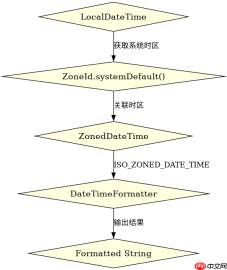
import java.time.LocalDateTime;
import java.time.ZoneId;
import java.time.ZonedDateTime;
import java.time.format.DateTimeFormatter;

public class Main {
    public static void main(String[] args) {
        LocalDateTime now = LocalDateTime.now();
        ZonedDateTime zoned = now.atZone(ZoneId.systemDefault());
        String formatted = zoned.format(DateTimeFormatter.ISO_ZONED_DATE_TIME);
        System.out.println(formatted);
    }
}
预期输出示例:2023-10-05T14:30:00+08:00[Asia/Shanghai],其中 +08:00 为偏移量,[Asia/Shanghai] 为时区 ID。
如何处理 LocalDateTime 与 JSON 序列化中的编码问题?
在 JSON 序列化中,LocalDateTime 需通过 Jackson 等库配置自定义序列化器,并指定字符编码为 UTF-8。例如,使用 Jackson2ObjectMapperBuilder.json().charset(StandardCharsets.UTF_8) 确保输出字节流为 UTF-8,同时注册 JavaTimeModule 支持时间类型。此步骤分离了时间格式与字符编码,前者由序列化器处理,后者由 I/O 层控制。


import com.fasterxml.jackson.databind.ObjectMapper;
import com.fasterxml.jackson.datatype.jsr310.JavaTimeModule;
import java.nio.charset.StandardCharsets;
import java.time.LocalDateTime;

public class JsonExample {
    public static void main(String[] args) throws Exception {
        ObjectMapper mapper = new ObjectMapper();
        mapper.registerModule(new JavaTimeModule());
        LocalDateTime time = LocalDateTime.now();
        byte[] jsonBytes = mapper.writeValueAsBytes(time);
        System.out.println(new String(jsonBytes, StandardCharsets.UTF_8));
    }
}
预期输出示例:"2023-10-05T14:30:00",字节流以 UTF-8 编码,无时区信息。
LocalDateTime 在跨时区传输时可能丢失哪些信息?
当 LocalDateTime 直接用于跨时区传输时,会丢失原始时区上下文,导致接收方无法还原准确时间点。例如,发送 2023-10-05T14:30:00 到不同时区服务器,若未附加时区标识,接收方可能误判为本地时间。解决方案是始终使用 ZonedDateTime 或 OffsetDateTime 传输,确保时区信息完整。
Java免费学习笔记:立即使用
解锁 Java 大师之旅:从入门到精通的终极指南


