






先把文本拆成词,再用 counter 统计次数,通过 most_common(n) 取前 n 项。需要把大小写视为同一词时,在计数前统一大小写。
基础计数与 most_common 用法
Counter 对象接收一个可迭代对象(如字符串或列表),自动统计元素出现次数。调用 most_common(n) 方法可直接返回出现频率最高的 n 个元素及其计数值,按频率降序排列。若 n 省略,则返回所有元素的排序结果。
from collections import Counter

text = "apple banana apple orange banana apple"
counts = Counter(text.split())
print(counts.most_common(2))
上述代码将输出 [('apple', 3), ('banana', 2)]。注意输入需为可迭代序列,直接传入长字符串会按字符统计而非单词。
统一大小写与预处理
原始文本中 'Apple' 和 'apple' 会被视为不同键。为确保统计准确,应在创建 Counter 前将文本转换为小写。使用 str.lower() 配合 split() 可实现简单的分词与标准化。

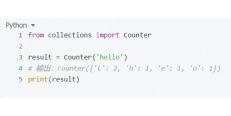
from collections import Counter

text = "Hello hello HELLO world World"
words = text.lower().split()
counts = Counter(words)
print(counts)
运行后输出:Counter({'hello': 3, 'world': 2})。此时大小写差异已被消除,相同词汇合并计数。
并列频率的二次排序规则
当多个词频率相同时,most_common 默认保持它们在输入序列中的首次出现顺序(稳定排序)。若需按字母顺序打破平局,需手动对结果进行二次排序。利用 sorted 函数指定 key 参数,先按频率降序,再按词元升序排列。
from collections import Counter

text = "cat dog bird cat dog fish fish"
counts = Counter(text.split())
# 获取所有项并按 (频率, 词) 排序
sorted_items = sorted(counts.items(), key=lambda x: (-x[1], x[0]))
print(sorted_items)
预期输出:[('cat', 2), ('dog', 2), ('fish', 2), ('bird', 1)]。此处 cat、dog、fish 频率均为 2,但按字母顺序 a-z 排列。若只需前 N 个,可对 sorted_items 切片 [:N]。
Python免费学习笔记(深入):立即使用
在学习笔记中,你将探索 Python 的核心概念和高级技巧!


