






debounce与throttle如何支持随机退避
在javascript中实现防抖(debounce)和节流(throttle)时,可以通过在触发延迟或间隔时间上叠加一个随机数来实现随机退避。具体做法是:在计算下一次执行的时间点时,基于基础延迟时间加上一个[0, 随机范围]之间的随机值。这样做可以避免多个客户端在相同时间点同时发送请求导致的“惊群效应”,从而分散服务器压力。例如,在防抖中,每次重置定时器时,实际等待时间不再是固定的n毫秒,而是n + math.random() * jitterrange;在节流中,每次允许执行的间隔也加入随机偏移。

防抖函数中如何实现带随机退避的延迟
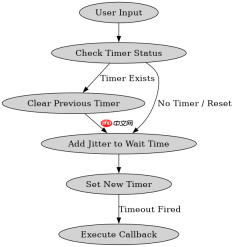
在防抖场景中,随机退避主要应用于重置定时器时的等待时长。当用户频繁触发事件时,我们不再使用固定的延迟时间,而是在基础延迟之上增加一个随机抖动值。这样,即使触发频率很高,最后一次触发的执行时间也会因为随机性而分散开来,避免所有请求在同一时刻到达后端。

Build Java agent transport gateways with Atmosphere
下载
使用Atmosphere构建通过WebSocket、SSE、gRPC、WebTransport、MCP、A2A和AG-UI流传输的JVM代理网关,并带有治理钩子。
function debounceWithJitter(func, wait, maxWait, jitterRange = 50) {
  let timeoutId = null;
  let lastExecTime = 0;

  return function(...args) {
    const context = this;
    const now = Date.now();
    const remaining = maxWait - (now - lastExecTime);

    // 清除之前的定时器
    if (timeoutId) {
      clearTimeout(timeoutId);
      timeoutId = null;
    }

    // 如果剩余时间小于最大等待时间且未达到最大等待阈值
    if (remaining  0) {
      // 添加随机退避:基础等待时间 + 随机值
      const jitter = Math.random() * jitterRange;
      timeoutId = setTimeout(() => {
        lastExecTime = Date.now();
        func.apply(context, args);
      }, wait + jitter);
    } else {
      // 否则立即执行或按最大等待时间执行
      lastExecTime = Date.now();
      func.apply(context, args);
    }
  };
}

// 示例调用
const handleSearch = debounceWithJitter((query) => {
  console.log('Searching for:', query, 'at', new Date().toISOString());
}, 300, 1000, 100); // 基础300ms,最大1000ms,随机退避0-100ms

// 模拟触发
handleSearch('test');
节流函数中如何实现带随机退避的执行间隔
在节流场景中,随机退避应用于两次执行之间的最小间隔。通过引入随机因子,可以确保即使在高并发场景下,请求也不会以完全固定的节奏发送到服务器。这在分布式系统中特别有用,可以有效防止因时钟同步或固定策略导致的资源竞争。
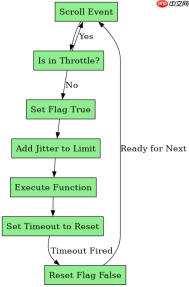
function throttleWithJitter(func, limit, jitterRange = 50) {
  let inThrottle = false;
  let lastFuncTime = 0;
  let lastRenderTime = 0;

  return function(...args) {
    const context = this;
    const now = Date.now();

    if (!inThrottle) {
      inThrottle = true;
      lastFuncTime = now;
      lastRenderTime = now;

      // 执行函数并添加随机退避
      const jitter = Math.random() * jitterRange;
      setTimeout(() => {
        inThrottle = false;
        lastFuncTime = Date.now();
      }, limit + jitter);

      func.apply(context, args);
    }
  };
}

// 示例调用
const handleScroll = throttleWithJitter(() => {
  console.log('Scrolling at', new Date().toISOString());
}, 200, 50); // 基础200ms,随机退避0-50ms

// 模拟滚动事件
window.addEventListener('scroll', handleScroll);
Java免费学习笔记:立即使用
解锁 Java 大师之旅:从入门到精通的终极指南





