






使用 javascript fetch api 处理大文件上传的核心做法是结合 readablestream 进行分块传输,并配合 content-range 请求头实现断点续传。具体而言,你需要将文件按固定大小(如 1mb)切分为多个 file 对象或 buffer,然后逐个发起 post 请求。服务端需支持解析 content-range 以确认当前块的位置和总大小,并在接收完成后合并文件。若某次请求失败,客户端应记录已上传的块数,下次重试时从该位置继续发送,从而避免重复传输整个大文件。

如何计算文件的 Content-Range 头部信息
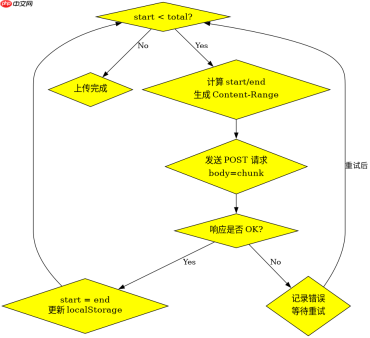
在分块上传中,Content-Range 头的格式为 bytes [start]-[end]/[total],其中 start 是当前块的起始字节偏移量,end 是结束偏移量(包含),total 是文件的总字节数。计算时需先获取文件的 size 属性作为 total,然后根据当前块的索引 i 和块大小 chunkSize 计算 start = i * chunkSize,end = Math.min(start + chunkSize - 1, total - 1)。这个头部信息让服务端知道当前上传的是哪一部分数据,是实现断点续传的关键。
const file = document.getElementById('fileInput').files[0];
const chunkSize = 1 * 1024 * 1024; // 1MB
const total = file.size;
let start = 0;

async function uploadChunk() {
  const end = Math.min(start + chunkSize, total);
  const chunk = file.slice(start, end);

  const headers = {
    'Content-Type': chunk.type,
    'Content-Range': `bytes ${start}-${end - 1}/${total}`
  };

  const response = await fetch('/upload', {
    method: 'POST',
    headers: headers,
    body: chunk
  });

  if (response.ok) {
    start = end;
    if (start <p>上述代码展示了基本的分块逻辑。当 <code>start</code> 小于 <code>total</code> 时,持续递归调用 <code>uploadChunk</code>。每个请求只发送一个 <code>chunk</code>,并通过 <code>Content-Range</code> 告知服务端位置。如果网络中断,只需保存当前的 <code>start</code> 值,重启后从该位置继续即可。注意,浏览器中的 <code>fetch</code> 默认不支持流式上传大文件时的进度回调,因此通常依赖服务端的响应状态来判断成功与否。</p><h2>如何实现断点续传的进度存储与恢复</h2><p>为了实现真正的断点续传,需要在客户端持久化已上传的块信息。最简单的方式是使用 <code>localStorage</code> 或 <code>IndexedDB</code> 存储当前已上传到的字节偏移量 <code>lastUploadedByte</code> 和文件元数据(如文件名、大小、哈希值)。在开始上传前,先检查本地存储是否有残留的 <code>lastUploadedByte</code>,如果有,则将其作为初始 <code>start</code> 值,跳过已上传的部分。每次成功上传一块后,更新本地存储中的 <code>lastUploadedByte</code>。这样即使页面刷新或关闭,也能从断点处继续上传,而不必从头开始。</p><div class="aritcle_card flexRow artxards">
											<div class="artcardd flexRow">
												<a class="aritcle_card_img" rel="nofollow" href="/xiazai/skill13095" title="Build Java agent transport gateways with Atmosphere"><img
														src="https://img.php.cn/upload/skill/001/246/273/6adaf20e352aa140.jpg" alt="Build Java agent transport gateways with Atmosphere" onerror="this.onerror='';this.src='/static/lhimages/moren/morentu.png'" ></a>
												<div class="aritcle_card_info flexColumn">
													<a rel="nofollow" href="/xiazai/skill13095" title="Build Java agent transport gateways with Atmosphere" class="overflowclass">Build Java agent transport gateways with Atmosphere</a>
													<p class="overflowclass">使用Atmosphere构建通过WebSocket、SSE、gRPC、WebTransport、MCP、A2A和AG-UI流传输的JVM代理网关,并带有治理钩子。</p>
												</div>
												<a rel="nofollow" href="/xiazai/skill13095" title="Build Java agent transport gateways with Atmosphere" class="aritcle_card_btn flexRow flexcenter"><b></b><span>下载</span>
												</a>
											</div>
										</div><p><img src="https://img.php.cn/upload/article/001/242/473/179480469576593.png?x-oss-process=image/resize,p_40" alt="JavaScript Fetch API 怎么处理大文件上传"></p><pre class="brush:php;toolbar:false;">// 假设已从 localStorage 读取 lastUploadedByte
let start = parseInt(localStorage.getItem('lastUploadedByte')) || 0;
const total = file.size;

async function resumeUpload() {
  while (start <p>此代码片段演示了基于 <code>localStorage</code> 的断点续传机制。通过循环检查 <code>start ,确保所有块都被上传。每次成功后更新 <code>localStorage</code>,保证进度不丢失。若遇到网络错误,程序会抛出异常并跳出循环,此时 <code>start</code> 仍指向未完成的块,用户可稍后重新调用 <code>resumeUpload</code> 继续。这种方式避免了因单次请求失败而重传整个文件的问题,显著提升了大文件上传的可靠性。</code></p><h2>当文件总大小超过 2GB 时如何处理内存溢出</h2><p>当文件总大小超过 2GB 时,直接使用 <code>file.slice()</code> 可能会在内存中创建巨大的临时对象,导致浏览器崩溃或性能下降。解决方案是采用更细粒度的分块策略,例如将每块大小减小到 256KB 或更小,并使用 <code>ReadableStream</code> 逐步读取文件内容,而不是一次性加载整个文件到内存。此外,可以结合 <code>requestIdleCallback</code> 或 Web Worker 来异步处理分块逻辑,避免阻塞主线程。对于超大文件,建议在服务端也做相应优化,如支持流式写入磁盘,减少内存占用。</p>
大量免费API接口:立即使用
涵盖生活服务API、金融科技API、企业工商API、等相关的API接口服务。免费API接口可安全、合规地连接上下游,为数据API应用能力赋能!





