






使用 fetch 获取 midi 数据时,应调用 response.arraybuffer() 方法将响应体解析为二进制缓冲区。midi 文件本质上是二进制流,直接读取文本或 json 会导致数据损坏。拿到 arraybuffer 后,可以使用 uint8array 进行后续处理或直接通过 web midi api 发送。

如何验证获取到的 MIDI 数据是否完整且格式正确
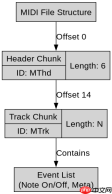
验证 MIDI 数据的核心在于检查文件头(Header Chunk)的标识符和长度。一个标准的 .mid 文件以 0x4D 0x54 0x68 0x64 (MThd) 开头,随后是 4 字节的头部长度(通常为 6),接着是格式类型、通道数和拍号。通过检查这些字节,可以确保下载的文件没有被截断或损坏。
const url = '/path/to/song.mid';

async function validateMidi(url) {
  const response = await fetch(url);
  if (!response.ok) throw new Error('Network error');

  // 1. 获取 ArrayBuffer
  const buffer = await response.arrayBuffer();
  const view = new Uint8Array(buffer);

  // 2. 检查最小长度 (Header: 4 + 4 + 2 + 2 + 2 = 14 bytes)
  if (view.length <h2>如何将 Array Buffer 转换为可操作的 MIDI 事件列表</h2><p>要将二进制数据转换为具体的音符事件(如 Note On/Off),需要解析 MIDI 文件中的 Track Chunk。每个 Track Chunk 包含一系列变长数量值(VLQ)编码的事件。解析过程需要遍历字节流,识别状态字节(Status Byte)和数据字节(Data Byte),并将它们组合成完整的 MIDI 消息对象。这个过程通常涉及状态机的实现,以处理系统实时消息和元数据。</p><div class="aritcle_card flexRow artxards">
											<div class="artcardd flexRow">
												<a class="aritcle_card_img" rel="nofollow" href="/xiazai/skill13095" title="Build Java agent transport gateways with Atmosphere"><img
														src="https://img.php.cn/upload/skill/001/246/273/6adaf20e352aa140.jpg" alt="Build Java agent transport gateways with Atmosphere" onerror="this.onerror='';this.src='/static/lhimages/moren/morentu.png'" ></a>
												<div class="aritcle_card_info flexColumn">
													<a rel="nofollow" href="/xiazai/skill13095" title="Build Java agent transport gateways with Atmosphere" class="overflowclass">Build Java agent transport gateways with Atmosphere</a>
													<p class="overflowclass">使用Atmosphere构建通过WebSocket、SSE、gRPC、WebTransport、MCP、A2A和AG-UI流传输的JVM代理网关,并带有治理钩子。</p>
												</div>
												<a rel="nofollow" href="/xiazai/skill13095" title="Build Java agent transport gateways with Atmosphere" class="aritcle_card_btn flexRow flexcenter"><b></b><span>下载</span>
												</a>
											</div>
										</div><p><img src="https://img.php.cn/upload/article/001/242/473/179480415762000.png?x-oss-process=image/resize,p_40" alt="JavaScript Fetch API 怎么处理接口返回的 MIDI 数据"></p><pre class="brush:php;toolbar:false;">// 简化的 MIDI 解析逻辑示例
function parseMidiEvents(buffer) {
  const view = new Uint8Array(buffer);
  let offset = 0;
  const events = [];

  // 跳过 Header Chunk (假设已验证)
  offset += 14;

  while (offset <h2>如果接口返回的是 Base64 编码的 MIDI 字符串该如何处理</h2><p>当接口返回 Base64 字符串而非原始二进制时,不能直接使用 <code>arrayBuffer()</code>,因为那会解析 Base64 文本本身。必须先获取文本内容,然后将其解码为二进制数据。在浏览器环境中,可以使用 <code>atob()</code> 将 Base64 转为字符序列,再逐个字符转换为对应的字节码构建 <code>ArrayBuffer</code>。这种方法避免了引入外部库,但需要注意处理大文件时的性能问题。</p>
大量免费API接口:立即使用
涵盖生活服务API、金融科技API、企业工商API、等相关的API接口服务。免费API接口可安全、合规地连接上下游,为数据API应用能力赋能!





