






在 java nio 中,bytebuffer 的 get() 方法用于从缓冲区读取数据。调用该方法时,它会从当前 position 指向的位置读取一个字节(或指定类型的数据),并将 position 自动向后移动相应的位数。如果希望在不改变 position 的情况下查看数据,应使用带 index 参数的重载方法 get(int index)。

get() 与 get(int index) 的区别是什么
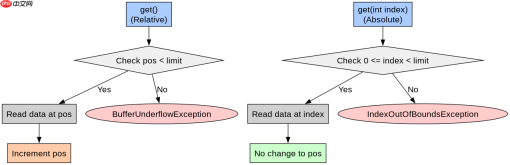
主要区别在于对缓冲区状态的影响。get() 是相对获取,会修改 position;而 get(int index) 是绝对获取,不会修改 position,但要求索引必须在 limit 范围内。若索引越界,绝对获取会抛出 IndexOutOfBoundsException,而相对获取在超出 limit 时会抛出 BufferUnderflowException。
import java.nio.ByteBuffer;

public class GetDemo {
    public static void main(String[] args) {
        // 创建容量为 4 的堆缓冲区
        ByteBuffer buffer = ByteBuffer.allocate(4);

        // 写入数据:0x01, 0x02, 0x03, 0x04
        buffer.put((byte) 0x01);
        buffer.put((byte) 0x02);
        buffer.put((byte) 0x03);
        buffer.put((byte) 0x04);

        // 切换为读模式,此时 position=0, limit=4
        buffer.flip();

        // 1. 相对获取:读取 position 处的值,并移动 position
        byte b1 = buffer.get(); // 返回 0x01, position 变为 1
        System.out.println("Relative get: " + Integer.toHexString(b1 & 0xFF));

        // 2. 绝对获取:读取 index 1 处的值,不移动 position
        byte b2 = buffer.get(1); // 返回 0x02, position 仍为 1
        System.out.println("Absolute get at 1: " + Integer.toHexString(b2 & 0xFF));

        // 3. 再次相对获取:继续从 position (1) 处读取
        byte b3 = buffer.get(); // 返回 0x03, position 变为 2
        System.out.println("Next relative get: " + Integer.toHexString(b3 & 0xFF));

        // 预期输出:
        // Relative get: 1
        // Absolute get at 1: 2
        // Next relative get: 3
    }
}
如何正确使用 get() 避免异常
在使用 get() 前,必须确保缓冲区处于正确的模式(通常通过 flip() 切换)且剩余空间充足。可以通过 hasRemaining() 方法检查是否还有可读数据,或者通过 remaining() 获取剩余可读字节数。如果在写模式下直接调用 get(),虽然语法上允许,但通常没有意义,因为此时 limit 等于 capacity,读取的是未初始化的零值或旧数据。

使用Atmosphere构建通过WebSocket、SSE、gRPC、WebTransport、MCP、A2A和AG-UI流传输的JVM代理网关,并带有治理钩子。

import java.nio.ByteBuffer;

public class SafeGetDemo {
    public static void main(String[] args) {
        ByteBuffer buffer = ByteBuffer.allocate(4);
        buffer.put((byte) 0xAA);
        buffer.put((byte) 0xBB);
        buffer.flip(); // 准备读取

        // 安全读取循环
        while (buffer.hasRemaining()) {
            byte b = buffer.get();
            System.out.print(Integer.toHexString(b & 0xFF) + " ");
        }
        // 输出: aa bb 0 0

        // 尝试越界读取会抛出异常
        try {
            buffer.get(); // BufferUnderflowException
        } catch (Exception e) {
            System.out.println("\nCaught: " + e.getClass().getSimpleName());
        }
    }
}
基于程序中某个输入、条件或结果的具体问题
在上述代码中,当缓冲区被 flip() 后,limit 被设置为写入时的 position(即 4)。当我们连续调用 get() 直到缓冲区耗尽后,再次调用会触发 BufferUnderflowException。这是因为 get() 内部会检查 position 是否小于 limit。如果需要在读取后重置位置以便重新读取,可以调用 rewind(),它会将 position 设为 0,同时保持 limit 不变,从而允许重复读取相同的数据。
,
Java免费学习笔记:立即使用
解锁 Java 大师之旅:从入门到精通的终极指南


