






使用 fetch() 发起请求后,通过返回的 response 对象调用 .json() 方法即可将 mod 数据解析为 javascript 对象。该方法会自动处理 http 状态码检查并执行 json 反序列化,最终在 promise 中返回解析后的数据结构。

fetch() 获取数据时如何处理网络异常
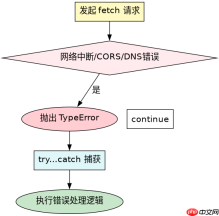
当网络请求因 DNS 错误、断网或 CORS 策略被拦截时,fetch() 会直接抛出 TypeError 异常,此时不会进入正常的响应流。开发者需要在 try...catch 块中捕获该异常,或在链式调用的 .catch() 中处理,以防止程序崩溃。

Build Java agent transport gateways with Atmosphere
下载
使用Atmosphere构建通过WebSocket、SSE、gRPC、WebTransport、MCP、A2A和AG-UI流传输的JVM代理网关,并带有治理钩子。
const url = 'https://api.example.com/data';

async function getData() {
  try {
    const response = await fetch(url);
    if (!response.ok) {
      throw new Error(`HTTP error! status: ${response.status}`);
    }
    const data = await response.json();
    console.log(data);
  } catch (error) {
    console.error('Fetch failed:', error.message);
  }
}

getData();
response.json() 遇到非标准 JSON 格式时会发生什么
如果服务器返回的内容不是合法的 JSON 字符串(例如纯文本或 HTML),response.json() 会抛出 SyntaxError。这是因为该方法严格依赖 JSON.parse 进行解析,任何格式错误都会导致 Promise 拒绝。此时应检查 Content-Type 头或使用 response.text() 先获取原始内容再自行处理。

const url = 'https://api.example.com/text';

async function getTextData() {
  try {
    const response = await fetch(url);
    // 假设服务器返回的是纯文本 "Hello World"
    const text = await response.text();
    console.log(text);
  } catch (error) {
    console.error('Request failed:', error);
  }
}
大量免费API接口:立即使用
涵盖生活服务API、金融科技API、企业工商API、等相关的API接口服务。免费API接口可安全、合规地连接上下游,为数据API应用能力赋能!





