






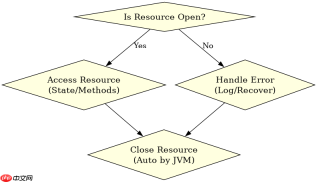
在 java 的 try-with-resources 语句中,catch 块可以直接访问并操作已声明的资源变量。这是因为 try-with-resources 会自动将资源变量隐式声明为 final,其作用域覆盖整个 try、catch 和 finally 代码块,因此你可以在 catch 块中读取资源的状态或调用其方法,但无法再对其进行重新赋值。

try-with-resources 中资源变量的作用域范围
资源变量的作用域从 try 关键字开始,一直延伸到 finally 块的末尾。这意味着在 catch 块内部,你不仅可以访问资源对象本身,还可以利用它来记录错误日志或执行清理逻辑。这种设计允许开发者在发生异常时,依然能够获取资源的当前状态,例如检查文件是否被部分写入或网络连接是否处于半开状态。
import java.io.*;

public class ResourceAccess {
    public static void main(String[] args) {
        // 定义一个模拟资源
        AutoCloseableResource resource = new AutoCloseableResource();

        try (resource) {
            System.out.println("Try block: Resource is open? " + resource.isOpen());
            throw new RuntimeException("Simulated error");
        } catch (Exception e) {
            // 在 catch 块中直接访问资源
            System.out.println("Catch block: Resource is open? " + resource.isOpen());
            System.out.println("Error caught: " + e.getMessage());
        }
    }
}

class AutoCloseableResource implements AutoCloseable {
    private boolean open = true;

    @Override
    public void close() throws Exception {
        this.open = false;
        System.out.println("Resource closed automatically.");
    }

    public boolean isOpen() {
        return open;
    }
}
运行上述代码,输出结果如下: Try block: Resource is open? true Error caught: Simulated error Resource closed automatically. Catch block: Resource is open? false
注意:虽然 catch 块能访问资源,但在 catch 块执行完毕后,资源会被自动关闭。如果 catch 块中调用了 close() 方法,再次关闭可能会抛出异常或产生副作用,需根据具体资源类型处理。
catch 块中访问资源时的注意事项
在 catch 块中访问资源时,必须注意资源可能已经被自动关闭。try-with-resources 机制会在 try 块正常结束或异常结束时自动调用资源的 close() 方法。如果异常发生在 close() 之前,资源可能仍处于打开状态;但如果异常发生在 close() 之后(例如在自动关闭过程中),资源可能已经被关闭。


import java.io.*;

public class ResourceAccessWithClose {
    public static void main(String[] args) {
        AutoCloseableResource resource = new AutoCloseableResource();

        try (resource) {
            System.out.println("Try block: Resource is open? " + resource.isOpen());
            // 模拟在 try 块中抛出异常
            throw new RuntimeException("Simulated error in try");
        } catch (Exception e) {
            // 此时资源可能已被关闭
            System.out.println("Catch block: Resource is open? " + resource.isOpen());
            // 尝试访问已关闭的资源
            try {
                resource.close(); // 可能抛出 IllegalStateException
            } catch (Exception ex) {
                System.out.println("Caught exception during manual close: " + ex.getMessage());
            }
        }
    }
}

class AutoCloseableResource implements AutoCloseable {
    private boolean open = true;

    @Override
    public void close() throws Exception {
        if (!open) {
            throw new IllegalStateException("Resource already closed");
        }
        this.open = false;
        System.out.println("Resource closed.");
    }

    public boolean isOpen() {
        return open;
    }
}
运行上述代码,输出结果如下: Try block: Resource is open? true Catch block: Resource is open? false Caught exception during manual close: Resource already closed
这表明在 catch 块中访问资源时,应首先检查资源状态,避免对已关闭的资源进行操作。同时,不要手动调用 close() 方法,除非你有明确的理由需要控制关闭时机。
基于资源关闭顺序的具体问题
当 try-with-resources 中包含多个资源时,它们的关闭顺序与声明顺序相反。如果在 catch 块中访问其中一个资源,而其他资源已经被关闭,这可能导致依赖关系混乱。例如,如果一个数据库连接依赖于一个文件流,而文件流先被关闭,那么数据库连接的关闭可能会失败。
为避免此类问题,建议在 catch 块中仅访问当前正在处理的资源,并确保其他资源的关闭不会受到影响。如果必须访问多个资源,应先检查它们的状态,再执行相关操作。
Java免费学习笔记:立即使用
解锁 Java 大师之旅:从入门到精通的终极指南


