






gson 序列化对象的核心做法是调用 gsonbuilder 构建实例,并使用其 tojson() 方法将 java 对象转换为 json 字符串。具体实现时,需先定义包含字段的 pojo 类,接着实例化 gson 对象,最后传入目标对象即可得到结果。若字段为 null 或存在特殊类型,gson 默认会将其序列化为 null 或对应的标准格式。

Gson 如何配置以忽略空值字段
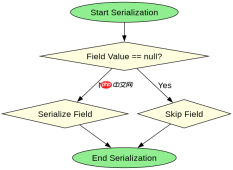
在 Gson 中忽略空值字段,需要在构建 Gson 实例时启用 serializeNulls(false) 的默认行为(即不序列化 null),或者显式使用 excludeFieldsWithNullValues()。默认情况下,Gson 不会输出值为 null 的字段,但如果需要更严格的控制,可以通过自定义 ExclusionStrategy 来实现。以下代码展示了如何创建一个忽略所有 null 字段的 Gson 实例,并验证其行为。
import com.google.gson.Gson;
import com.google.gson.GsonBuilder;

public class Main {
    public static void main(String[] args) {
        // 创建忽略 null 值的 Gson 实例
        Gson gson = new GsonBuilder()
                .serializeNulls(false) // 默认行为,显式声明
                .create();

        User user = new User("Alice", null, 30);
        String json = gson.toJson(user);
        System.out.println(json);
    }
}

class User {
    String name;
    String email;
    int age;

    public User(String name, String email, int age) {
        this.name = name;
        this.email = email;
        this.age = age;
    }
}
预期输出:{"name":"Alice","age":30}。注意 email 字段因值为 null 而被省略。
Gson 如何处理日期类型的序列化
Gson 处理日期类型时,默认会将 Date 或 LocalDateTime 等对象序列化为毫秒时间戳或 ISO-8601 格式的字符串。若需自定义日期格式,可通过注册 TypeAdapter 或使用 setDateFormat() 方法。以下代码演示了如何将 Date 序列化为指定格式的字符串。


import com.google.gson.Gson;
import com.google.gson.GsonBuilder;
import java.util.Date;

public class Main {
    public static void main(String[] args) {
        Gson gson = new GsonBuilder()
                .setDateFormat("yyyy-MM-dd HH:mm:ss")
                .create();

        Event event = new Event(new Date(), "Conference");
        String json = gson.toJson(event);
        System.out.println(json);
    }
}

class Event {
    Date timestamp;
    String title;

    public Event(Date timestamp, String title) {
        this.timestamp = timestamp;
        this.title = title;
    }
}
预期输出:{"timestamp":"2023-10-01 12:00:00","title":"Conference"}。日期格式由 setDateFormat 指定。
Gson 序列化时如何处理泛型类型
Gson 在处理泛型类型时,需借助 TypeToken 保留运行时类型信息。直接序列化泛型集合可能导致类型擦除问题,因此应通过 new TypeToken 获取完整类型。以下代码展示了如何正确序列化泛型列表。>(){}.getType()
import com.google.gson.Gson;
import com.google.gson.reflect.TypeToken;
import java.lang.reflect.Type;
import java.util.List;
import java.util.ArrayList;

public class Main {
    public static void main(String[] args) {
        Gson gson = new Gson();

        List<user> users = new ArrayList();
        users.add(new User("Bob", "bob@example.com", 25));
        users.add(new User("Charlie", null, 35));

        Type type = new TypeToken<list>>(){}.getType();
        String json = gson.toJson(users, type);
        System.out.println(json);
    }
}</list></user>
预期输出:[{"name":"Bob","email":"bob@example.com","age":25},{"name":"Charlie","age":35}]。泛型类型通过 TypeToken 正确传递。
Java免费学习笔记:立即使用
解锁 Java 大师之旅:从入门到精通的终极指南


