






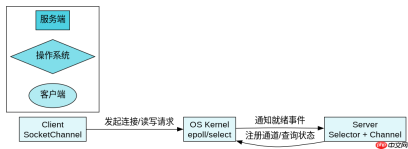
java nio 的非阻塞 io 是通过 selector、channel 和 selectionkey 配合实现的,核心在于将多个通道的注册与状态检查交给操作系统底层(如 linux 的 epoll)处理。开发者只需创建一个 selector 实例,将需要监听的 channel 设置为非阻塞模式并注册到选择器上,然后调用 select() 方法等待就绪事件,当有数据可读或可写时再获取对应的 selectionkey 进行读写操作。
如何配置 Channel 为非阻塞模式并注册到 Selector
要实现非阻塞 IO,第一步是确保 SocketChannel 处于非阻塞状态,第二步是将其实例注册到 Selector 上并指定感兴趣的事件类型。只有完成这两步,后续才能通过选择器轮询到该通道的状态变化。
import java.io.IOException;
import java.net.InetSocketAddress;
import java.nio.channels.SelectionKey;
import java.nio.channels.Selector;
import java.nio.channels.ServerSocketChannel;
import java.util.Iterator;

public class NonBlockingServer {
    public static void main(String[] args) throws IOException {
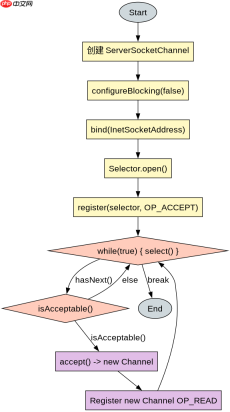
        // 1. 创建 ServerSocketChannel
        ServerSocketChannel serverChannel = ServerSocketChannel.open();

        // 2. 设置为非阻塞模式
        serverChannel.configureBlocking(false);

        // 3. 绑定端口
        serverChannel.bind(new InetSocketAddress(8080));

        // 4. 创建 Selector
        Selector selector = Selector.open();

        // 5. 注册通道到 Selector,监听 ACCEPT 事件
        SelectionKey key = serverChannel.register(selector, SelectionKey.OP_ACCEPT);

        System.out.println("Server started on port 8080 in non-blocking mode.");

        // 6. 进入循环,使用 select() 等待事件
        while (true) {
            int readyChannels = selector.select();
            if (readyChannels == 0) continue;

            Iterator<selectionkey> selectedKeys = selector.selectedKeys().iterator();
            while (selectedKeys.hasNext()) {
                SelectionKey selectionKey = selectedKeys.next();
                selectedKeys.remove();

                if (selectionKey.isAcceptable()) {
                    // 处理新连接
                    ServerSocketChannel ssc = (ServerSocketChannel) selectionKey.channel();
                    SocketChannel clientChannel = ssc.accept();
                    if (clientChannel != null) {
                        clientChannel.configureBlocking(false);
                        clientChannel.register(selector, SelectionKey.OP_READ);
                    }
                } else if (selectionKey.isReadable()) {
                    // 处理读取逻辑
                    handleRead(selectionKey);
                }
            }
        }
    }

    private static void handleRead(SelectionKey key) throws IOException {
        SocketChannel channel = (SocketChannel) key.channel();
        // 实际业务中需处理 ByteBuffer 和半包问题
    }
}</selectionkey>
Selector.select() 是如何判断哪些 Channel 就绪的
Selector 内部维护了一个已注册通道的集合,当调用 select() 时,它会阻塞直到至少有一个注册的通道触发了其感兴趣的事件(如 OP_READ、OP_WRITE)。操作系统内核负责监控这些文件描述符的状态,一旦有变化,就会通知 Java 进程,此时 select() 返回就绪通道的数量,并通过 selectedKeys() 获取具体的 SelectionKey 集合。


import java.io.IOException;
import java.nio.ByteBuffer;
import java.nio.channels.SocketChannel;
import java.nio.charset.StandardCharsets;
import java.util.Set;

public class ClientExample {
    public static void main(String[] args) throws IOException {
        SocketChannel clientChannel = SocketChannel.open();
        clientChannel.configureBlocking(false);
        clientChannel.connect(new java.net.InetSocketAddress("localhost", 8080));

        // 模拟发送数据
        String data = "Hello NIO";
        ByteBuffer buffer = ByteBuffer.wrap(data.getBytes(StandardCharsets.UTF_8));
        clientChannel.write(buffer);

        // 关闭通道
        clientChannel.close();
    }
}
非阻塞模式下读取数据需要注意什么
在非阻塞模式下,read() 方法可能返回 0,表示当前没有数据可读,但这并不意味着连接断开。开发者必须检查返回值,如果为 0 则应继续等待下一次 select() 唤醒,而不是抛出异常或认为连接失败。此外,由于网络数据的到达是不连续的,单次 read() 可能无法读取完整消息,因此需要实现缓冲区管理,将多次读取的数据拼接起来,直到满足业务逻辑所需的完整数据包长度。
Java免费学习笔记:立即使用
解锁 Java 大师之旅:从入门到精通的终极指南


