






torealpath() 方法用于将当前 path 对象转换为绝对路径并解析掉所有冗余的符号链接,返回一个表示文件系统中实际存在的路径。调用该方法时,若文件不存在会抛出 nosuchfileexception,若权限不足则抛出 accessdeniedexception。它适用于需要获取文件真实物理位置的场景,例如在生成日志文件或处理软链接时。

toRealPath() 遇到空输入或无效路径会返回什么
当 Path 对象指向的文件在文件系统中不存在时,toRealPath() 不会返回空值,而是直接抛出 java.nio.file.NoSuchFileException。这是该方法的默认行为,旨在确保返回的路径对应于真实的文件系统节点。如果希望允许文件不存在的情况,可以传入 NativePathAttributeView 相关的选项,但标准 API 中通常通过捕获异常来处理。
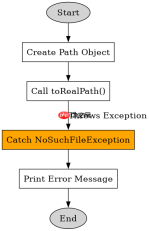
import java.nio.file.Path;
import java.nio.file.Paths;
import java.nio.file.NoSuchFileException;

public class Main {
    public static void main(String[] args) {
        Path path = Paths.get("/nonexistent/file.txt");
        try {
            Path realPath = path.toRealPath();
            System.out.println(realPath);
        } catch (NoSuchFileException e) {
            System.out.println("File not found: " + e.getFile());
        }
    }
}
运行上述代码,由于 /nonexistent/file.txt 不存在,控制台将输出:File not found: /nonexistent/file.txt。这验证了方法在文件缺失时的异常抛出机制。
toRealPath() 如何处理符号链接
toRealPath() 的核心功能之一是解析符号链接(Symlinks)。如果 Path 指向一个符号链接,该方法会追踪链接目标,直到找到最终的物理文件,并返回该文件的绝对路径。这意味着返回的路径不再包含符号链接本身,而是其指向的真实位置。这对于确保操作的是实际数据而非快捷方式至关重要。


import java.nio.file.Path;
import java.nio.file.Paths;
import java.nio.file.Files;
import java.nio.file.LinkOption;

public class Main {
    public static void main(String[] args) throws Exception {
        // 假设 /tmp/real_file.txt 是一个真实存在的文件
        // 且 /tmp/link_to_file.txt 是指向它的符号链接
        Path linkPath = Paths.get("/tmp/link_to_file.txt");

        // toRealPath() 默认会解析符号链接
        Path realPath = linkPath.toRealPath();
        System.out.println("Link: " + linkPath);
        System.out.println("Real: " + realPath);

        // 对比:使用 normalize() 仅去除冗余名称,不解析链接
        Path normalizedPath = linkPath.normalize();
        System.out.println("Normalized: " + normalizedPath);
    }
}
假设 /tmp/link_to_file.txt 指向 /tmp/real_file.txt,运行结果将为:Link: /tmp/link_to_file.txtReal: /tmp/real_file.txtNormalized: /tmp/link_to_file.txt。
这表明 toRealPath() 成功将符号链接解析为真实路径,而 normalize() 仅处理路径中的 . 和 ..,不改变链接属性。
基于程序中 toRealPath() 返回结果的类型问题
toRealPath() 的返回值类型是 Path,具体实现类通常为 java.nio.file.Path 接口的默认实现(如 sun.nio.fs.UnixPath 或 WindowsPath)。这个返回值是一个不可变的 Path 对象,可以直接用于后续的 Files 工具类操作,如读取、写入或检查文件属性。它不是字符串,因此不能直接用于需要 String 类型的 API,需调用 toString() 或 toUri() 进行转换。
Java免费学习笔记:立即使用
解锁 Java 大师之旅:从入门到精通的终极指南


