






在 spring boot rest 接口中接收 list 类型参数,最稳妥的方式是使用 @requestparam 配合重复参数(如 ?ids=1&ids=2)或 json 数组绑定到 @requestbody。对于 get 请求,推荐使用 @requestparam list;对于 post/put 请求,推荐使用 @requestbody list。需注意 get 请求中 @requestparam 对泛型类型的支持依赖于 spring 版本和配置,而 @requestbody 则直接依赖 jackson 序列化。

GET 请求如何通过 URL 参数传递 List
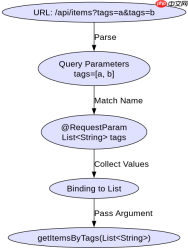
GET 请求通常通过查询字符串传递数据。Spring MVC 允许将多个同名查询参数自动绑定到 List 集合中。例如,调用 /api/items?tags=java&tags=spring 时,控制器方法中的 @RequestParam List 会自动接收到包含 "java" 和 "spring" 的列表。这种方式无需额外的 JSON 解析,适合简单数据传递。
import org.springframework.web.bind.annotation.*;
import java.util.List;

@RestController
@RequestMapping("/api")
public class ItemController {

    @GetMapping("/items")
    public List<string> getItemsByTags(@RequestParam List<string> tags) {
        // 假设 tags 为 ["java", "spring"]
        return tags;
    }
}</string></string>
上述代码中,@RequestParam 未指定名称时默认匹配参数名。若前端发送 ?tags=java&tags=spring,后端 tags 变量即为对应列表。若参数名为其他值,需显式指定 @RequestParam("tags")。注意:某些旧版 Spring 或特定配置下,可能需要设置 spring.mvc.servlet.multipart.enabled=false 或使用 @RequestParam(required = false) 处理空值情况。
POST 请求如何通过 JSON Body 传递 List
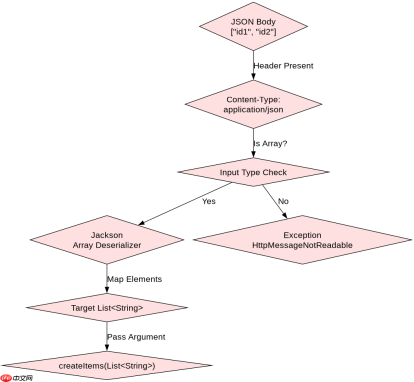
POST 请求更适合传递复杂结构数据。使用 @RequestBody 注解可将 HTTP 请求体中的 JSON 数组直接反序列化为 Java List。例如,发送 ["id1", "id2"] 作为 JSON 主体,控制器方法中的 @RequestBody List 将正确接收该列表。此方式要求客户端设置正确的 Content-Type 为 application/json。

import org.springframework.web.bind.annotation.*;
import java.util.List;

@RestController
@RequestMapping("/api")
public class ItemController {

    @PostMapping("/items")
    public List<string> createItems(@RequestBody List<string> ids) {
        // 假设 ids 为 ["id1", "id2"]
        return ids;
    }
}</string></string>
该示例展示了标准的 POST 接口实现。Jackson 默认支持将 JSON 数组映射到 List。若传入非数组 JSON(如对象),将抛出 HttpMessageNotReadableException。确保客户端发送的是标准 JSON 数组格式,即 ["value1", "value2"],而非嵌套对象或其他结构。
当 List 中包含自定义对象时如何处理
若 List 元素为自定义类(如 User),@RequestBody 同样适用,只需确保该类有默认构造函数及 getter/setter。例如,发送 [{"name":"Alice","age":25}],控制器可定义为 @RequestBody List。Spring 会自动调用 Jackson 进行反序列化。若缺少无参构造函数,将导致反序列化失败。建议始终提供默认构造函数以兼容框架需求。


