使用 list 方法配合 comparison 委托,可以在运行时根据用户选择的字段动态切换排序逻辑。具体做法是定义一个包含所有候选字段的枚举或字符串列表,在调用 sort 时传入一个基于该选择进行分支判断的匿名函数或局部函数,从而直接修改原列表的顺序。

如何根据枚举值动态指定排序键?
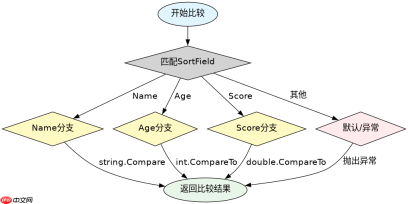
通过定义一个 SortField 枚举来代表用户可选的排序维度,并在 Sort 方法的比较器中利用 switch 语句匹配该枚举值,即可实现不同字段的切换。这种方法类型安全且易于扩展,当新增排序字段时只需在枚举和比较器中增加对应分支。
using System;
using System.Collections.Generic;

public enum SortField { Name, Age, Score }

public class Student
{
    public string Name { get; set; }
    public int Age { get; set; }
    public double Score { get; set; }
}

public class Program
{
    public static void Main()
    {
        var students = new List<student>
        {
            new Student { Name = "Alice", Age = 20, Score = 85.5 },
            new Student { Name = "Bob", Age = 22, Score = 90.0 },
            new Student { Name = "Charlie", Age = 20, Score = 78.0 }
        };

        // 模拟用户选择按年龄排序
        SortField userChoice = SortField.Age;

        students.Sort((x, y) =>
        {
            switch (userChoice)
            {
                case SortField.Name:
                    return string.Compare(x.Name, y.Name, StringComparison.Ordinal);
                case SortField.Age:
                    return x.Age.CompareTo(y.Age);
                case SortField.Score:
                    return x.Score.CompareTo(y.Score);
                default:
                    throw new ArgumentException("Invalid sort field");
            }
        });

        foreach (var s in students)
        {
            Console.WriteLine($"{s.Name}: {s.Age}, {s.Score}");
        }
    }
}</student>
运行上述代码,由于 userChoice 被设置为 SortField.Age,列表将首先按年龄升序排列。因为 Alice 和 Charlie 年龄相同(均为 20),它们的相对顺序取决于原始列表中的位置(稳定排序特性)。Bob(22岁)会排在最后。输出结果将显示两个 20 岁的学生在前,22 岁的学生在后。
如何处理多条件组合排序?
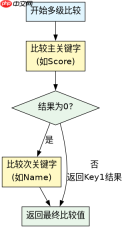
当用户需要更复杂的排序需求,例如“先按成绩降序,成绩相同时按姓名升序”时,可以在 Comparison 委托中链式调用多个比较逻辑。通过检查第一个关键字的比较结果是否为 0,来决定是否继续比较第二个关键字,从而实现多级排序。

using System;
using System.Collections.Generic;

public class Student
{
    public string Name { get; set; }
    public double Score { get; set; }
}

public class Program
{
    public static void Main()
    {
        var students = new List<student>
        {
            new Student { Name = "Alice", Score = 90.0 },
            new Student { Name = "Bob", Score = 90.0 },
            new Student { Name = "Charlie", Score = 85.0 }
        };

        // 模拟用户选择:成绩降序,姓名升序
        bool scoreDescending = true;
        bool nameAscending = true;

        students.Sort((x, y) =>
        {
            int scoreCompare;
            if (scoreDescending)
                scoreCompare = y.Score.CompareTo(x.Score); // 降序
            else
                scoreCompare = x.Score.CompareTo(y.Score); // 升序

            if (scoreCompare != 0)
                return scoreCompare;

            int nameCompare;
            if (nameAscending)
                nameCompare = string.Compare(x.Name, y.Name, StringComparison.Ordinal);
            else
                nameCompare = string.Compare(y.Name, x.Name, StringComparison.Ordinal);

            return nameCompare;
        });

        foreach (var s in students)
        {
            Console.WriteLine($"{s.Name}: {s.Score}");
        }
    }
}</student>
在此示例中,Alice 和 Bob 的成绩都是 90.0,因此第一层比较返回 0,程序进入第二层比较。由于设置了 nameAscending 为 true,系统会比较他们的名字,Alice 排在 Bob 前面。Charlie 成绩较低,排在最后。最终输出顺序为 Alice、Bob、Charlie。
当排序字段为空值时会发生什么?
如果实体类中的排序字段(如 Name 或 Age)可能为 null 或默认值,直接使用 string.Compare 或 CompareTo 可能会抛出 NullReferenceException 或产生非预期的排序结果。必须在比较逻辑中加入空值检查,通常将 null 视为最小值或最大值处理,以确保排序稳定性。
using System;
using System.Collections.Generic;

public class Student
{
    public string Name { get; set; }
    public int? Age { get; set; }
}

public class Program
{
    public static void Main()
    {
        var students = new List<student>
        {
            new Student { Name = "Alice", Age = 20 },
            new Student { Name = null, Age = 22 },
            new Student { Name = "Bob", Age = null }
        };

        students.Sort((x, y) =>
        {
            // 处理 Name 为 null 的情况
            if (x.Name == null && y.Name == null) return 0;
            if (x.Name == null) return -1; // null 排前面
            if (y.Name == null) return 1;

            int nameCompare = string.Compare(x.Name, y.Name, StringComparison.Ordinal);
            if (nameCompare != 0) return nameCompare;

            // 处理 Age 为 null 的情况
            if (x.Age == null && y.Age == null) return 0;
            if (x.Age == null) return -1;
            if (y.Age == null) return 1;

            return x.Age.Value.CompareTo(y.Age.Value);
        });

        foreach (var s in students)
        {
            Console.WriteLine($"Name: {s.Name ?? "null"}, Age: {s.Age?.ToString() ?? "null"}");
        }
    }
}</student>
运行该代码,由于排序逻辑优先比较 Name,Name 为 null 的学生会排在最前面。接着比较 Age,Age 为 null 的学生也会被视为较小值。最终输出顺序将是:Name为null的学生、Alice、Bob。这种处理方式避免了运行时异常,并提供了可预测的空值排序行为。