






在 vite 项目中配置 typescript,核心做法是安装 @vitejs/plugin-react(或其他框架插件)并修改 vite.config.ts,同时确保安装了 typescript 和 tsc。vite 原生支持 typescript,无需额外 loader,只需通过插件处理 jsx/tsx 语法即可。若项目包含纯 js 文件,需配置 allowjs 选项以允许混合开发。

Vite 如何识别并处理 .ts 和 .tsx 文件
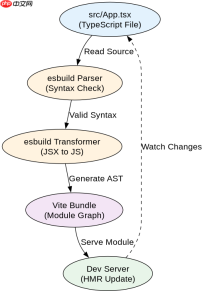
Vite 使用 esbuild 进行极速的 TypeScript 转译,因此在 vite.config.ts 中引入对应框架的插件后,所有 .ts、.tsx、.mts 和 .mjsx 文件会被自动识别。对于 React 项目,必须使用 @vitejs/plugin-react 来启用 JSX 转换;对于 Vue 项目,则使用 @vitejs/plugin-vue。这些插件内部集成了对 TypeScript 语法的解析逻辑,使得开发者可以直接编写类型安全的组件代码。
// vite.config.ts
import { defineConfig } from 'vite'
import react from '@vitejs/plugin-react'

export default defineConfig({
  plugins: [react()],
  // 其他配置...
})
上述代码展示了最基础的 React + TypeScript 配置。运行 npx vite 时,Vite 会加载此配置文件,并通过 esbuild 将 .tsx 文件转换为浏览器可执行的 JavaScript。如果项目中存在 .js 或 .jsx 文件,需要在 tsconfig.json 中设置 "allowJs": true,否则 TypeScript 编译器可能会忽略这些文件或报错。
TypeScript 编译选项与 Vite 的交互机制
虽然 Vite 使用 esbuild 进行转译,但 tsconfig.json 中的 compilerOptions 仍然对类型检查和 IDE 提示至关重要。Vite 在开发模式下不会执行完整的类型检查,而是依赖 IDE(如 VS Code)和 tsc 命令进行静态分析。在生产构建时,Vite 同样只负责语法转换,不执行类型擦除后的二次校验。因此,strict 模式应始终开启以确保代码质量,而 target 和 module 设置需与 Vite 支持的 ES 版本兼容。

你是 TypeScript 项目架构专家,专注于脚手架搭建生产就绪的 Node.js 和前端应用。生成包含现代工具链(pnpm、Vite、Next.js)、类型

{
  "compilerOptions": {
    "target": "ES2020",
    "useDefineForClassFields": true,
    "module": "ESNext",
    "lib": ["ES2020", "DOM", "DOM.Iterable"],
    "skipLibCheck": true,
    "moduleResolution": "bundler",
    "allowImportingTsExtensions": true,
    "resolveJsonModule": true,
    "isolatedModules": true,
    "noEmit": true,
    "jsx": "react-jsx",
    "strict": true,
    "noUnusedLocals": true,
    "noUnusedParameters": true,
    "noFallthroughCasesInSwitch": true
  },
  "include": ["src"]
}
在 tsconfig.json 中,"moduleResolution": "bundler" 是关键配置,它告诉 TypeScript 采用类似 Webpack 或 Vite 的模块解析策略,从而正确处理相对路径导入和裸模块导入。同时,"isolatedModules": true 确保每个文件都能独立被 esbuild 转译,避免跨文件类型推断导致的构建错误。当你在 src 目录下创建新的 .ts 文件时,Vite 会自动将其纳入热更新范围,无需重启服务器。
如何处理 Vite 中未声明的类型定义
在 Vite + TypeScript 项目中,经常遇到第三方库缺少类型定义的情况,此时会出现 "Cannot find module ..." 或 "Property does not exist on type ..." 错误。解决这一问题的标准做法是在 src 目录下创建一个 env.d.ts 文件,用于声明全局类型或模块扩展。例如,对于静态资源图片,需要声明其模块类型;对于没有类型的 npm 包,可以使用 declare module 语句提供简易类型。
// src/env.d.ts
declare module '*.png' {
  const src: string;
  export default src;
}

declare module '*.vue' {
  import type { DefineComponent } from 'vue';
  const component: DefineComponent;
  export default component;
}
当 Vite 构建过程中遇到未识别的模块时,它会查找 tsconfig.json 中 include 路径下的 .d.ts 文件。如果在 env.d.ts 中正确声明了模块,TypeScript 编译器将不再报错,且 IDE 能提供相应的智能提示。这种机制允许开发者在不修改第三方库源码的情况下,安全地在 Vite 项目中使用任何 JavaScript 库。
Java免费学习笔记:立即使用
解锁 Java 大师之旅:从入门到精通的终极指南





