利用css让bootstrap 4的collapse折叠面板实现平滑展开,核心在于覆盖bootstrap默认的`display: none/block`切换逻辑,改用`max-height`配合`transition`属性。具体做法是:在自定义css中为`.collapsing`类设置`height`和`max-height`的过渡动画,并移除默认的`overflow: hidden`限制(或保留但需确保高度计算正确),同时为`.collapse`和`.collapsing`设置具体的`height`过渡效果。这样做可以让面板在展开和收起时产生平滑的高度变化动画,而不是生硬的显隐。

如何修改CSS以启用高度过渡动画
直接回答本节问题:需要重写Bootstrap 4中关于`.collapse`、`.collapsing`类的样式,特别是`height`属性的`transition`。

.collapse {
  display: block;
  height: 0;
  overflow: hidden;
  transition: height 0.35s ease;
}

.collapsing {
  position: relative;
  height: 0;
  overflow: hidden;
  transition: height 0.35s ease;
}
上述代码将`.collapse`和`.collapsing`的`display`从`none`改为`block`,并添加了`height`的过渡效果。当点击触发器时,Bootstrap会添加`.collapsing`类,此时元素高度从0开始变化。需要注意的是,Bootstrap 4的JS插件在动画过程中会动态计算目标高度,因此CSS中的`transition`必须与JS的行为兼容。如果希望更精确控制,可以结合`max-height`,但`height`直接过渡通常更直观。
如何处理内容高度不确定时的平滑展开
直接回答本节问题:当折叠面板内容高度不固定时,单纯依赖`height`过渡可能不够稳健,推荐使用`max-height`配合一个足够大的值,或者使用JavaScript辅助计算实际高度后应用过渡。

.collapse {
  display: block;
  max-height: 0;
  overflow: hidden;
  transition: max-height 0.35s ease-out;
}

.collapsing {
  position: relative;
  max-height: 1000px; /* 根据最大预期内容设置 */
  overflow: hidden;
  transition: max-height 0.35s ease-in;
}
使用`max-height`方法时,展开动画会将`max-height`从0增加到设定值(如1000px),收起时则减少。这种方法对内容高度不敏感,但可能导致动画时间与实际内容高度不成比例。为了获得最佳体验,建议结合JavaScript在展开前计算内容的实际`scrollHeight`,并将其作为`max-height`的值动态应用,或者直接使用`height`过渡并确保容器高度能自适应内容。
基于输入条件判断何时使用height还是max-height
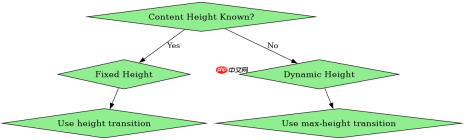
直接回答该问题:当折叠面板的内容高度固定且已知时,使用`height`过渡更精准;当内容高度动态变化且无法预知最大值时,使用`max-height`过渡更稳妥,但需设置合理的上限值以避免动画过长或过短。
前端入门到VUE实战笔记:立即使用
在学习笔记中,你将探索 前端 的入门与实战技巧!