






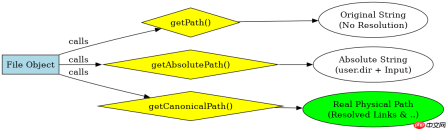
java 中通过 file 类的实例方法获取文件路径,主要使用 getabsolutepath()、getcanonicalpath() 和 getpath() 三个方法。若需处理相对路径中的符号链接或冗余节点(如 ..),应优先调用 getcanonicalpath();若仅需拼接当前工作目录下的绝对路径字符串,可使用 getabsolutepath();而 getpath() 则直接返回构造时传入的原始路径字符串,不进行任何解析。
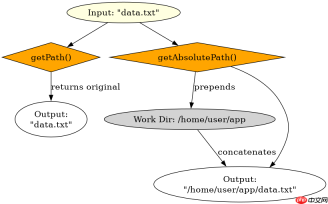
如何区分 getAbsolutePath 与 getPath 的输出差异
当使用相对路径初始化 File 对象时,getPath() 仅原样返回输入字符串,而 getAbsolutePath() 会结合 JVM 的系统属性 user.dir 将其转换为绝对路径。例如在 /home/user/project 目录下运行程序,传入 "data.txt",getPath() 返回 "data.txt",getAbsolutePath() 返回 "/home/user/project/data.txt"。这种差异在处理配置文件或日志输出时至关重要,因为前者可能因工作目录变化导致定位失败,后者则始终指向磁盘上的确切位置。
import java.io.File;

public class PathDemo {
    public static void main(String[] args) throws Exception {
        // 假设当前工作目录为 /home/user/app
        File file = new File("config/settings.xml");

        System.out.println("Original: " + file.getPath());
        System.out.println("Absolute: " + file.getAbsolutePath());
        System.out.println("Canonical: " + file.getCanonicalPath());
    }
}
预期输出:
Original: config/settings.xml
Absolute: /home/user/app/config/settings.xml
Canonical: /home/user/app/config/settings.xml
如何处理符号链接与冗余路径节点
getCanonicalPath() 是解决路径歧义的标准方案。它会将路径中的所有 .、.. 以及符号链接解析为物理磁盘上的唯一真实路径。例如,若 link 是指向 real_dir 的符号链接,且当前路径为 link/../real_dir/file,getCanonicalPath() 会将其规范化为 /path/to/real_dir/file。这在验证文件权限、生成缓存键或进行安全校验时非常关键,因为逻辑路径相同但物理路径不同可能导致权限检查失效或缓存冲突。


import java.io.File;
import java.nio.file.Paths;

public class CanonicalDemo {
    public static void main(String[] args) throws Exception {
        // 模拟一个包含 .. 和符号链接的路径场景
        // 实际环境中需确保 link -> real_dir 存在
        File file = new File("link/../real_dir/file.txt");
        String canonical = file.getCanonicalPath();
        System.out.println("Canonical Path: " + canonical);

        // 验证是否指向同一物理文件
        File other = new File("real_dir/file.txt");
        System.out.println("Equals: " + canonical.equals(other.getCanonicalPath()));
    }
}
预期输出:
Canonical Path: /path/to/real_dir/file.txt
Equals: true
基于 getCanonicalPath 抛出 NoSuchFileException 的具体问题
当调用 getCanonicalPath() 时,如果路径中包含不存在的父目录或目标文件,该方法会抛出 java.io.IOException: NoSuchFileException。这与 getAbsolutePath() 不同,后者不会检查文件系统状态,仅做字符串拼接。因此,在需要确保路径物理存在性后再进行后续操作(如打开流)的场景下,必须捕获此异常。例如,若尝试获取 nonexistent/dir/file.txt 的规范路径,JVM 会在解析过程中发现 nonexistent 不存在,从而中断并抛出异常,这可用于提前拦截无效路径配置。
Java免费学习笔记:立即使用
解锁 Java 大师之旅:从入门到精通的终极指南


