isolation: isolate 通过强制元素创建一个新的层叠上下文(stacking context),将子元素的 z-index 限制在该元素内部,从而避免与外部页面其他元素的层级发生冲突。具体做法是在 css 中为需要隔离的元素设置 isolation: isolate,此时该元素及其所有后代形成一个独立的层级空间,其内部的堆叠顺序不会影响外部。
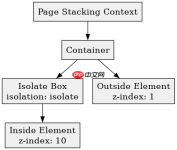
z-index 在隔离容器内外的表现差异是什么
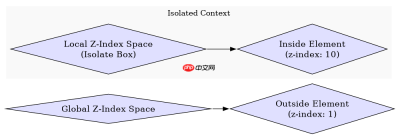
当元素设置了 isolation: isolate 后,其内部的 z-index 值仅在该容器内部有效,不会溢出到父级或兄弟元素。这意味着即使子元素的 z-index 设置为 9999,它也不会覆盖页面上其他未处于同一层叠上下文的元素,除非这些元素也属于同一个层叠上下文。
/* HTML Structure */
<div class="container">
  <div class="outside">Outside Element (z-index: 1)</div>
  <div class="isolate-box">
    <div class="inside">Inside Element (z-index: 10)</div>
  </div>
</div>

/* CSS Styles */
.container {
  position: relative;
  height: 300px;
}

.outside {
  position: absolute;
  top: 50px;
  left: 50px;
  width: 100px;
  height: 100px;
  background-color: red;
  z-index: 1;
}

.isolate-box {
  position: absolute;
  top: 80px;
  left: 80px;
  width: 150px;
  height: 150px;
  background-color: rgba(0, 0, 255, 0.5);
  isolation: isolate; /* Creates new stacking context */
}

.inside {
  position: absolute;
  top: 0;
  left: 0;
  width: 100%;
  height: 100%;
  background-color: green;
  z-index: 10; /* Only affects children of .isolate-box */
}
在上述代码中,.outside 元素位于 .isolate-box 的下方,因为 .isolate-box 创建了新的层叠上下文,而 .outside 没有设置 z-index 或 position 来参与更高层级的比较。尽管 .inside 的 z-index 为 10,但它被限制在 .isolate-box 内部,无法影响 .outside 的显示顺序。
如何验证 isolation: isolate 对背景混合的影响
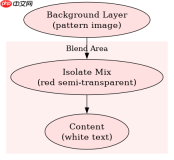
isolation: isolate 不仅影响层叠顺序,还会改变背景混合的行为。当元素设置了 isolation: isolate 时,其背景会与后面的内容独立混合,而不是直接与整个页面的背景混合。这在使用半透明背景或混合模式(如 mix-blend-mode)时非常有用,可以确保视觉效果符合预期。

<div class="bg-layer">
  Background Image
</div>
<div class="isolate-mix">
  <div class="content">Content with Mix-Blend-Mode</div>
</div>

.bg-layer {
  position: fixed;
  top: 0;
  left: 0;
  width: 100%;
  height: 100%;
  background-image: url('pattern.png');
  z-index: -1;
}

.isolate-mix {
  position: absolute;
  top: 50px;
  left: 50px;
  width: 200px;
  height: 200px;
  background-color: rgba(255, 0, 0, 0.5);
  isolation: isolate;
  mix-blend-mode: multiply;
}

.content {
  color: white;
  font-size: 24px;
}
在这个示例中,.isolate-mix 元素的红色半透明背景会与 .bg-layer 的背景图案进行混合,但由于 isolation: isolate 的存在,这种混合仅限于 .isolate-mix 内部,不会影响页面上的其他元素。这使得设计师可以更精确地控制视觉效果的边界。
基于程序中某个输入、条件或结果的具体问题
在实际开发中,如果需要在多个重叠元素中实现局部透明效果而不影响全局布局,可以使用 isolation: isolate 结合 mix-blend-mode 来实现。例如,在一个复杂的仪表盘界面中,各个模块可能需要独立的背景混合效果,而不会相互干扰。
前端入门到VUE实战笔记:立即使用
在学习笔记中,你将探索 前端 的入门与实战技巧!