






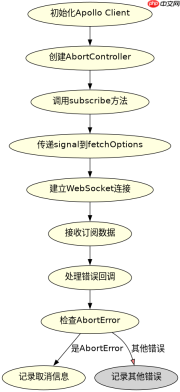
使用 abortcontroller 实例的 signal 属性传递给 apollo client 的 fetchoptions,即可在调用 controller.abort() 时立即取消 graphql 订阅请求。

Apollo Client 如何接收并处理信号
Apollo Client 3.x 版本支持通过 options 对象传递 fetchOptions,其中的 signal 会被直接传给底层的 fetch 或 WebSocket 实现。当订阅建立后,如果控制器被中止,客户端会触发错误回调并关闭连接。
import { ApolloClient, InMemoryCache, gql, createHttpLink } from '@apollo/client';
import { WebSocketLink } from '@apollo/client/link/ws';
import { split } from '@apollo/client/link';
import { getMainDefinition } from '@apollo/client/utilities';

const httpLink = new createHttpLink({
  uri: 'http://localhost:4000/subscriptions'
});

const wsLink = new WebSocketLink({
  uri: 'ws://localhost:4000/subscriptions',
  options: {
    reconnect: true
  }
});

const link = split(
  ({ query }) => {
    const definition = getMainDefinition(query);
    return definition.kind === 'OperationDefinition' && definition.operation === 'subscription';
  },
  wsLink,
  httpLink
);

const client = new ApolloClient({
  link,
  cache: new InMemoryCache()
});

// 创建控制器
const controller = new AbortController();

// 执行订阅
client.subscribe({
  query: gql`
    subscription OnMessage {
      messageCreated {
        id
        content
      }
    }
  `,
  variables: {},
  fetchOptions: {
    signal: controller.signal // 将信号传递给订阅
  }
}).subscribe({
  next: console.log,
  error: (err) => {
    if (err.name === 'AbortError') {
      console.log('Subscription cancelled');
    } else {
      console.error(err);
    }
  }
});

// 需要取消时调用
controller.abort();
上述代码展示了完整的 Apollo Client 配置和订阅过程。通过 fetchOptions 传入 signal,可以在任何时刻通过 controller.abort() 终止正在进行的订阅请求。错误处理中检查 err.name 是否为 AbortError 可以区分正常取消和其他网络错误。
React Hook 中的取消策略
在 React 组件中使用 useSubscription hook 时,可以通过 useEffect 的清理函数来自动管理信号的销毁。这样在组件卸载或依赖项变化时,订阅会自动取消,避免内存泄漏。

import { useSubscription, gql } from '@apollo/client';
import { useEffect, useRef } from 'react';

const MESSAGE_SUBSCRIPTION = gql`
  subscription OnMessage {
    messageCreated {
      id
      content
    }
  }
`;

function MessageList() {
  const controllerRef = useRef(new AbortController());

  const { data, loading, error } = useSubscription(MESSAGE_SUBSCRIPTION, {
    variables: {},
    fetchOptions: {
      signal: controllerRef.current.signal
    }
  });

  useEffect(() => {
    // 组件卸载时取消订阅
    return () => {
      controllerRef.current.abort();
    };
  }, []);

  if (loading) return <p>Loading...</p><div class="aritcle_card flexRow artxards">
											<div class="artcardd flexRow">
												<a class="aritcle_card_img" rel="nofollow" href="/xiazai/skill11083" title="Java调试"><img
														src="https://img.php.cn/upload/skill/001/246/273/6adaf20dbae7c507.jpg" alt="Java调试" onerror="this.onerror='';this.src='/static/lhimages/moren/morentu.png'" ></a>
												<div class="aritcle_card_info flexColumn">
													<a rel="nofollow" href="/xiazai/skill11083" title="Java调试" class="overflowclass">Java调试</a>
													<p class="overflowclass">通过 JDWP 实现 Java 远程调试:连接远程 JVM、设置断点、单步执行代码、查看变量值、获取调用栈。适用于需要调试远程 Java 应用、排查运行时状态、追踪代码执行流程的场景。
术语注解
JDWP:Java Debug Wire Protocol,Java 调试有线协议(Java 远程调试底层通信协议)
remote JVM:远程 Java 虚拟机
step through code:代码单步调试(步入 / 步过 / 步出调试)
inspect variables:变量查看 / 变量检视
stac</p>
												</div>
												<a rel="nofollow" href="/xiazai/skill11083" title="Java调试" class="aritcle_card_btn flexRow flexcenter"><b></b><span>下载</span>
												</a>
											</div>
										</div>;
  if (error) return <p>Error: {error.message}</p>;

  return (
-
{data?.messageCreated.map(msg => (
- {msg.content} ))}
); }
这个 React 组件示例展示了如何在类组件之外使用 Hooks 模式管理订阅生命周期。useRef 保存控制器实例,确保在重新渲染时不会创建新的控制器。useEffect 的清理函数在组件卸载时调用 abort,保证资源正确释放。这种模式特别适合需要动态控制订阅生命周期的场景。
基于特定输入条件的取消行为
当订阅查询包含变量参数时,不同的输入条件会导致不同的取消行为。例如,当用户切换搜索关键词时,旧的订阅应该被取消以避免数据混乱。
import { useState, useEffect, useRef } from 'react';
import { useSubscription, gql } from '@apollo/client';

const SEARCH_SUBSCRIPTION = gql`
  subscription SearchResults($keyword: String!) {
    searchResults(keyword: $keyword) {
      id
      title
    }
  }
`;

function SearchComponent() {
  const [keyword, setKeyword] = useState('');
  const controllerRef = useRef(new AbortController());

  const { data, loading, error } = useSubscription(SEARCH_SUBSCRIPTION, {
    variables: { keyword },
    fetchOptions: {
      signal: controllerRef.current.signal
    },
    skip: !keyword // 没有关键词时跳过订阅
  });

  useEffect(() => {
    // 关键词变化时重置控制器
    controllerRef.current.abort();
    controllerRef.current = new AbortController();
  }, [keyword]);

  return (
    <div>
      <input value="{keyword}" onchange="{e"> setKeyword(e.target.value)}
      />
      {loading && <p>Searching...</p>}
      {error && <p>Error: {error.message}</p>}
      <ul>
        {data?.searchResults.map(item => (
          <li key="{item.id}">{item.title}</li>
        ))}
      </ul>
</div>
  );
}
此示例展示了基于关键词变化的取消逻辑。当用户输入新的搜索词时,先中止当前的订阅控制器,然后创建新的控制器实例。skip 选项确保在没有关键词时不发起订阅请求。这种模式可以有效防止旧数据污染新搜索结果,同时避免不必要的网络请求。
Java免费学习笔记:立即使用
解锁 Java 大师之旅:从入门到精通的终极指南





