





错误“access-control-allow-origin头含多个值”源于nginx与后端服务重复设置该响应头,违反http规范;需统一cors控制权,移除后端手动设置,nginx中用map白名单+always参数安全输出单值,并隐藏后端透传头、单独处理options预检。
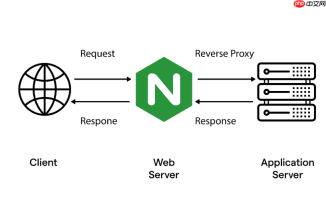
浏览器报错 “The 'Access-Control-Allow-Origin' header contains multiple values” 是因为响应中出现了两个或多个 Access-Control-Allow-Origin 响应头。这违反了 HTTP 规范,浏览器直接拒绝该响应,跨域请求失败。
根本原因不是 Nginx 主动发了两个 Origin 头,而是 Nginx 和后端服务(如 Node.js、Spring Boot、Django)各自独立设置了这个头,在代理转发过程中叠加输出,最终返回给浏览器一个非法的重复头。
检查并统一 CORS 控制权
后端代码里必须移除所有手动设置
Access-Control-Allow-Origin的逻辑
比如:Express 中禁用app.use(cors());Spring Boot 关闭@CrossOrigin注解或全局WebMvcConfigurer配置;PHP 或 Python 项目里删掉header('Access-Control-Allow-Origin: ...')用
curl -I -X OPTIONS http://your-api.com/xxx或 Postman 发送 OPTIONS 请求,查看原始响应头
如果返回里仍有Access-Control-Allow-Origin,说明后端仍在输出,需继续排查中间件、框架自动注入或 CDN 缓存覆盖确保 Nginx 配置中没有在多个作用域(如
server块和嵌套的location块)重复使用add_headeradd_header在 location 内生效,但若外层 server 也写了相同指令,就会叠加——尤其注意 include 的配置文件是否重复引入
在 Nginx 中安全输出单值 Origin 头
不要用通配符 * 配合 credentials: true,也不要直接 add_header Access-Control-Allow-Origin $http_origin 而不做校验。推荐做法:
-
使用
map指令预定义白名单,避免正则匹配出错或空值透传map $http_origin $cors_origin { default ""; "https://a.com" "https://a.com"; "https://b.com" "https://b.com"; "http://localhost:3000" "http://localhost:3000"; } -
在
location块中启用always参数确保对 204/304 等非 2xx 响应也生效add_header Access-Control-Allow-Origin $cors_origin always; add_header Access-Control-Allow-Credentials "true" always; add_header Access-Control-Allow-Methods "GET, POST, OPTIONS, PUT, DELETE" always; add_header Access-Control-Allow-Headers "Content-Type, Authorization, X-Requested-With" always;
-
清除后端可能透传的 CORS 头,防止干扰
proxy_hide_header Access-Control-Allow-Origin;
proxy_hide_header Access-Control-Allow-Credentials;
proxy_hide_header Access-Control-Allow-Methods;
proxy_hide_header Access-Control-Allow-Headers;
-
单独处理 OPTIONS 预检请求,立即返回 204 并附带必要头
if ($request_method = 'OPTIONS') {
    add_header Access-Control-Allow-Origin $cors_origin always;
    add_header Access-Control-Allow-Credentials "true" always;
    add_header Access-Control-Allow-Methods "GET, POST, OPTIONS, PUT, DELETE" always;
    add_header Access-Control-Allow-Headers "Content-Type, Authorization, X-Requested-With" always;
    add_header Access-Control-Max-Age "86400" always;
    return 204;
}

不复杂但容易忽略


