





最稳妥方案是直接用 return 301 指令,配置简单、性能高、语义清晰,适用于旧文章链接的精准跳转,支持单路径精确匹配、批量正则重写及查询参数保留,并需通过 nginx -t 和 curl 验证后上线。
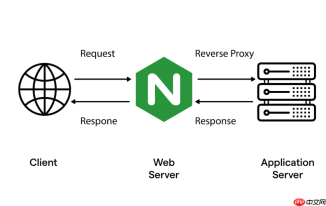
直接用 return 301 指令最稳妥,配置简单、性能高、语义清晰,适合旧文章链接的精准跳转。
单个旧文章路径重定向
当某篇旧文章永久迁移到新地址时,用 location 块匹配原始路径,避免影响其他请求:
- 确保
server_name是当前站点域名(如old-site.com) - 用
location = /old-article.html精确匹配(加=提高性能) -
return 301后接完整新 URL,含协议、域名和路径
示例:
server {
    listen 80;
    server_name old-site.com;
    location = /blog/2020/first-post.html {
        return 301 https://new-site.com/articles/welcome-to-new-site/;
    }
}
批量旧文章路径重定向(带规则)
若多篇旧文章按固定模式迁移(比如年份目录结构变更为 slug 格式),可用 rewrite + permanent:

- 用正则捕获关键部分(如 ID、标题片段)
- 替换为新路径格式,
permanent自动返回 301 状态码 - 注意:避免在
if中使用rewrite,推荐放在location内或顶层
示例(把 /post/123 跳到 /article/123):
location ^~ /post/ {
    rewrite ^/post/(\d+)$ /article/$1 permanent;
}
保留查询参数 & 处理动态路径
旧文章链接常带 UTM 或 tracking 参数,需一并传递过去:
-
$request_uri自动包含路径 + 查询字符串,比拼接$args更可靠 - 若新地址是外部域名,且需强制 HTTPS,直接写
https://,别依赖$scheme - 路径中含特殊字符(如中文、空格)时,Nginx 默认已做编码,无需额外处理
示例(跳转带参旧链接):
location ~ ^/archive/\d{4}/[^/]+\.html$ {
    return 301 https://new-site.com$uri?$args;
    # 或更简洁:return 301 https://new-site.com$request_uri;
}
验证与上线要点
配置生效前必须验证,否则搜索引擎可能抓取错误跳转:
- 先运行
nginx -t检查语法,再nginx -s reload - 用
curl -I http://old-site.com/old-article.html确认响应头含301 Moved Permanently和正确Location - 浏览器测试时清缓存——301 会被强缓存,临时改用 302 可反复调试
- 上线后检查日志,确认旧路径访问量归零、新路径访问量上升


