





nginx正确代理websocket的关键是透传upgrade和connection头并启用http/1.1:需配置proxy_http_version 1.1、proxy_set_header upgrade $http_upgrade、proxy_set_header connection $connection_upgrade,缺一不可,否则升级失败返回200而非101。
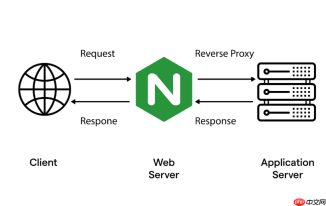
要让 Nginx 正确代理 WebSocket 连接,关键在于透传 Upgrade 和 Connection 请求头,并启用 HTTP/1.1 协议支持。否则客户端发起的 WebSocket 升级请求会被降级为普通 HTTP,导致连接失败。
必须设置的两个核心请求头
Nginx 默认不会转发 Upgrade 和 Connection 头,因为它们属于逐跳(hop-by-hop)头部。需显式配置才能透传:
-
proxy_set_header Upgrade $http_upgrade;:将客户端原始的
Upgrade值(通常是"websocket")复制过去 -
proxy_set_header Connection $connection_upgrade;:动态判断是否需要升级连接;Nginx 内置变量
$connection_upgrade在$http_upgrade为"websocket"时自动设为"upgrade",否则为"close"
还需配合的基础代理配置
仅设置头还不够,以下几项缺一不可:

-
proxy_http_version 1.1;:WebSocket 升级依赖 HTTP/1.1,HTTP/1.0 不支持
Upgrade机制 - proxy_set_header Host $host;:保持原始 Host,避免后端服务路由出错
- proxy_set_header X-Real-IP $remote_addr;(可选但推荐):传递真实客户端 IP
完整 location 示例
假设 WebSocket 服务运行在 http://localhost:8080,前端通过 /ws 路径访问:
location /ws {
    proxy_pass http://localhost:8080;
    proxy_http_version 1.1;
    proxy_set_header Upgrade $http_upgrade;
    proxy_set_header Connection $connection_upgrade;
    proxy_set_header Host $host;
    proxy_set_header X-Real-IP $remote_addr;
}
注意:proxy_pass 末尾不加 /(即不能写成 http://localhost:8080/),否则路径会被重写,可能破坏 WebSocket 子协议协商。
验证是否生效
可通过浏览器开发者工具 Network 面板查看 WebSocket 请求的请求头:
- 请求中应包含
Upgrade: websocket和Connection: Upgrade - 响应状态码应为
101 Switching Protocols - 若看到
200 OK或连接立即关闭,大概率是 Nginx 未正确透传升级头或协议版本不对


