


答案是:核心在于确认指令对应模块是否已编译或正确加载,如报“unknown directive”通常因模块缺失而非配置错误;需用nginx -v检查编译参数、verify load_module路径及上下文合法性,并通过nginx -c -e stderr捕获启动期真实错误。
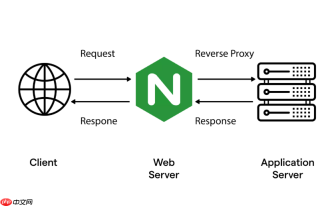
排查 Server 块中因缺少基础模块导致高级指令无法加载的故障,核心在于:Nginx 启动时若某指令(如 proxy_pass、rewrite、lua_code_cache)被识别为“unknown directive”,往往不是配置写错了,而是支撑该指令的模块根本没被编译进二进制或未正确加载。
确认指令对应模块是否已编译
很多高级指令依赖特定模块,例如:
-
proxy_pass→ 依赖ngx_http_proxy_module(基础模块,默认启用) -
rewrite→ 依赖ngx_http_rewrite_module(基础模块,默认启用) -
lua_code_cache→ 依赖ngx_http_lua_module(第三方模块,需手动编译+load_module) -
stream块中的proxy_pass→ 依赖--with-stream编译参数
执行 nginx -V 2>&1 | grep -o with-\S*,检查输出中是否含对应项。比如报 unknown directive "stream",但输出里没有 --with-stream,说明编译时未启用该功能。
检查 load_module 指令是否遗漏或路径错误
第三方模块(如 Lua、vts、echo)必须显式声明加载,且路径要绝对准确:

- 确保配置中有类似
load_module modules/ngx_http_lua_module.so; - 路径是相对于 Nginx 安装目录的
modules/子目录,不是绝对路径(除非你用绝对路径写法) - 验证
.so文件真实存在:ls -l $(dirname $(which nginx))/../modules/ngx_http_lua_module.so - 文件权限需为可读(
644或更宽松),且所属用户/组不影响加载(Nginx 加载模块不依赖运行用户权限)
定位指令所在上下文是否合法
即使模块存在,指令放错位置也会报错。Server 块中常见问题:
-
stream相关指令不能写在http或server块内,必须放在顶层stream { ... }块中 -
upstream块只能定义在http块顶层,不能嵌套在server内 -
location内使用lua_*指令,前提是ngx_http_lua_module已加载且支持该上下文
用 nginx -T 输出完整生效配置,搜索报错指令,看它实际落在哪个配置块里——这比单看配置文件更可靠,尤其当用了 include 多个文件时。
强制终端输出启动期错误
模块加载失败发生在日志系统初始化前,error.log 通常为空。唯一能捕获真实原因的方式是:
- 停掉服务:
systemctl stop nginx - 手动运行:
nginx -c /etc/nginx/nginx.conf -e stderr - 观察终端输出,典型提示如:
nginx: [emerg] unknown directive "lua_code_cache" in /etc/nginx/conf.d/app.conf:12
nginx: [emerg] failed to load module "/usr/lib/nginx/modules/ngx_http_lua_module.so": /usr/lib/nginx/modules/ngx_http_lua_module.so: cannot open shared object file: No such file or directory
这类输出直接告诉你缺模块、路径错,还是版本不兼容。


