





nginx需作为链路参与者而非透明管道:透传/生成trace-id等追踪头、启用underscores_in_headers、配置proxy_set_header对齐apm格式、使用pinpoint/skywalking插件主动埋点、为502/504错误注入链路指纹。
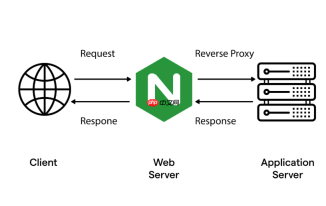
要让 Nginx 在统一异常监控体系中精准还原第三方代理库(如 Java、Python 或 Node.js 服务)的链式报错流向,核心不是“把 Nginx 当成日志收集器”,而是让它成为可观测链路中可信任的一环——即:Nginx 主动注入上下文、透传追踪标识、不破坏原始调用语义,并与后端 APM(如 Pinpoint、SkyWalking、Jaeger)对齐元数据格式。
以下四点是落地关键:
明确 Nginx 的角色定位:从“透明管道”升级为“链路参与者”
Nginx 默认不生成 trace_id 或 span_id,也不参与分布式追踪。若想还原链式报错(比如前端 → Nginx → Spring Boot → Redis 超时),必须打破“Nginx 不参与链路”的惯性认知:
- Nginx 本身不生成 trace,但必须透传并保全上游传递来的
trace-id、span-id、parent-span-id等头部(如X-B3-TraceId、X-Span-Id) - 若上游未带追踪头(如直接浏览器请求),可在 Nginx 入口 location 中用
map+add_header生成轻量级 trace_id(仅用于兜底,非强一致性)
示例配置:
http {
    map $http_x_b3_traceid $trace_id {
        ""    $request_id;  # fallback to nginx's built-in request_id
        default $http_x_b3_traceid;
    }

    log_format trace_log '$remote_addr - $remote_user [$time_local] '
                         '"$request" $status $body_bytes_sent '
                         '"$http_referer" "$http_user_agent" '
                         'trace="$trace_id" span="$http_x_b3_spanid" parent="$http_x_b3_parentspanid"';

    access_log /var/log/nginx/access.log trace_log buffer=512k flush=1m;
}
启用并规范第三方模块支持链路透传
原生 Nginx 不解析或转发带下划线的 header(如 X-Request-ID、X-Trace-ID),需显式开启:
underscores_in_headers on; # 允许接收含下划线的自定义 header
同时,在 proxy location 中强制透传关键追踪头:

location /api/ {
    proxy_pass http://backend;
    proxy_set_header X-Request-ID $request_id;
    proxy_set_header X-B3-TraceId $http_x_b3_traceid;
    proxy_set_header X-B3-SpanId $http_x_b3_spanid;
    proxy_set_header X-B3-ParentSpanId $http_x_b3_parentspanid;
    proxy_set_header X-B3-Sampled $http_x_b3_sampled;
    proxy_set_header X-B3-Flags $http_x_b3_flags;
}
注意:这些 header 名称需与后端 APM 客户端(如 Spring Cloud Sleuth、Brave)约定一致,否则链路断裂。
对接 Pinpoint 或 SkyWalking 的 Nginx 插件,实现主动埋点
仅靠 header 透传仍属被动,要精准还原“Nginx 层自身耗时、失败原因、上游响应延迟”,需使用官方支持的探针模块:
-
Pinpoint:启用
ngx_http_pinpoint_module(需编译安装),它会:- 自动提取
$upstream_addr、$upstream_response_time、$upstream_status - 将 Nginx 请求识别为
NGINX_PROXY类型 span,作为调用链首段 - 支持标注
proxy_pass目标、SSL 协商耗时、gzip 压缩开销等细节
- 自动提取
-
SkyWalking:使用
nginx-skywalking-plugin(Lua + OpenResty),通过lua-resty-tracing注入 span,兼容 SkyWalking v9+ 的 OAP 协议
二者均要求:
- Nginx 编译时启用
--with-http_ssl_module、--with-http_stub_status_module - 模块加载顺序正确(如 Pinpoint 模块需在
http块最前加载)
统一错误上下文注入,让 502/504 报错自带链路指纹
当 Nginx 返回 502(上游无响应)、504(超时)时,原生日志只记录 upstream timed out,无法关联原始请求 trace。可通过 error_page + add_header 补充上下文:
error_page 502 504 /5xx.html;
location = /5xx.html {
    internal;
    add_header X-Trace-ID $http_x_b3_traceid always;
    add_header X-Request-ID $request_id always;
    return 502 "Upstream error. Trace: $http_x_b3_traceid, ReqID: $request_id";
}
再配合 Logstash 或 Filebeat 将 access_log 与 error_log 关联解析(按 $request_id 或 $http_x_b3_traceid 分组),即可在 Kibana 或 APM UI 中点击 502 错误,直接跳转到完整调用链。
不复杂但容易忽略


