






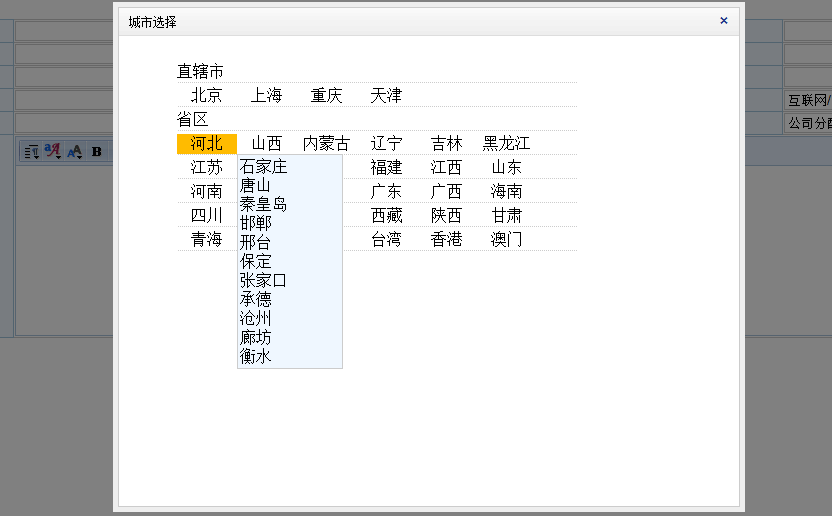
前些文章用写过,省市县三级联动,但是感觉选择的时候不够直观,现在改进了下,效果如下图
<title></title><script type="text/javascript" src="../js/jquery-1.7.min.js"></script><style type="text/css">
#provinceDiv{ list-style:none;}
#provinceDiv li{ list-style:none; border-bottom:1px dotted #ccc; width:400px; height:20px;margin-bottom:3px;}
#provinceDiv li span{ display:block; width:60px; height:20px; float:left; line-height:20px; text-align:center; position:relative;}
#provinceDiv li span:hover{ background:#fb0;}
#provinceDiv li span.current{ background:#fb0;}
div.cityDiv{ border:1px solid #ccc; width:auto; width:100px;_width:100px; height:100px;_height:100px;height:auto; background:#eff7ff; display:none; position:absolute; padding:2px;}
div.cityDiv a{ display:block; text-decoration:none; color:#000;}
div.cityDiv a:hover{ background:#fb0;}
</style><script type="text/javascript">
$(function () {
var isoncityDiv = false; //是否在cityDiv上,默认为false
$("span").bind("click", function () {
var spanid = $(this).attr("id"); //获取当前spanid
$("span").not("#" + spanid).removeClass("current");
$(this).addClass("current");
$("div.cityDiv").remove(); //立即移除所有动态创建的div
var spanCurrent = $("#" + $(this).attr("id")); //当前点击的sapn对象
var tipDiv = $("<div id='city_" + $(this).attr("id") + "' class='cityDiv'></script>
"); //动态创建城市div tipDiv.html(System_Select_City.GetCity(spanid).value);//后台输出的数据包含城市数据 tipDiv.bind("mouseover", function () { tipDiv.show(); isoncityDiv = true; //鼠标在其上为true }).bind("mouseout", function () { tipDiv.hide(); }); $("body").append(tipDiv); //加入body var top = spanCurrent.offset().top; //获取top var left = spanCurrent.offset().left; //获取left tipDiv.offset({ top: top + 20, left: left + 60 }); tipDiv.show(); //获取显示div }).bind("mouseout", function () { var spanCurrent = $("#city_" + $(this).attr("id")); var a = function () { if (!isoncityDiv) { //不在 弹出的div上时候 执行 spanCurrent.remove(); } clearTimeout(int); }; var int = setTimeout(a, 3000); }); }); //关闭谈出口 function show(title) { parent.closeDiv(title); }
以上内容给大家介绍了基于jquery实现仿51job城市选择功能实例代码,希望对大家有所帮助!