





nginx返回403 forbidden的常见原因是index指令未在生效location中显式配置,导致无法定位默认首页;使用alias时必须同级声明index并配合try_files,而root会自动拼接,还需确保文件存在、权限正确且大小写匹配。
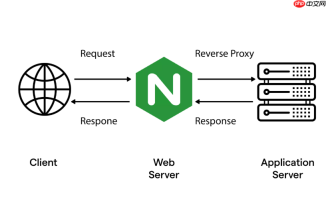
当 Nginx 返回 403 Forbidden,而你确认文件权限、路径、用户配置都正确时,很可能是 index 指令未生效——它没被正确继承或覆盖,导致 Nginx 无法自动定位默认首页文件,进而拒绝列出目录(且又找不到显式请求的 index 文件),最终触发 403。
index 指令必须在能生效的作用域中声明
Nginx 的 index 指令只在 http、server 或 location 块中有效,且遵循继承规则:子块不会自动继承父块的 index,除非显式声明或使用 default 配置。常见错误是只在 http 块写了 index index.html;,但在具体 location 中用了 try_files 或 alias,却没重新指定 index。

- 用
alias时,index不会自动追加到别名路径末尾——必须在同级location中显式写index index.html; - 用
try_files $uri $uri/ =404;时,$uri/触发目录匹配,此时是否找 index 取决于该 location 是否配置了index;没配就直接跳到 =404 或返回 403(若禁止目录浏览) - 检查是否有更高优先级的
location(如正则匹配)拦截了请求,导致实际生效的 location 块里压根没写index
root 和 alias 对 index 的行为差异
root 是路径前缀,Nginx 会在 root + URI 后自动尝试拼接 index 文件;alias 是路径替换,Nginx 会把 URI 完全替换为 alias 路径,不自动追加斜杠或 index 文件,必须靠 index 指令 + try_files 配合才能生效。
- 错误示例(alias 下 index 失效):
location /static/ { alias /data/assets/; }访问/static/→ 实际查/data/assets/,但没配 index,也不拼index.html→ 403 - 正确写法:
location /static/ {<br> alias /data/assets/;<br> index index.html;<br> try_files $uri $uri/index.html =404;<br>}
检查 index 文件是否存在且可读
即使 index 指令生效,Nginx 仍需成功读取对应文件。常见疏漏:
- 文件名大小写不符(Linux 区分大小写,
Index.html≠index.html) - 文件放在错误路径:比如
root /var/www;,但index.html实际在/var/www/html/下,应改为root /var/www/html;或调整index路径 - 文件权限不足:Nginx 工作进程用户(如
www-data或nginx)对文件无读取权限(cat能看不代表 Nginx 能读)
快速验证与调试步骤
- 运行
nginx -t确认语法正确,再nginx -T输出完整生效配置,搜索对应 location,确认index行存在且位置合理 - 临时开启
autoindex on;(仅测试!),访问目录看能否列出文件——若能,说明路径和权限 OK,问题纯属 index 未触发;若仍 403,重点查权限或disable_symlinks等限制 - 在 location 中加
error_log /var/log/nginx/debug.log debug;(需编译含 debug 日志),观察日志中 Nginx 实际尝试访问的文件路径


