





微服务下必须用Nginx统一处理跨域,因各服务部署在不同域名/端口导致前端直连触发浏览器同源策略报错;若分散配置CORS易不一致,Nginx作为反向代理可集中管控跨域逻辑,使后端专注业务。
为什么微服务下必须用Nginx统一处理跨域
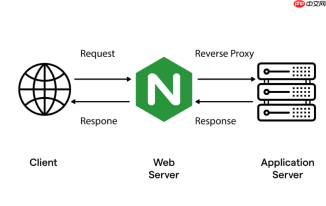
前端请求后端接口时,浏览器出于安全限制会拦截非同源请求。微服务架构中,用户服务、订单服务、商品服务通常部署在不同域名或端口(如 user-api:8081、order-api:8082),前端(web-app:3000)直接调用必然触发跨域报错。若每个服务单独加 CORS 配置,既重复又难统一管理——比如预检请求(OPTIONS)的响应头、允许的 origin 列表、凭证支持(withCredentials)等,稍有不一致就会导致接口失效。Nginx 作为最外层反向代理,天然适合集中控制请求入口,把跨域逻辑收口到一层,后端服务专注业务,不耦合 HTTP 安全策略。
Nginx 跨域配置的关键字段与含义
以下是最常用且必须理解的跨域响应头及其 Nginx 配置写法:
-
add_header 'Access-Control-Allow-Origin' '$http_origin'; —— 动态回传请求头中的 origin,支持多域名;不能写死为
*(否则无法携带 cookie) -
add_header 'Access-Control-Allow-Credentials' 'true'; —— 允许前端发送凭据(如 Cookie、Authorization),此时
Allow-Origin必须是具体域名,不能为* - add_header 'Access-Control-Allow-Methods' 'GET, POST, PUT, DELETE, OPTIONS'; —— 明确允许的 HTTP 方法,含 OPTIONS(预检必需)
- add_header 'Access-Control-Allow-Headers' 'DNT,User-Agent,X-Requested-With,If-Modified-Since,Cache-Control,Content-Type,Range,Authorization'; —— 列出前端可能携带的自定义请求头
- add_header 'Access-Control-Expose-Headers' 'Content-Length,Content-Range'; —— 指定哪些响应头可被 JS 读取(如分页字段)
- add_header 'Access-Control-Max-Age' 3600; —— 预检结果缓存时间(秒),减少重复 OPTIONS 请求
实战:Nginx 统一代理 + 跨域 + 微服务路由
假设前端访问 /api/user/ 走用户服务,/api/order/ 走订单服务,所有请求先经 Nginx(api.example.com),再按路径分发。配置示例如下:
server {
    listen 80;
    server_name api.example.com;
<pre class="brush:php;toolbar:false;"># 处理所有跨域预检请求(OPTIONS)
location / {
    if ($request_method = 'OPTIONS') {
        add_header 'Access-Control-Allow-Origin' '$http_origin';
        add_header 'Access-Control-Allow-Credentials' 'true';
        add_header 'Access-Control-Allow-Methods' 'GET, POST, PUT, DELETE, OPTIONS';
        add_header 'Access-Control-Allow-Headers' 'DNT,User-Agent,X-Requested-With,If-Modified-Since,Cache-Control,Content-Type,Range,Authorization';
        add_header 'Access-Control-Expose-Headers' 'Content-Length,Content-Range';
        add_header 'Access-Control-Max-Age' 3600;
        add_header 'Content-Type' 'text/plain; charset=utf-8';
        add_header 'Content-Length' 0;
        return 204;
    }
}

# 用户服务代理
location ^~ /api/user/ {
    proxy_pass http://user-service:8081/;
    proxy_set_header Host $host;
    proxy_set_header X-Real-IP $remote_addr;
    proxy_set_header X-Forwarded-For $proxy_add_x_forwarded_for;

    # 跨域响应头(实际请求阶段)
    add_header 'Access-Control-Allow-Origin' '$http_origin';
    add_header 'Access-Control-Allow-Credentials' 'true';
    add_header 'Access-Control-Allow-Methods' 'GET, POST, PUT, DELETE, OPTIONS';
    add_header 'Access-Control-Allow-Headers' 'DNT,User-Agent,X-Requested-With,If-Modified-Since,Cache-Control,Content-Type,Range,Authorization';
    add_header 'Access-Control-Expose-Headers' 'Content-Length,Content-Range';
}

# 订单服务代理
location ^~ /api/order/ {
    proxy_pass http://order-service:8082/;
    proxy_set_header Host $host;
    proxy_set_header X-Real-IP $remote_addr;
    proxy_set_header X-Forwarded-For $proxy_add_x_forwarded_for;

    add_header 'Access-Control-Allow-Origin' '$http_origin';
    add_header 'Access-Control-Allow-Credentials' 'true';
    add_header 'Access-Control-Allow-Methods' 'GET, POST, PUT, DELETE, OPTIONS';
    add_header 'Access-Control-Allow-Headers' 'DNT,User-Agent,X-Requested-With,If-Modified-Since,Cache-Control,Content-Type,Range,Authorization';
    add_header 'Access-Control-Expose-Headers' 'Content-Length,Content-Range';
}
}

注意:所有 location 块内必须重复添加跨域 header,因为 Nginx 的 add_header 不继承,子块不会自动获得父块设置。
常见踩坑与验证方法
配置完别急着上线,务必验证以下几点:
- 用 curl 模拟预检请求:
curl -X OPTIONS -H "Origin: https://web-app.com" -H "Access-Control-Request-Method: POST" -I https://api.example.com/api/user/login,检查返回是否含204及完整跨域头 - 前端开启
withCredentials: true时,确认响应中Access-Control-Allow-Origin是具体域名(如https://web-app.com),不是* - 若使用 JWT 放在 Authorization 头,确保
Access-Control-Allow-Headers包含Authorization,且后端未因 header 缺失拒绝请求 - Nginx reload 后,检查错误日志:
tail -f /var/log/nginx/error.log,常见错误如变量未定义($http_origin在非 CORS 请求中为空)、语法错误导致 reload 失败
大量免费API接口:立即使用
涵盖生活服务API、金融科技API、企业工商API、等相关的API接口服务。免费API接口可安全、合规地连接上下游,为数据API应用能力赋能!


